What Is Ideogram V1 Remix? AI Image Remixing and Style Transfer
Ideogram V1 Remix lets you transform existing images into new styles. Discover how remixing works and creative ways to use it.
What Is Ideogram V1 Remix?
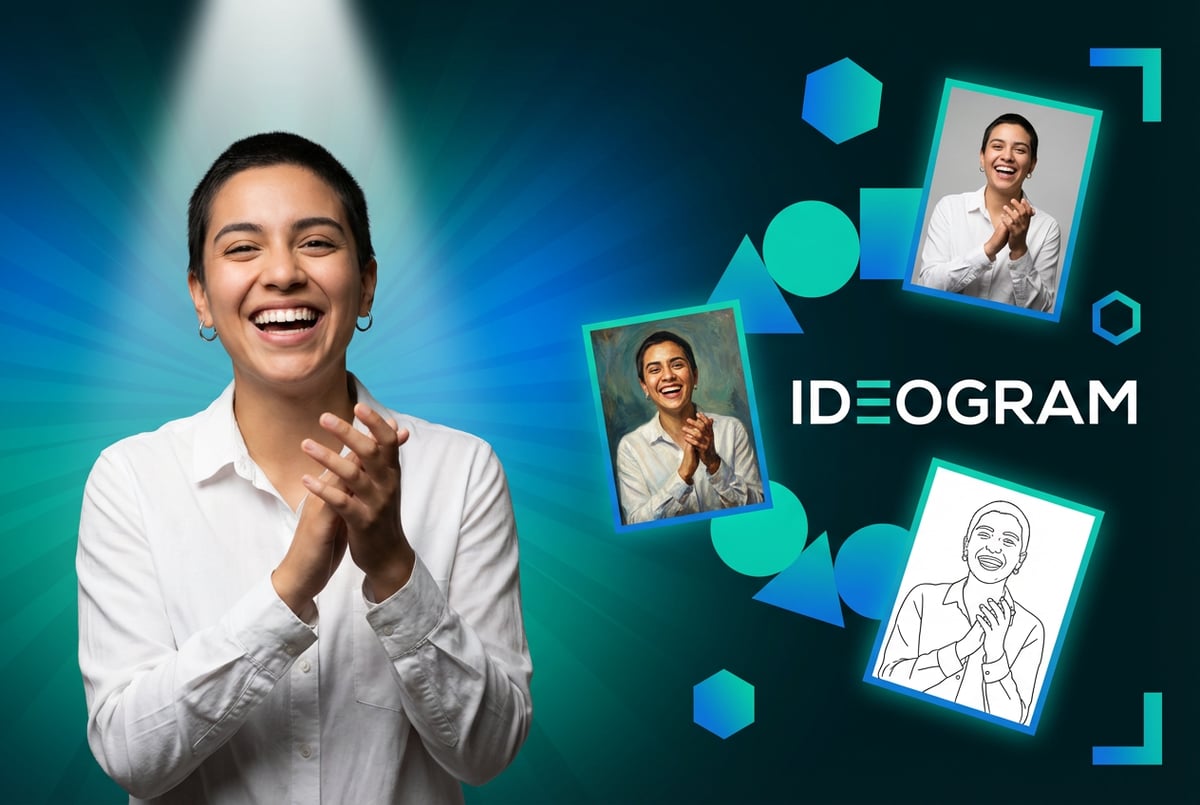
Ideogram V1 Remix is an AI-powered feature that transforms existing images into new visual styles while preserving core composition and structure. Instead of generating images from scratch using only text prompts, the remix feature lets you upload a reference image and apply different artistic styles, color schemes, or aesthetic treatments to create variations.
The tool was developed by Ideogram, a Toronto-based company founded in 2022 by four former Google Brain researchers: Mohammad Norouzi, William Chan, Chitwan Saharia, and Jonathan Ho. These researchers brought deep expertise in generative AI from their work on foundational models at Google, and they specifically set out to solve one of AI image generation’s biggest challenges: rendering text accurately within images.
Ideogram V1 Remix operates differently from standard text-to-image generation. When you use the remix feature, you provide both a source image and instructions for how you want it transformed. The AI analyzes the original image’s composition, subject matter, and visual elements, then applies the requested style changes while maintaining the fundamental structure and recognizable features of the original.
This approach sits between full image generation and simple image editing. You’re not just applying filters or adjusting colors. The AI rebuilds the image in a new style, understanding which elements matter most and how to translate them into different visual languages.
How Ideogram V1 Remix Actually Works
The remix process starts when you upload an image to Ideogram’s platform. The AI model analyzes the image at multiple levels, identifying objects, composition, lighting, and spatial relationships. This analysis creates an internal representation of what the image contains and how elements relate to each other.
When you provide instructions for the remix, such as “make this image look like an oil painting” or “transform this into a minimalist line drawing,” the model uses that guidance along with its understanding of the original image to generate a new version. The AI doesn’t just overlay effects. It reconstructs the image based on both the source material and your instructions.
Ideogram V1 Remix supports various aspect ratios, from 1:3 (extremely tall) to 3:1 (extremely wide). This flexibility lets you adapt images for different formats without losing important visual elements. You can transform a square social media image into a vertical smartphone format or expand a portrait into a wide banner, all while applying style changes.
The model uses a prompt length of up to 10,000 tokens, giving you room to provide detailed instructions about the transformation you want. More specific prompts typically yield better results, though the model can work with simpler instructions too.
Core Features of the Remix Tool
Ideogram V1 Remix includes several capabilities that make it useful for different types of image transformation work.
Style Transfer
The primary function is applying artistic styles to existing images. You can transform photographs into paintings, illustrations into different illustration styles, or realistic images into abstract versions. The AI understands various artistic movements and can apply characteristics like brushwork patterns, color palette shifts, and compositional approaches associated with different styles.
Style transfer with Ideogram maintains subject integrity better than simple filter applications. If you’re transforming a portrait, facial features remain recognizable even as the rendering style changes dramatically.
Composition Preservation
Unlike generating entirely new images, the remix feature keeps the basic layout and arrangement of elements from your source image. This matters when you need consistent framing across multiple style variations or when the composition itself is important to preserve.
If your source image has a person positioned on the left third of the frame with a mountain background, the remixed version will maintain that spatial arrangement even as it changes how those elements are rendered visually.
Text Rendering
Ideogram built its reputation on handling text better than other AI image generators. The V1 Remix feature maintains this strength. When your source image includes text elements like signs, labels, or typography, the remix process can preserve or appropriately transform that text rather than garbling it into meaningless symbols.
This makes the tool particularly useful for remixing marketing materials, product mockups, or any imagery where text needs to remain legible and correctly spelled.
Batch Processing
The platform supports generating multiple remix variations from a single source image. You can create several different style interpretations at once, making it easier to explore options without running separate operations for each variation.
Image Remixing Applications
Different users apply the remix feature for specific purposes based on their needs.
Brand Asset Variations
One coffee. One working app.
You bring the idea. Remy manages the project.

Marketing teams use remixing to create multiple versions of brand imagery for different channels or campaigns. A single product photo can be remixed into styles appropriate for Instagram, LinkedIn, print materials, and video thumbnails without new photoshoots.
This speeds up asset production significantly. Instead of creating each variation from scratch, you start with proven compositions and apply style changes to match different contexts.
Design Exploration
Designers use the tool to explore different visual directions quickly. When working on a logo, illustration, or layout concept, they can remix their initial work into various styles to see which direction resonates before committing to detailed execution.
This exploratory phase traditionally took hours or days. With remixing, you can generate multiple style options in minutes and gather feedback on directions before investing significant time in refinement.
Content Adaptation
Publishers and content creators remix images to match different editorial styles or platform requirements. A realistic photograph might be remixed into a more illustrative style for certain publications, or a complex image might be simplified for mobile viewing.
Artistic Experimentation
Artists use remixing as a creative tool, transforming their work into unexpected styles or combining elements from different artistic traditions. The tool serves as a creative partner that suggests possibilities the artist might not have considered independently.
Comparing Ideogram V1 Remix to Alternatives
Several platforms offer similar image transformation capabilities, each with different strengths.
Ideogram vs Midjourney Remix
Midjourney includes remix functionality that excels at artistic and painterly transformations. Midjourney generally produces more aesthetically striking results with strong artistic flair, particularly for fantasy, sci-fi, or highly stylized imagery.
Ideogram V1 Remix performs better with text preservation and commercial design applications. When your source image includes typography or needs to maintain readable text elements, Ideogram handles this more reliably. The pricing model also differs, with Ideogram offering more straightforward per-image costs at $0.06 per generation compared to Midjourney’s subscription tiers.
Ideogram vs Stable Diffusion Image-to-Image
Stable Diffusion’s image-to-image mode provides extensive customization options for technically skilled users. You can adjust denoising strength, guidance scale, and other parameters to fine-tune how the model transforms your source image.
This flexibility requires more technical knowledge to use effectively. Ideogram V1 Remix offers a simpler interface with less manual parameter adjustment, making it more accessible for users who want results without deep technical configuration. Stable Diffusion requires either local GPU resources or cloud GPU rental, while Ideogram provides hosted access without infrastructure setup.
Ideogram vs DALL-E Image Editing
DALL-E offers image editing capabilities focused on inpainting and outpainting, letting you modify specific regions or extend images beyond their original boundaries. These tools excel at precise edits to particular areas.
Ideogram V1 Remix focuses more on global style transformation rather than localized edits. When you need to change the overall aesthetic of an image rather than modify specific elements, the remix approach works better. DALL-E’s integration with ChatGPT makes it convenient for users already working in that ecosystem.
Getting Started with Ideogram V1 Remix
Using the remix feature requires an Ideogram account. The platform offers different pricing tiers, with the V1 Remix feature priced at $0.06 per image generation.
The process follows these steps:
Other agents ship a demo. Remy ships an app.
Real backend. Real database. Real auth. Real plumbing. Remy has it all.
1. Upload your source image: Select the image you want to remix from your local files. The platform accepts common formats like JPEG, PNG, and WebP.
2. Choose your aspect ratio: Select whether you want to maintain the original proportions or adapt the image to a different format. Options range from vertical (1:3) through square (1:1) to wide formats (3:1).
3. Write your transformation instructions: Describe the style or changes you want applied. Be specific about artistic style, color treatment, level of detail, or other characteristics you want in the output.
4. Set generation parameters: Choose how many variations you want generated and any additional settings relevant to your needs.
5. Generate and review results: The platform processes your request and provides the remixed images. You can then iterate with different instructions or settings if the initial results need adjustment.
Tips for Better Remix Results
Getting quality output from the remix feature depends partly on how you set up and instruct the process.
Source Image Quality
Start with clear, well-composed source images. Blurry or low-resolution sources produce inferior remixes because the AI has less visual information to work with. Higher resolution inputs give the model more detail to analyze and translate into the new style.
Simple compositions often remix more reliably than extremely complex scenes. An image with three or four main elements will transform more predictably than one with dozens of overlapping objects.
Instruction Specificity
Vague prompts like “make it artistic” produce unpredictable results. More specific instructions like “transform into a watercolor painting with soft edges and muted pastel colors” give the AI clearer direction.
Reference specific artistic styles, periods, or artists when relevant. Instead of “make it look painted,” try “render in the style of impressionist landscape painting with visible brushstrokes and emphasis on light effects.”
Iterative Refinement
Treat your first remix as a starting point rather than a final result. Generate a batch of variations with slightly different instructions to see which direction works best, then refine from there.
If the initial results miss the mark, adjust your instructions based on what went wrong. Too much detail loss? Ask for more detail preservation. Colors too muted? Request more saturation or vibrancy.
Understanding Model Limitations
Like all AI image tools, Ideogram V1 Remix has boundaries. Complex human anatomy, particularly hands and fingers, sometimes renders incorrectly even in remix mode. Multiple overlapping figures can confuse the spatial relationships.
Text rendering, while better than most alternatives, still occasionally produces errors with complex fonts or very small text. Review any remixed images with text carefully before using them in professional contexts.
Remixing Workflows for Different Projects
How you incorporate remixing into your workflow depends on what you’re creating.
Marketing Asset Production
Start with a photoshoot or initial design creation that establishes composition and core visual elements. Use that base asset as the source for remixing into platform-specific or campaign-specific variations.
For example, photograph a product in a clean studio setup. Then remix that photograph into different styles for various channels: a bold, high-contrast version for social media, a softer, lifestyle-oriented version for email campaigns, and a minimalist interpretation for print materials.
This approach maintains visual consistency across your campaign while adapting presentation to match different contexts and audience expectations.
Rapid Prototyping
When developing new visual concepts, use remixing to explore directions before committing resources to final production. Create a rough mockup or sketch, then remix it into multiple polished styles to evaluate which approach resonates with stakeholders or test audiences.
This compressed feedback cycle helps you fail fast and iterate cheaply. You can test ten visual directions in the time it would traditionally take to fully develop two or three.
Content Library Expansion
Organizations with existing image libraries can use remixing to multiply the utility of their assets. A collection of 100 photographs becomes 500 or 1,000 variations when you remix each into multiple styles relevant to different use cases.
This extends the life and value of existing content investments without requiring new production.
Technical Considerations
Several technical factors affect remix quality and performance.
Processing Time
Generation speed varies based on image complexity and server load. Simple remixes might complete in under a minute, while complex transformations or batch operations take longer. Plan your workflow timing accordingly if you’re working against deadlines.
Output Resolution
Ideogram V1 produces different output resolutions depending on the selected aspect ratio and model version. Standard outputs work well for web use and social media. For print applications requiring higher resolution, you may need to use upscaling tools after remixing.
File Format Handling
The platform accepts common image formats as inputs and typically outputs PNG files. If you need specific formats for your workflow, plan for format conversion as a post-processing step.
Cost Management
At $0.06 per generation, costs stay manageable for most uses, but they add up with high-volume production.
Plan your remix strategy to minimize unnecessary generations. Instead of creating 20 variations of every image, generate smaller batches and iterate based on results. Use your most promising directions for additional refinement rather than exploring every possibility.
For teams working at scale, budget for both generation costs and the staff time required to review outputs and select the best options. The human review and selection process remains essential even as AI handles the creation work.
Integrating AI Image Tools with Workflow Platforms
While Ideogram provides its own web interface, you can incorporate image generation and remixing into broader automated workflows using platforms like MindStudio. MindStudio offers access to over 200 AI models including multiple image generation options, letting you build workflows that combine remixing with other automation steps.
For example, you could create a workflow that takes new product photos, automatically generates multiple remixed style variations using different models, applies consistent branding elements, and publishes approved versions to your asset management system. MindStudio’s visual workflow builder makes it possible to orchestrate these multi-step processes without extensive coding.
This type of integration matters when you’re moving beyond occasional image creation to systematic content production at scale. Instead of manually running remix operations and handling outputs one at a time, you can build pipelines that process batches automatically and route results appropriately based on your business logic.
Style Transfer Technical Background
Remy doesn't write the code. It manages the agents who do.
Remy runs the project. The specialists do the work. You work with the PM, not the implementers.
Understanding how style transfer works helps you use it more effectively.
The underlying technology separates an image into content and style representations. The content representation captures what objects and elements are present and how they’re arranged. The style representation captures visual characteristics like color palette, texture patterns, brushwork, and tonal qualities.
During remixing, the model attempts to preserve the content representation from your source image while applying a new style representation based on your instructions. This separation isn’t perfect, which is why some remixes shift composition more than intended or fail to capture subtle details from the source.
Earlier style transfer techniques used neural networks trained on specific artistic styles. Modern approaches like those in Ideogram V1 Remix use more flexible models that can interpret natural language descriptions of desired styles rather than requiring pre-trained style examples.
Common Remix Challenges and Solutions
Users encounter predictable issues when remixing images.
Loss of Important Details
Style transformations sometimes eliminate details that matter for your use case. When this happens, try adjusting your instructions to explicitly request preservation of those elements. For example, if facial features blur too much, specify “maintain clear facial features with defined edges” in your remix prompt.
Unexpected Color Shifts
The model might interpret style instructions in ways that produce color palettes you didn’t intend. If this occurs, include specific color guidance in your prompts: “using primarily blue and green tones” or “maintaining the original warm color palette.”
Text Degradation
Even with Ideogram’s strong text handling, complex typography can degrade during style transformation. For critical text elements, consider overlaying the original text on top of the remixed image in post-processing rather than relying entirely on the AI to preserve it.
Inconsistent Results
The same source image and prompt can produce different results across multiple generations. This randomness is inherent to how these models work. Generate multiple variations when consistency matters, then select the best result rather than expecting identical outputs every time.
Remix Feature Updates and Model Evolution
Ideogram regularly updates its models. The V1 Remix feature represents one point in the platform’s evolution, with newer versions like V2 and V3 offering additional capabilities.
Later versions improved photorealism, with blind tests showing that 78% of observers couldn’t distinguish certain generated images from professional photography. They also added style reference features that let you upload multiple reference images to guide aesthetic output more precisely.
When working with Ideogram, be aware that the V1 Remix feature may have different characteristics than newer model versions. For most use cases, exploring newer model options makes sense unless you specifically need V1’s particular rendering approach.
Legal and Copyright Considerations
Using AI remixing tools raises questions about ownership and usage rights.
When you upload an image to remix, ensure you have the rights to that source image. Using copyrighted images you don’t own as remix sources could create legal issues even though the output looks different.
Everyone else built a construction worker.
We built the contractor.
One file at a time.
UI, API, database, deploy.
The copyright status of AI-generated and remixed images remains somewhat unsettled legally. In the United States, completely AI-generated works cannot receive copyright protection because they lack human authorship. Images that combine human creative input with AI assistance may qualify for protection, but the boundaries aren’t fully established.
For commercial use, review Ideogram’s terms of service regarding usage rights for generated content. Most platforms grant users commercial rights to outputs created with paid accounts, but confirm this applies to your specific subscription level and use case.
Quality Control and Review Processes
AI-generated content requires human review before publication or professional use.
Establish a quality checklist for remixed images: Are important details preserved correctly? Does any text render accurately and legibly? Are there obvious AI artifacts like distorted hands or impossible geometry? Does the style transformation achieve the intended effect? Is the image appropriate for its intended context and audience?
Build review steps into your workflow rather than assuming AI outputs are ready for immediate use. Even with high-quality tools like Ideogram, some percentage of generations will need adjustment or regeneration.
Remixing in Professional Creative Workflows
Professional designers and studios integrate remixing differently than casual users.
Rather than replacing traditional creative work, remixing accelerates certain phases of the process. Concept development becomes faster when you can generate multiple visual directions quickly. Client presentations become richer when you can show variations instead of a single direction.
The role of human expertise shifts toward curation and refinement rather than execution of every visual variation. Designers spend more time evaluating options and less time manually creating each possibility.
This doesn’t eliminate the need for skilled creative professionals. It changes what they focus on, emphasizing judgment, taste, and strategic thinking over manual execution of variations.
Future Developments in Image Remixing
AI image remixing capabilities continue advancing rapidly.
Current limitations around consistency and detail preservation will likely improve as models become more sophisticated. We’re seeing movement toward models that better understand semantic content and can make more intelligent decisions about what to preserve versus what to transform.
Multi-reference remixing is emerging, where you can provide both a source image and multiple style reference images to guide the transformation. This gives you finer control over the output aesthetic by showing the model examples of what you want rather than just describing it.
Integration with other creative tools is expanding. Expect tighter connections between remixing features and design software, photo editors, and content management systems. The boundaries between AI tools and traditional creative applications are blurring.
Remixing Best Practices Summary
To get the most from Ideogram V1 Remix and similar tools:
Start with high-quality source images that have clear composition and good technical quality. Use specific, detailed prompts that describe exactly what kind of transformation you want. Generate multiple variations to explore options rather than committing to a single result. Review outputs carefully for artifacts, errors, or unintended changes. Iterate based on what works and what doesn’t in your initial results. Maintain realistic expectations about what AI can and cannot do reliably. Plan workflows that incorporate human review and quality control. Keep usage rights and legal considerations in mind for commercial applications.
- ✕a coding agent
- ✕no-code
- ✕vibe coding
- ✕a faster Cursor
The one that tells the coding agents what to build.
The technology works best when you understand its capabilities and limitations, then structure your creative process to leverage its strengths while compensating for its weaknesses.
Practical Applications Across Industries
Different industries find unique applications for image remixing.
E-commerce
Online retailers remix product photos into lifestyle imagery, showing items in various contexts and settings without expensive photo shoots. A single product shot becomes dozens of variations showing the item in different styles and scenarios.
Publishing
Publishers adapt imagery to match editorial styles across different sections or publications. The same photograph might be remixed into different visual treatments for different contexts while maintaining subject recognition.
Advertising
Agencies test creative concepts by remixing reference imagery into campaign-appropriate styles before committing to final production. This accelerates the pitch process and helps clients visualize possibilities.
Game Development
Game studios use remixing for concept art exploration, quickly generating variations of character designs, environment concepts, or props in different artistic styles to establish visual direction.
Education
Educational content creators adapt images into styles appropriate for different age groups or learning contexts, making a single source image work for multiple educational purposes.
When Not to Use Remixing
Image remixing isn’t appropriate for every situation.
When precise accuracy matters, such as medical imaging, scientific visualization, or technical documentation, avoid remixing. The transformation process can introduce visual changes that affect information accuracy.
For legally sensitive applications like evidence documentation, identification photos, or contractual imagery, stick with original photography without AI transformation.
When brand consistency requires pixel-perfect reproduction of established assets, remixing introduces too much variation. Use original files or standard editing tools instead.
For artistic work where the creation process itself holds value, using AI to generate variations might not align with artistic intent or the expectations of collectors and audiences.
Measuring Remix Success
How do you know if remixing is working for your needs?
Track practical metrics: Time saved compared to manual creation of the same variations. Cost per usable output including both generation fees and review time. Percentage of generated images that meet quality standards without additional editing. Client or audience response to remixed content compared to traditionally created alternatives.
These measurements help you understand whether AI remixing delivers value for your specific use cases or whether traditional methods remain more efficient.
Conclusion
Ideogram V1 Remix represents one approach to AI-powered image transformation that emphasizes style transfer while preserving composition. The tool excels at certain applications, particularly those involving text-heavy imagery and commercial design work.
Like any AI creative tool, it works best when users understand both its capabilities and limitations. The feature doesn’t replace creative judgment or eliminate the need for skilled professionals. It accelerates certain creative processes and expands what’s possible in given timeframes.
Success with remixing comes from treating it as one tool in a broader creative toolkit rather than a complete solution. Combine it with human expertise, traditional creative skills, and proper quality control processes to get results that serve your actual needs.
As AI image technology continues developing, remixing capabilities will improve. The fundamental approach of transforming existing images into new styles will remain useful even as the specific tools and techniques evolve.