Sub-Agents vs Agent Teams in Claude Code: What's the Difference and When to Use Each
Sub-agents report to one session but can't talk to each other. Agent teams can debate and collaborate. Learn which architecture fits your workflow.
Two Ways to Scale AI Work — And Why the Difference Matters
If you’re building multi-agent workflows with Claude Code, you’ve probably hit a decision point: should you use sub-agents, or should you set up an agent team? The two approaches sound similar, but they solve fundamentally different problems.
Sub-agents and agent teams are both multi-agent architectures. Both involve more than one AI instance doing work. But how they coordinate, communicate, and split up tasks is completely different — and choosing the wrong one for a given workflow creates real headaches: bottlenecks, wasted compute, or outputs that miss the mark because no one was checking anyone else’s work.
This article breaks down what each pattern actually is, how Claude Code implements them, and the specific situations where each one fits best.
What Sub-Agents Actually Are
In Claude Code, a sub-agent is a separate agent instance that a parent orchestrator spawns to handle a specific piece of work. The parent delegates a task, the sub-agent executes it, and then returns a result. That’s the whole relationship.
The Hub-and-Spoke Model
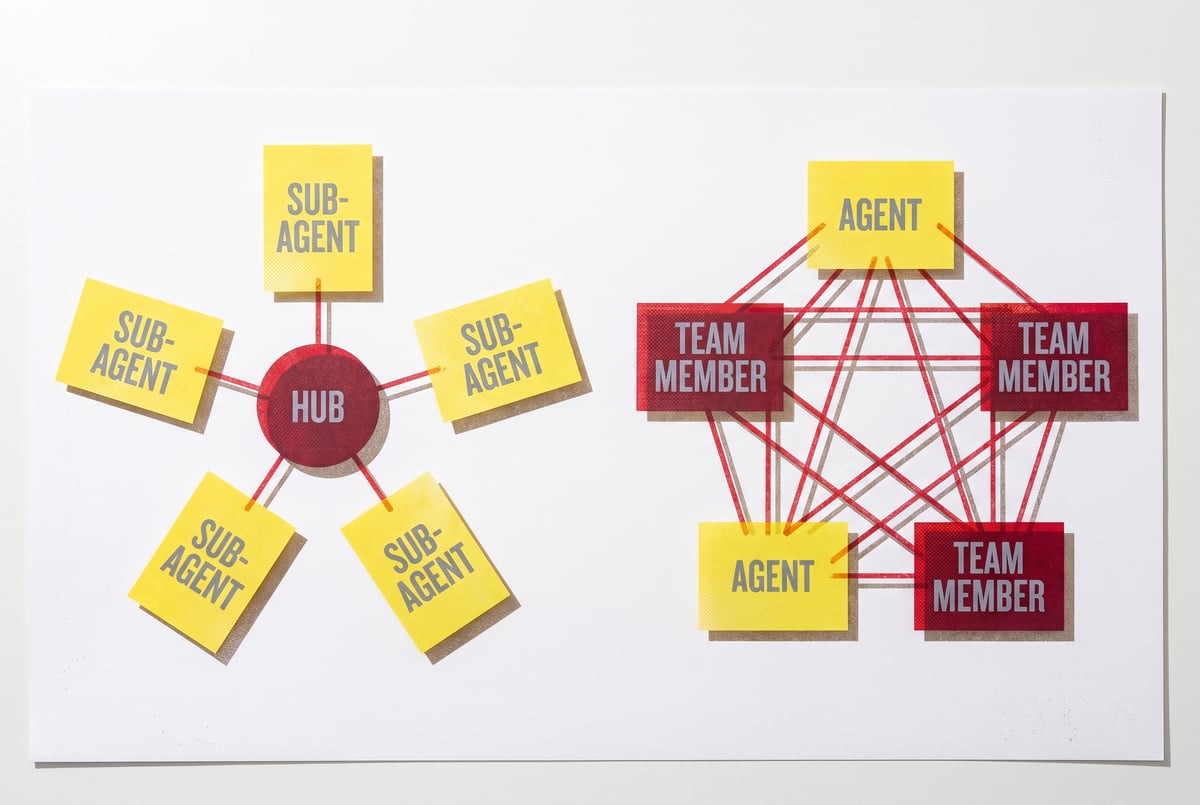
Sub-agents operate on a hub-and-spoke topology. The orchestrating agent sits at the center. Every sub-agent connects to that center — not to each other.
This means:
- Sub-agents can’t directly message or pass information to sibling sub-agents
- All communication flows through the parent
- Each sub-agent only knows what the parent told it and what it discovers itself
- When a sub-agent finishes, it reports back to the parent
Remy doesn't build the plumbing. It inherits it.
Other agents wire up auth, databases, models, and integrations from scratch every time you ask them to build something.
Remy ships with all of it from MindStudio — so every cycle goes into the app you actually want.

Claude Code uses the Task tool to implement this pattern. When the orchestrator calls Task, it launches a sub-agent with a specific prompt, context, and set of permissions. The sub-agent runs in its own session — with its own context window — and returns a result when it’s done.
Why Isolated Sessions Matter
One of the most important properties of sub-agents is that each one gets a fresh context window. This isn’t a limitation — it’s actually a feature.
Large orchestration tasks often exceed what a single context window can hold. By farming work out to sub-agents, you effectively give each piece of the problem its own “working memory.” The sub-agent can focus entirely on its slice of work without getting confused by unrelated context from other tasks.
This also means sub-agents are well-suited for parallel execution. If your orchestrator needs to analyze five different documents, it can spawn five sub-agents simultaneously and wait for all five to finish — rather than processing them sequentially.
What Sub-Agents Can and Can’t Do
Can do:
- Run in parallel with other sub-agents
- Access tools the parent grants them (web browsing, code execution, file access, etc.)
- Operate autonomously within their assigned task
- Return structured or unstructured results to the parent
Can’t do:
- Communicate directly with peer sub-agents
- See what other sub-agents are working on
- Negotiate, debate, or validate each other’s work
- Share a running context with sibling agents
That last set of limitations is significant. Sub-agents are independent workers, not collaborators.
What Agent Teams Are
Agent teams are a different architecture altogether. In an agent team, multiple agents can communicate with each other — not just with a central orchestrator. They can review each other’s work, push back on conclusions, ask clarifying questions, and build on what peer agents have produced.
Peer-to-Peer vs. Hub-and-Spoke
Where sub-agents form a hub-and-spoke, agent teams form a network. Information can flow between agents in multiple directions. One agent’s output becomes another agent’s input — and that second agent might send something back, creating a real dialogue.
This enables fundamentally different workflows:
- A critic agent can review a writer agent’s draft and send feedback directly
- A researcher agent can hand findings to a synthesizer agent who then queries the researcher for clarification
- Multiple specialist agents can debate a decision before passing a consensus to an executor
This kind of back-and-forth isn’t possible with plain sub-agents. To do something similar with sub-agents, you’d have to route everything through the parent — which creates orchestration overhead and loses the conversational quality of genuine peer-to-peer debate.
How Claude Code Supports Agent Teams
Claude Code doesn’t have a single built-in “agent team” primitive the way it has the Task tool for sub-agents. Instead, agent teams in Claude Code are typically constructed by:
- Using multiple Claude instances that communicate via a shared state (files, databases, message queues)
- Structuring the orchestrator to explicitly pass outputs from one agent as inputs to another, managing the flow of information between specialists
- Integrating with multi-agent frameworks like LangGraph or custom orchestration layers that handle inter-agent messaging
Anthropic’s guidance on building effective multi-agent systems emphasizes designing agents with clear roles and well-defined communication contracts — which becomes even more important when agents need to actually interact rather than just work in parallel.
- ✕a coding agent
- ✕no-code
- ✕vibe coding
- ✕a faster Cursor
The one that tells the coding agents what to build.
The coordination logic is more complex, but the payoff is workflows that can genuinely improve output quality through deliberation rather than just speed things up through parallelism.
The Core Distinction in Plain Terms
Here’s the simplest way to think about it:
Sub-agents: Multiple workers, one manager. Workers can’t talk to each other. Great for parallelizing independent tasks.
Agent teams: Multiple peers who can communicate. Great for tasks that benefit from review, debate, or iterative refinement.
A sub-agent setup is like a project manager assigning different sections of a report to five different freelancers. They each do their piece independently, hand it in, and the manager stitches it together.
An agent team is like a small editorial team — a writer, an editor, and a fact-checker who actually talk to each other before anything goes out the door.
Both approaches are useful. The question is what your workflow actually needs.
When to Use Sub-Agents
Sub-agents are the right tool when the work is naturally parallelizable and independent. The key question: can each piece of work be completed without knowing what the other pieces are doing?
Parallel Research Tasks
If you need to gather information on five topics, none of which depend on each other, sub-agents handle this efficiently. Spawn five agents, let them run simultaneously, collect the results. This is faster than running them sequentially, and each agent gets a clean context window focused entirely on its topic.
Specialized Execution
When different parts of a task require genuinely different skills — one sub-agent browses the web, another runs code, another reads files — sub-agents let you scope each agent’s tools and instructions precisely. The orchestrator maintains overall control while each specialist focuses on what it does best.
High-Volume Processing
Sub-agents scale well for processing large batches of similar items: analyzing a folder of documents, classifying a list of customer tickets, generating metadata for product catalog entries. The orchestrator distributes items across multiple sub-agents and aggregates results.
When You Want Predictability
Sub-agent workflows are generally easier to reason about and debug. Every result traces back to a clear handoff: the parent asked for X, the sub-agent returned Y. There’s no inter-agent debate to untangle when something goes wrong.
Good use cases for sub-agents:
- Parallelizing independent research across multiple sources
- Running code analysis on multiple files simultaneously
- Generating variations of content in parallel
- Processing large batches of similar items
- Specialized tool use (web agent, code agent, file agent) working separately
When to Use Agent Teams
Agent teams make sense when the quality of the output depends on deliberation, cross-checking, or iterative improvement — not just task completion.
Quality-Critical Outputs
Some tasks are too important to trust to a single pass. If you’re generating a legal summary, an investment thesis, or a technical specification, having a second agent critique the first agent’s output before it reaches you adds a meaningful quality filter that sub-agents alone can’t provide.
Debate and Consensus
Everyone else built a construction worker.
We built the contractor.
One file at a time.
UI, API, database, deploy.
When there’s genuine uncertainty about the right answer, agent teams can explore multiple perspectives before converging. A financial analysis might benefit from one agent taking a bullish stance, another taking a bearish stance, and a synthesis agent summarizing the strongest arguments from each. This kind of structured adversarial collaboration produces more robust conclusions.
Iterative Refinement
Some work improves through cycles of draft-review-revise. A writer agent drafts, an editor agent critiques, the writer revises based on feedback, the editor checks again. This loop produces better output than a single-pass agent, but it requires agents to actually communicate.
Complex Reasoning Chains
When solving a complex problem requires passing partial conclusions between specialists — not just divvying up independent tasks — agent teams handle this more naturally than sub-agents routed through a central orchestrator.
Good use cases for agent teams:
- Content that needs editorial review and revision cycles
- Analysis tasks that benefit from multiple perspectives
- Decision support where adversarial debate improves quality
- Workflows with complex dependency chains between specialists
- Any situation where catching errors before output matters
Architectural Trade-offs: A Direct Comparison
| Sub-Agents | Agent Teams | |
|---|---|---|
| Communication | Hub-and-spoke (via parent only) | Peer-to-peer possible |
| Coordination complexity | Lower | Higher |
| Best for | Parallel independent work | Collaborative, iterative work |
| Context isolation | Strong (each agent is independent) | Depends on implementation |
| Speed advantage | High (parallel execution) | Lower (coordination overhead) |
| Quality advantage | Lower (no peer review) | Higher (agents can critique each other) |
| Debuggability | Easier (clear handoffs) | Harder (more interaction points) |
| Claude Code primitive | Task tool | Custom orchestration |
Neither architecture is universally better. Most sophisticated workflows use both — sub-agents for the heavy parallel lifting, agent teams for the parts that require deliberation.
Combining Both in a Single Workflow
The most capable Claude Code systems don’t pick one approach — they use both where each fits.
Here’s a concrete example: a competitive intelligence workflow.
- An orchestrating agent receives a request to analyze five competitors.
- It spawns five sub-agents in parallel, one per competitor. Each sub-agent independently researches its target using web browsing tools and returns a structured report.
- The orchestrator passes all five reports to an agent team: an analyst agent, a strategist agent, and an editor agent.
- The analyst and strategist debate the key findings and implications, passing drafts back and forth.
- The editor agent reviews the final synthesis for clarity and completeness before returning it to the user.
Sub-agents handle the parallel data-gathering efficiently. The agent team handles the high-stakes synthesis where quality matters. The result is faster than doing everything sequentially and better than a single-agent pass at the whole thing.
Practical Guidance: How to Choose
When you’re designing a multi-agent workflow, work through these questions:
1. Are the tasks independent? If each piece of work can be completed without knowing what other agents are doing, sub-agents are the right tool. If tasks depend on each other’s outputs in non-linear ways, you need an agent team.
2. Does quality depend on review? If the output needs to be checked, critiqued, or improved before it’s useful, sub-agents alone won’t get you there. Agent teams enable the feedback loops that drive quality.
3. How important is speed? Sub-agents parallelize naturally and efficiently. Agent teams introduce coordination overhead. If speed is the priority and tasks are independent, lean toward sub-agents.
Seven tools to build an app. Or just Remy.
Editor, preview, AI agents, deploy — all in one tab. Nothing to install.
4. How complex is the coordination logic? Sub-agent coordination is handled by the parent orchestrator with clear handoffs. Agent team coordination requires more careful design — who talks to whom, in what order, with what shared state. If you’re not prepared to manage that complexity, start with sub-agents and add team coordination where it’s genuinely needed.
5. What are the failure modes? Sub-agent failures are usually isolated — one agent fails, the others keep going, the parent handles the error. Agent team failures can cascade through the conversation. Design accordingly.
FAQ
What is a sub-agent in Claude Code?
A sub-agent in Claude Code is a separate agent instance spawned by a parent orchestrating agent using the Task tool. The sub-agent runs in its own session with its own context window, executes a specific task, and returns a result to the parent. Sub-agents can run in parallel but can’t communicate directly with each other — all information flows through the parent orchestrator.
What’s the difference between sub-agents and agent teams?
Sub-agents operate in a hub-and-spoke pattern: each agent communicates only with the central orchestrator, not with peer agents. Agent teams enable peer-to-peer communication — agents can review each other’s work, exchange drafts, and engage in back-and-forth dialogue. Sub-agents excel at parallelizing independent work; agent teams excel at collaborative, iterative tasks where quality depends on deliberation.
Can Claude Code run agents in parallel?
Yes. When an orchestrating agent in Claude Code spawns multiple sub-agents using the Task tool, those sub-agents can run concurrently. This makes sub-agents particularly efficient for tasks that can be split into independent parallel workstreams — like researching multiple topics simultaneously or processing a batch of files at the same time.
When should I use an agent team instead of sub-agents?
Use an agent team when the quality of your output depends on agents reviewing, critiquing, or building on each other’s work. Good scenarios include: content that benefits from editorial review cycles, analyses that require multiple perspectives or adversarial debate, and complex reasoning chains where one specialist’s output needs to be validated by another before moving forward.
How do agent teams communicate in Claude Code?
Claude Code doesn’t have a single built-in primitive for agent team communication the way it has the Task tool for sub-agents. Agent teams are typically built using shared state (files, databases, or message queues that multiple agents read and write), structured orchestration where the parent explicitly routes outputs between agents, or integration with multi-agent frameworks that handle inter-agent messaging. The coordination design is more complex but enables genuine peer-to-peer collaboration.
Can I use both sub-agents and agent teams in the same workflow?
Yes — and for sophisticated workflows, combining both is often the best approach. A common pattern: use sub-agents to parallelize independent data-gathering tasks (fast, efficient), then pass all results to an agent team for collaborative synthesis and quality review (thorough, high-quality). Each architecture handles the part of the workflow it’s best suited for.
Key Takeaways
- Sub-agents work in a hub-and-spoke model — they execute independently and report to a parent orchestrator, but can’t communicate with each other directly.
- Agent teams enable peer-to-peer communication — agents can review, debate, and iterate on each other’s work, improving output quality through deliberation.
- Sub-agents are the right choice when tasks are independent and can be parallelized. Agent teams are right when quality depends on review cycles or multi-perspective analysis.
- Most robust workflows combine both: sub-agents for parallel execution, agent teams for collaborative synthesis.
- Claude Code implements sub-agents natively via the
Tasktool; agent teams require custom orchestration or framework integration. - Tools like MindStudio’s Agent Skills Plugin can reduce the infrastructure burden on individual agents in complex multi-agent systems, keeping coordination logic clean.
If you’re building multi-agent systems and want to explore what’s possible without managing all the plumbing yourself, MindStudio is worth a look. You can start building free at mindstudio.ai.