What Is the Ultra Code Mode in Claude Code? X-High Effort Plus Dynamic Workflows
Ultra Code is Claude Code's highest effort mode. It combines extra-high reasoning with automatic dynamic workflow orchestration for massive parallel tasks.

Claude Code’s Effort Spectrum, Explained
When Anthropic shipped Claude Code, they didn’t just build another AI coding assistant. They built a tool that can reason about problems, plan multi-step solutions, and even delegate work to sub-agents running in parallel. Ultra Code mode is what happens when you push all of that to maximum.
If you’ve used Claude Code and wondered what Ultra mode actually does differently — beyond “it uses more compute” — this article breaks it down. You’ll learn what extra-high effort reasoning means in practice, how dynamic workflow orchestration works, when Ultra Code is worth using, and when it’s overkill.
The short version: Ultra Code mode in Claude Code is the highest-effort setting available. It combines extended reasoning (Claude thinking longer and harder about a problem) with automatic orchestration of parallel sub-agent workflows. It’s built for tasks that are too complex, too large, or too interconnected for a single-pass approach.
What Claude Code Actually Is
Before getting into Ultra mode specifically, it helps to understand what Claude Code is at its core.
Claude Code is Anthropic’s terminal-based agentic coding tool. Unlike a chat interface where you paste code back and forth, Claude Code operates directly in your development environment. It can read files, write code, run tests, execute shell commands, and take action across your entire codebase.
Remy doesn't write the code. It manages the agents who do.
Remy runs the project. The specialists do the work. You work with the PM, not the implementers.

That “agentic” part is key. Claude Code doesn’t just respond — it plans and executes sequences of actions to accomplish a goal. You can give it a high-level instruction like “refactor the authentication module to use JWT tokens and add test coverage,” and it will figure out the steps, run them, check the results, and adjust.
Claude Code also supports multi-agent behavior. A single Claude instance can spawn sub-agents that work on separate tasks concurrently. This is what makes Ultra mode genuinely different from just “turning up the temperature.”
Claude Code’s Effort Levels
Claude Code doesn’t operate at a single fixed level of effort. Anthropic designed it with configurable effort settings that control how much reasoning Claude applies before taking action.
Think of it as a dial with a few stops:
- Auto — Claude decides how much thinking is appropriate for each request. Simple tasks get quick responses; complex ones get more deliberation.
- Normal / Standard — A baseline level of effort. Fast, capable, good for most everyday coding tasks.
- High — More extended thinking. Claude considers more alternatives, backtracks on dead ends, and generally produces more careful output.
- Ultra — Maximum effort. Extended reasoning is maxed out, and Claude will automatically orchestrate dynamic multi-agent workflows for tasks that benefit from parallelism.
Most developers spend most of their time in auto or standard mode. Ultra Code mode is specifically designed for situations where a task is large enough, complex enough, or risky enough that the extra compute time is worth it.
What “X-High Effort” Means in Practice
The “extra-high effort” part of Ultra Code mode refers to Claude’s extended thinking capability.
When Claude uses extended thinking, it doesn’t just generate a response — it reasons through the problem step by step before producing output. This internal reasoning isn’t visible in the final response, but it heavily shapes what Claude produces.
Why Extended Thinking Changes Outcomes
Standard language model inference works roughly like this: you give the model a prompt, it predicts the most likely continuation, and out comes a response. This works well for clear, well-defined tasks.
But complex coding problems often involve trade-offs, ambiguities, and dependencies that benefit from deliberate analysis. Extended thinking gives Claude time to:
- Consider multiple implementation approaches before committing
- Identify edge cases that a quick pass would miss
- Reason about how a change in one part of a codebase might affect other parts
- Plan a sequence of actions that avoids dead ends
In Ultra Code mode, this reasoning process is amplified. Claude is given more “thinking budget” — more computational room to work through problems before producing output or taking action.
How the Thinking Budget Is Set
In Anthropic’s API, extended thinking is controlled by a budget_tokens parameter — the amount of reasoning the model can spend before it produces output. Roughly:
- Low (around 1,000–4,000 tokens): straightforward tasks where speed matters more than depth.
- Standard (around 8,000–16,000 tokens): moderate complexity, like code review, function-level refactoring, or debugging.
- High (32,000+ tokens): complex architectural analysis, multi-step planning, and reasoning across dependencies.
- ✕a coding agent
- ✕no-code
- ✕vibe coding
- ✕a faster Cursor
The one that tells the coding agents what to build.
Ultra Code mode runs at the high end of this range, and in some configurations at the maximum supported budget. A larger budget lets the model hold more of the problem in its reasoning chain, weigh more edge cases before writing, and produce a more coherent plan when a change spans many files. The trade-off is latency and cost — which is exactly why Ultra Code pairs a large thinking budget with parallel execution, so more compute per step doesn’t turn into proportionally longer wall-clock time.
What This Looks Like in a Real Task
Say you ask Claude Code to migrate a large application from one database ORM to another. In standard mode, it might start making changes immediately, hit conflicts partway through, and require intervention.
In Ultra Code mode with extended thinking, Claude is more likely to:
- Analyze the full scope of the migration first
- Identify which modules are tightly coupled vs. easily swappable
- Plan a sequenced migration path that minimizes risk
- Flag potential breaking changes before touching any files
The output quality difference is most noticeable on tasks with many interdependencies — exactly the kind of work that tends to go wrong with less careful approaches.
Dynamic Workflow Orchestration: The Other Half of Ultra
Extended thinking is only one part of what makes Ultra Code mode distinct. The other half is dynamic workflow orchestration.
This is where things get more interesting — and more powerful.
How Multi-Agent Orchestration Works in Claude Code
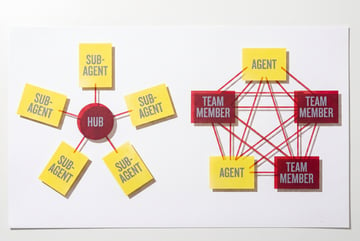
Claude Code can act as an orchestrator: a primary agent that breaks a large task into sub-tasks and assigns each sub-task to a separate Claude instance (sub-agent). These sub-agents can run in parallel, each working on their piece of the problem simultaneously.
In standard or high effort modes, this orchestration is available but requires manual setup or explicit prompting. In Ultra Code mode, this orchestration becomes dynamic — Claude automatically decides when to spin up sub-agents, what to assign them, and how to coordinate their outputs.
This means:
- Parallelism without manual planning — You don’t have to architect the multi-agent workflow yourself. Ultra Code detects when parallel execution would help and sets it up automatically.
- Context-aware task splitting — Sub-tasks are assigned based on what makes sense for the codebase, not a rigid template. Claude might give one agent the API layer, another the database layer, and a third the test suite.
- Result synthesis — When sub-agents finish, the orchestrator reviews their outputs, resolves conflicts, and integrates the pieces into a coherent whole.
Why Dynamic Workflows Matter for Large Tasks
The practical implication is speed and coherence at scale. A migration that might take sequential steps hours to complete — even with a capable AI — can be dramatically compressed when independent components are handled simultaneously.
More importantly, dynamic orchestration handles coordination. When you manually parallelize work across agents or developers, you often create integration problems. Ultra Code’s orchestrator is designed to maintain consistency across sub-agent outputs, reducing the “too many cooks” problem.
This is grounded in Anthropic’s broader approach to agentic AI systems, where effective multi-agent behavior requires not just parallelism but thoughtful coordination of shared context and state.
When to Use Ultra Code Mode
Ultra Code mode isn’t always the right choice. More compute means more time and more cost. Here’s a clear breakdown of when it’s worth it and when it isn’t.
Use Ultra Code When:
- Large-scale refactors — Touching dozens of files across multiple modules. The extended reasoning helps Claude understand dependencies; the multi-agent orchestration helps it work on parallel components simultaneously.
- Complex architectural changes — Migrating databases, switching frameworks, redesigning APIs. These changes have cascading effects that benefit from deep upfront reasoning.
- Codebase-wide analysis — Identifying security vulnerabilities, performance bottlenecks, or technical debt across an entire project. This is exactly the kind of parallel scanning that sub-agents handle well.
- Feature implementation with many dependencies — When a new feature requires changes in the backend, frontend, database schema, and test suite simultaneously.
- Unfamiliar codebases — When Claude Code needs to understand a complex project before doing anything. The extended thinking period acts like a careful code review before action.
Skip Ultra Code When:
- You’re writing a single function or fixing a specific bug
- The task is well-defined with minimal cross-cutting concerns
- You need a fast response and the task doesn’t require deep analysis
- You’re iterating quickly on a prototype and prefer speed over thoroughness
The mental model: if a task is the kind of thing a senior engineer would spend an hour planning before touching code, Ultra Code mode is probably the right tool.
How Ultra Code Fits Into Multi-Agent AI Workflows
Ultra Code mode doesn’t exist in isolation. For teams building with AI agents more broadly, it’s part of a larger picture of how AI systems coordinate work.
The pattern Ultra Code uses — an orchestrator that manages sub-agents, hands off tasks, synthesizes results — is a general architecture for complex AI workflows. It’s not unique to coding. The same structure applies to research workflows, content pipelines, data processing tasks, and business automation.
Ultra Code vs. Other High-Effort Coding Modes
It’s worth situating Ultra Code mode relative to what other AI coding tools offer, since the landscape has become more crowded.
Claude Code Ultra vs. Standard Claude Code
The difference is primarily in the automatic orchestration. Standard Claude Code with extended thinking enabled gives you the reasoning benefits — but you still work sequentially. Ultra mode adds the dynamic multi-agent layer on top of that.
Claude Code vs. Other Agentic Coding Tools
Tools like Cursor, GitHub Copilot Workspace, and Devin each take different approaches to complex coding tasks. Most focus on a single-agent model with strong IDE integration. Claude Code’s Ultra mode is more differentiated by its automatic multi-agent orchestration — the ability to genuinely parallelize work on a large task without manual setup.
For teams evaluating agentic coding tools, the key question isn’t just “how smart is the AI?” but “how well does it handle tasks that are too large for a single-pass approach?” Ultra Code mode is Anthropic’s answer to that specific question.
Which Claude Model to Reach For
Effort mode is only part of the picture — the model underneath it matters too. A rough guide to the Claude lineup for code work:
| Model | Strengths for code | Extended thinking | Best for |
|---|---|---|---|
| Claude Haiku 3.5 | Fast, cheap, strong on simple tasks | Limited | Autocomplete, quick fixes |
| Claude Sonnet 4 | Balanced capability and speed | Moderate | Standard development tasks |
| Claude Opus 4 | Deep reasoning, complex problem solving | Full budget available | Architecture, complex debugging |
| Claude Opus (Ultra Code) | Maximum reasoning plus parallel orchestration | Maximum budget | Codebase-scale migrations |
Sonnet handles the majority of everyday coding well and at a fraction of the cost. Reserve the highest-effort Opus configurations — and Ultra Code mode specifically — for work whose scope and complexity justify the extra compute. Anthropic’s model documentation has the full specifications for the current lineup.
Building on Top of Claude Code’s Capabilities
Seven tools to build an app. Or just Remy.
Editor, preview, AI agents, deploy — all in one tab. Nothing to install.
Ultra Code mode works best when it’s part of a thoughtful workflow, not just a switch you flip. Here are a few practical patterns for getting the most out of it.
Give It Scope, Not Just Tasks
Ultra Code’s extended reasoning works better when it has full context. Instead of “fix the auth module,” try “the auth module has three known issues: [list them]. We’re also planning to add OAuth support next sprint. Refactor with both the fixes and the upcoming OAuth integration in mind.”
This gives the planning phase real material to work with.
Use It for the Planning Phase Separately
Some developers use Ultra Code mode specifically for the analysis and planning step — let it reason through the full scope of a large task, generate a plan, then review that plan before executing. This separates the “thinking” from the “doing” in a way that lets you catch issues before they’re baked into code.
Combine With Version Control Checkpoints
Because Ultra Code can make broad changes across many files simultaneously, it’s especially important to have clean git state before running it. Treat each Ultra Code session like a branch: start clean, let it work, review the diff in full before merging.
Pair With MindStudio Workflows for Non-Code Steps
If your development process includes steps outside the codebase — updating documentation, notifying Slack channels, creating tickets in Jira, generating release notes — you can connect Claude Code to MindStudio workflows that handle those steps automatically. This extends the “orchestration” model from code to the full development lifecycle. Learn more about building AI agents that work across tools on MindStudio.
Guardrails for Large Ultra Code Runs
Because Ultra Code can touch many files in parallel, a few guardrails keep a big run from turning into a big cleanup.
- Set interface contracts. Agents working in parallel need to agree on interfaces they don’t own. Be explicit about what a run can and cannot change — an agent working inside a service shouldn’t rewrite a public API contract unless that’s in scope, and even then it should flag the change for review.
- Plan for conflict resolution. Parallel work can produce changes that collide, like two edits to the same shared utility. Review the full diff for conflicts before you merge, and treat any overlap on shared code as something to check by hand.
- Set a cost ceiling. Extended thinking at high budget across many agents adds up. Before running a full-codebase task, test on a representative subset, measure the cost, and set a budget limit before you scale up.
- Keep a human in the loop. Build in checkpoints — review the plan before execution and the diffs before they’re committed. Treat these as part of the workflow, not an optional extra.
Frequently Asked Questions
What is Ultra Code mode in Claude Code?
Ultra Code mode is the highest effort setting in Claude Code, Anthropic’s agentic coding tool. It combines extra-high reasoning (extended thinking, where Claude deliberates more carefully before acting) with automatic dynamic workflow orchestration, where Claude spawns and coordinates parallel sub-agents to handle large or complex tasks simultaneously.
How is Ultra Code different from regular Claude Code?
In standard mode, Claude Code works sequentially — it plans, executes, checks results, and adjusts, but as a single agent. Ultra Code mode adds automatic multi-agent orchestration, so it can split large tasks across multiple Claude instances running in parallel. It also uses more extended reasoning, meaning Claude spends more time thinking through a problem before taking action.
When should I use Ultra Code mode?
Use Ultra Code when you’re tackling tasks that are large in scope, complex in their dependencies, or risky enough to warrant more careful planning. Good candidates include large-scale refactors, architectural migrations, codebase-wide analysis, and feature implementations that touch many parts of a system simultaneously. For smaller or well-defined tasks, standard mode is faster and more cost-efficient.
Does Ultra Code mode cost more to use?
Yes. Extended thinking and multi-agent orchestration both consume more compute than standard inference. The exact cost depends on the task scope and how many sub-agents are invoked. For tasks that genuinely benefit from Ultra mode — large, parallel, complex — the efficiency gains in output quality and time-to-completion typically justify the higher compute cost. For simple tasks, stick with standard mode.
What is dynamic workflow orchestration in Claude Code?
Dynamic workflow orchestration means Claude Code automatically decides when to break a task into parallel sub-tasks, spins up sub-agent instances to handle those sub-tasks, and synthesizes the results. “Dynamic” means this happens based on Claude’s assessment of the task — you don’t need to manually define the workflow. The primary Claude instance acts as an orchestrator, while sub-agents work concurrently on separate components.
Can I use Ultra Code mode with other tools and workflows?
Yes. Claude Code can be extended with additional tools and integrations. For example, using the MindStudio Agent Skills Plugin, you can give Claude Code access to external capabilities — running workflows, searching the web, sending messages — as callable methods. This lets you build broader automation pipelines that combine Claude Code’s reasoning with other services and tools. Explore what you can build with AI agents and automated workflows.
Key Takeaways
- Ultra Code mode is Claude Code’s highest effort setting, combining extended reasoning with automatic multi-agent orchestration.
- Extended thinking gives Claude more deliberation time before acting, producing better planning and fewer mid-task failures on complex problems.
- Dynamic workflow orchestration lets Claude automatically parallelize large tasks across sub-agents — without requiring manual workflow design.
- It’s not for everything — Ultra Code is best reserved for large-scale refactors, architectural changes, and tasks with many interdependencies. Simpler tasks don’t need it.
- The orchestration pattern extends beyond code — the same multi-agent principles that make Ultra Code powerful apply to broader AI workflow automation, which is where platforms like MindStudio come in.
If you’re building AI-powered workflows beyond the codebase — or want to extend what Claude Code can do by connecting it to business tools and automated pipelines — MindStudio is a practical starting point. It’s free to try, and the average build takes under an hour.