What Is Claude Code Agent View? How to Manage Multiple AI Agents at Once
Claude Code's new Agent View lets you monitor and control multiple coding sessions from one terminal tab. Here's how it works and why it matters.

Running Multiple AI Coding Agents Without Losing Your Mind
If you’ve used Claude Code for more than a few minutes, you know the feeling: you want to run one agent fixing a bug while another refactors a module, but juggling multiple terminal windows is a mess. Context switches, lost output, no clean way to see what’s actually running.
Claude Code’s Agent View is built to solve exactly that. It’s a dedicated interface layer inside Claude Code that lets you monitor and control multiple AI coding sessions — what Anthropic calls “agents” — from a single place. No more tab hunting.
This article explains what Claude Code Agent View is, how multi-agent workflows actually work inside it, and how to get the most out of running parallel agents on real projects.
What Claude Code Agent View Actually Is
Claude Code is Anthropic’s CLI-based coding agent. You run it in your terminal, give it a task, and it reads files, writes code, runs commands, and iterates until the job is done. It’s genuinely useful — but until recently, running multiple simultaneous tasks meant opening multiple separate terminal sessions and mentally tracking them yourself.
Agent View changes that by giving you a structured interface within Claude Code that surfaces all your active agents in one place. Think of it as a task manager specifically for Claude Code sessions.
With Agent View, you can:
- See all running agents and their current status at a glance
- Launch new sub-agents from within a parent session
- Review what each agent is working on without switching contexts
- Track which agents are waiting for input vs. actively processing
- Terminate or redirect individual agents without touching the others
- ✕a coding agent
- ✕no-code
- ✕vibe coding
- ✕a faster Cursor
The one that tells the coding agents what to build.

It’s not a graphical dashboard — this is still terminal-native. But it’s a significant step up from managing everything manually across disconnected shell tabs.
Why Multi-Agent Workflows Matter for Coding
Single-agent, single-task is fine for small jobs. You ask Claude Code to write a test suite, it writes the test suite. Done.
But real development work rarely looks like that. You’re often dealing with several problems at once: a failing integration test, an unfinished feature branch, a documentation gap, and a performance issue that needs investigation. Doing all of that sequentially with one agent is slow.
Multi-agent workflows let you split that work and run it in parallel. Each agent handles one focused task. The result: work that might have taken 90 minutes in sequence could finish in 20–30 minutes with agents running concurrently.
The Orchestrator-Subagent Model
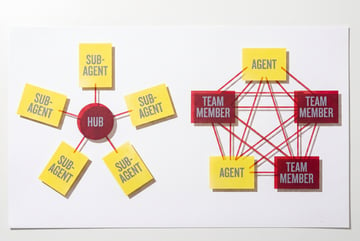
Claude Code uses an orchestrator-subagent pattern for multi-agent work. One agent acts as the coordinator — it understands the high-level goal and delegates specific subtasks to other agents it spawns. Those subagents report back when they finish or hit a problem.
This mirrors how software teams actually work. A tech lead breaks down a ticket into subtasks and assigns them out. Agents follow the same logic.
Agent View gives you visibility into that entire hierarchy — not just the top-level orchestrator, but every subagent it has created, and what each one is currently doing.
How to Use Claude Code Agent View
Launching Agent View
Agent View is accessed directly through the Claude Code CLI. Once you’re in a Claude Code session, you can invoke the agent view to see a live panel showing all active agents associated with your current project or workspace.
The interface displays each agent as a named entry with:
- A status indicator (thinking, executing, waiting, complete, error)
- The current task or last action taken
- How long the agent has been running
- Any pending input requests
From this view, you can navigate between agents, inspect their output streams, and intervene if something has gone off the rails.
Spawning Sub-Agents
When Claude Code’s orchestrator determines that a task can be parallelized, it spawns sub-agents automatically. But you can also direct Claude Code to spin up separate agents for specific jobs manually.
For example, you might have an orchestrator working on an API integration while you manually spin up a second agent to handle the database schema migration simultaneously. The Agent View keeps both tracked in one place.
Monitoring Status and Output
Each agent in the view has an expandable output panel. If an agent is mid-execution, you can see what file it’s working on, what command it last ran, and what its current reasoning step is.
This is genuinely useful. Without it, you’d have to wait for an agent to complete or check a separate terminal to know whether it’s stuck on something or just taking longer than expected.
Handling Agents That Need Input
Plans first. Then code.
Remy writes the spec, manages the build, and ships the app.
One of the more practical features: if a sub-agent hits an ambiguity it can’t resolve — it’s not sure which of two approaches to take, or it needs clarification about project structure — it can pause and surface that question in Agent View rather than making a guess that sends 30 minutes of work in the wrong direction.
You review the question, provide the answer, and the agent resumes. You never lose track of where it is in the workflow.
Practical Multi-Agent Patterns in Claude Code
Understanding the interface is one thing. Knowing how to structure work to take advantage of it is what actually moves the needle.
Parallel Feature Development
If you’re building two features that don’t touch overlapping files, run them simultaneously. Agent 1 handles the frontend component. Agent 2 handles the backend endpoint. Agent View shows both progressing in real time, and you can review their output independently.
Test Generation Alongside Feature Work
One common pattern: have your main agent implement the feature while a sub-agent — running in parallel — writes the tests for the spec you defined upfront. By the time the feature agent finishes, your test suite is mostly ready to run.
Code Review and Refactoring
After a feature is built, you can spin up a separate agent specifically tasked with reviewing it against your style guide, identifying technical debt, or suggesting refactors. Running it simultaneously with your next task means you’re not sitting idle waiting for a review cycle.
Debugging Without Blocking Development
If a bug surfaces while you’re mid-feature, you don’t have to stop. Spin up a dedicated debugging agent, hand it the failing test and relevant files, and let it investigate while you continue building. Agent View lets you check on it when you’re at a natural stopping point.
What Makes This Different from Just Opening Multiple Terminals
The obvious question: why not just open four terminal tabs and run Claude Code four times?
You can do that. But you lose:
Coordination. When agents are managed through Agent View, they share context about the project. The orchestrator knows what each subagent is working on and can avoid conflicts — two agents won’t try to edit the same file at the same time.
Visibility. Four separate terminal windows means four separate contexts to mentally track. Agent View gives you a single pane.
Input routing. If multiple agents need clarification, those requests queue up cleanly in Agent View. In separate terminals, you’re hunting for which window is asking you something.
Error propagation. If a sub-agent fails, the orchestrator is aware and can decide whether to retry, reroute, or surface the failure to you. In separate terminals, a failing agent just sits there until you notice.
The practical difference is most obvious on larger, more complex tasks. For a two-minute job, separate tabs are fine. For a multi-hour parallel development session, Agent View’s coordination layer is worth it.
Current Capabilities and Known Limitations
Claude Code’s multi-agent and Agent View functionality is still evolving. A few things to know as of now:
Context window management. Each agent consumes context. Running many agents simultaneously on large codebases can hit limits faster than you’d expect. Scoping tasks tightly helps — agents don’t need the full project in context, just the relevant parts.
Everyone else built a construction worker.
We built the contractor.
One file at a time.
UI, API, database, deploy.
Token costs scale with agents. More agents running in parallel means more tokens consumed. If you’re on a usage-based plan, it’s worth thinking about which tasks genuinely benefit from parallelization and which ones are fine to run sequentially.
File conflict handling. Claude Code handles most cases where agents might conflict, but complex merge situations — especially in large files that both agents modify — can still require manual intervention.
Not all tasks parallelize well. Interdependent tasks that require one to complete before the other begins still need to run sequentially. Agent View doesn’t change the dependency structure of your code — it just manages independent workstreams more cleanly.
How MindStudio Connects to Claude Code Workflows
If you’re running Claude Code agents in parallel, chances are those agents need to do things beyond writing code. Send an email when a deploy completes. Pull data from an external API. Generate documentation and push it somewhere. Run a search to look up a library’s current API spec.
This is where the MindStudio Agent Skills Plugin comes in. It’s an npm SDK (@mindstudio-ai/agent) that gives any AI agent — including Claude Code — access to 120+ pre-built capabilities as simple method calls.
Inside a Claude Code session, you can call things like:
agent.searchGoogle()— live web search without managing API keysagent.sendEmail()— trigger an email notification when a task completesagent.runWorkflow()— kick off a full MindStudio automation pipelineagent.generateImage()— produce visual assets as part of a build process
The plugin handles the infrastructure layer — rate limiting, retries, authentication — so Claude Code stays focused on reasoning and coding rather than managing API plumbing.
For teams running complex multi-agent Claude Code setups, this is a natural fit. Your orchestrator can call agent.runWorkflow() to kick off downstream business processes without anyone having to build and maintain that integration separately.
You can try MindStudio free at mindstudio.ai.
Frequently Asked Questions
What is Claude Code Agent View?
Claude Code Agent View is a built-in interface within Anthropic’s Claude Code CLI that lets you monitor and manage multiple AI coding agents from a single terminal view. Rather than tracking separate terminal sessions, Agent View surfaces all active agents, their current status, and any input they need in one place.
How many agents can you run simultaneously in Claude Code?
There’s no hard-coded maximum, but practical limits apply. Each agent consumes context window space and API tokens. Most users find that 3–5 parallel agents is a manageable and cost-effective range for typical coding tasks. Running more than that starts to get unwieldy in terms of oversight and cost, especially on large codebases.
Can Claude Code sub-agents edit the same files?
The orchestrator-subagent model is designed to coordinate task assignments and avoid file conflicts. In practice, it’s best to structure tasks so each agent has clear ownership of distinct parts of the codebase. Overlapping file ownership can still cause conflicts that require manual resolution.
Is Claude Code Agent View available to all users?
Remy doesn't write the code. It manages the agents who do.
Remy runs the project. The specialists do the work. You work with the PM, not the implementers.
Claude Code is available through Anthropic’s Claude.ai and API offerings. Agent View and multi-agent capabilities have been rolling out as part of Claude Code’s ongoing development. Check Anthropic’s Claude Code documentation for the current feature availability based on your subscription tier.
How does the orchestrator decide what to delegate to sub-agents?
The orchestrator uses its understanding of the task to identify work that can be parallelized — typically subtasks that don’t depend on each other’s outputs. When you give Claude Code a complex, multi-part goal, it reasons through the dependency structure and farms out independent pieces to sub-agents. You can also explicitly direct it to create agents for specific tasks.
What’s the difference between Claude Code and Claude’s standard chat interface for coding?
Standard Claude chat is conversational — you ask questions, get responses. Claude Code is agentic — it reads your actual codebase, executes commands, makes file edits, and iterates on its own to complete a goal. Agent View is specific to Claude Code because it’s managing persistent, autonomous sessions, not one-off chat completions.
Key Takeaways
- Claude Code Agent View gives you a unified interface to monitor and control multiple AI coding sessions from one terminal pane — no more juggling separate windows.
- The orchestrator-subagent model lets Claude Code break down complex tasks and run independent subtasks in parallel, which is meaningfully faster than sequential execution.
- Practical use cases include parallel feature development, concurrent test generation, isolated debugging, and background refactoring.
- Agent View adds coordination and visibility that separate terminal tabs don’t have — agents share context, avoid file conflicts, and route input requests cleanly.
- For teams that need agents to do more than write code — trigger workflows, send notifications, pull external data — the MindStudio Agent Skills Plugin integrates directly with Claude Code to add 120+ typed capabilities without the infrastructure overhead.
If you’re building with Claude Code and want to extend what your agents can actually do, start with MindStudio’s Agent Skills Plugin — it’s free to get started and takes minutes to wire in.