What Is Claude Opus 4.8 Dynamic Workflows? Parallel Sub-Agents Explained
Claude Opus 4.8 dynamic workflows spawn hundreds of parallel sub-agents from a single prompt. Learn how they work, when to use them, and what they cost.
How Claude Spawns Hundreds of Agents From a Single Prompt
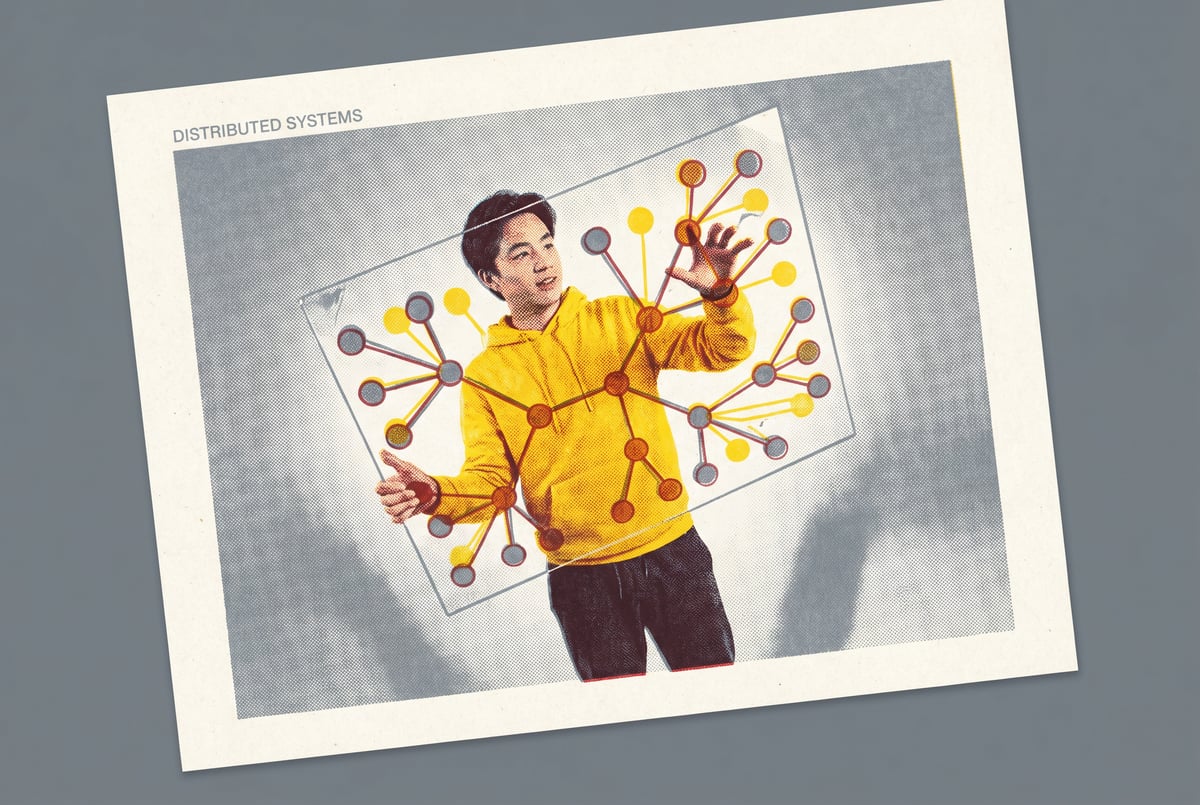
If you’ve been following Anthropic’s model releases, you’ve noticed that Claude hasn’t just gotten smarter — it’s gotten more structural. With Claude Opus 4 and the dynamic workflow architecture it supports, a single prompt can now trigger not one response, but an entire network of parallel sub-agents working simultaneously on different pieces of a problem.
That’s not a metaphor. Claude Opus 4 dynamic workflows are a real architectural pattern where an orchestrating agent breaks a task into components, spawns multiple specialized sub-agents to handle those components in parallel, collects their outputs, and synthesizes a final result. The primary keyword here — Claude multi-agent workflows — describes what’s quickly becoming one of the most practically useful patterns in applied AI.
This post explains exactly how this works, when it makes sense to use it, what it costs, and how platforms like MindStudio make it accessible without needing to write orchestration code yourself.
What “Dynamic Workflows” Actually Means
The term “dynamic” is doing a lot of work here, so let’s be specific.
A static workflow has a fixed number of steps defined in advance. You know step one will always call Model A, step two will always call Model B, and so on. Nothing adapts at runtime.
A dynamic workflow, by contrast, lets the orchestrating agent decide at runtime how many sub-agents to spawn, what tasks to assign them, and how to structure the work — based on the complexity and nature of the input. If the task is simple, maybe only two sub-agents are needed. If it’s a sprawling research project, it might spawn dozens.
The Orchestrator-Subagent Model
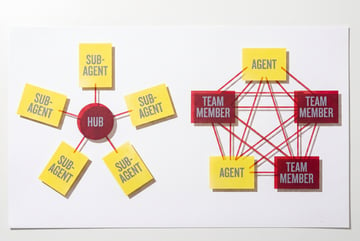
At the center of Claude’s dynamic workflow pattern is a two-tier structure:
- Orchestrator: The top-level Claude instance that receives the original prompt, plans the work, and delegates subtasks.
- Sub-agents: Specialized Claude instances (or other model instances) that receive specific scoped tasks, execute them, and return results.
The orchestrator doesn’t do all the work itself. It thinks about how to divide and conquer the problem, then coordinates the agents doing the actual work.
This is conceptually similar to how a project manager operates — they don’t write every document, they assign work to the right people and integrate the outputs.
What Makes It “Parallel”
In a traditional sequential workflow, sub-agent 2 can’t start until sub-agent 1 finishes. In a parallel architecture, all sub-agents work simultaneously. This has a huge practical implication: time-to-completion scales with the longest individual task, not the sum of all tasks.
A workflow that would take 10 minutes sequentially (10 sub-tasks × 1 minute each) can complete in roughly 1 minute if all sub-tasks run in parallel. That’s not a small efficiency gain — it fundamentally changes what’s feasible in real-time applications.
How Claude Opus 4 Handles Sub-Agent Spawning
Claude Opus 4 is Anthropic’s most capable model for complex reasoning and long-context tasks. It’s the model most suited to orchestration roles because orchestrating a multi-agent workflow requires the model to:
- Understand the full scope of a problem
- Decompose it into non-overlapping, well-scoped subtasks
- Write instructions for each sub-agent that are clear enough to produce useful outputs
- Handle partial failures gracefully (if one sub-agent fails or returns garbage)
- Synthesize diverse outputs into a coherent final result
These are genuinely hard reasoning tasks. Smaller or less capable models tend to produce poorly scoped subtasks, which leads to overlapping work or gaps in coverage.
Context Windows and Sub-Agent Communication
Each sub-agent in a parallel workflow operates with its own context window. The orchestrator passes instructions and relevant context to each sub-agent at the start of their task. Sub-agents don’t share memory with each other — they only know what the orchestrator told them and what they’ve generated themselves.
This means the orchestrator needs to be careful about what context each sub-agent receives. Too little, and the sub-agent produces irrelevant output. Too much, and you’re burning tokens unnecessarily on every sub-agent call.
Good orchestration design involves:
- Passing only task-relevant context to each sub-agent
- Being explicit about output format expectations
- Setting clear scope boundaries so sub-agents don’t duplicate each other’s work
Tool Use and Sub-Agent Capabilities
Sub-agents in a dynamic workflow can use tools — web search, code execution, API calls, database queries — just like a standalone agent would. The orchestrator can assign different tools to different sub-agents based on their specific tasks.
For example, in a competitive intelligence workflow:
- Sub-agent 1 gets web search access to gather public data on Competitor A
- Sub-agent 2 gets database access to pull your own sales data
- Sub-agent 3 gets code execution to run financial modeling
- Sub-agent 4 gets no tools, and simply reasons about strategic implications given a briefing
Everyone else built a construction worker.
We built the contractor.
One file at a time.
UI, API, database, deploy.

The orchestrator defines which tools each sub-agent can access, creating a kind of role-based specialization within the workflow.
When Parallel Sub-Agents Make Sense
Not every task benefits from multi-agent parallelism. The pattern is most useful when:
Tasks Are Naturally Decomposable
If a task can be cleanly broken into independent sub-tasks with minimal dependencies between them, parallelism works well. Research tasks, content generation at scale, multi-source data aggregation, and code review across large codebases are good examples.
If sub-tasks are tightly interdependent (output of task A must feed task B must feed task C), you don’t gain much from parallelism — you’re effectively sequential anyway.
Breadth Is More Important Than Depth
Parallel workflows trade depth for breadth. A single model given unlimited time can reason more deeply about any one subtask than a sub-agent given a scoped piece. If your problem requires extremely deep reasoning on a single thread, a single model with extended thinking may outperform a parallel architecture.
Latency Matters
If you’re building a user-facing product where response time affects usability, parallel sub-agents can make previously impractical workflows feasible. Generating 20 variations of something sequentially might take too long for a real-time product. Generating all 20 simultaneously is a different conversation.
Common Use Cases
- Document analysis at scale: Each sub-agent handles one document or section
- Multi-market research: Sub-agents cover different geographies or segments simultaneously
- Code generation + testing: One agent writes code, parallel agents write tests for different functions
- Content pipelines: Simultaneously generating drafts, summaries, social snippets, and metadata from a single source document
- Competitive monitoring: Multiple sub-agents tracking different competitors or data sources
What It Actually Costs
Parallel sub-agents are powerful, but they multiply your token consumption. If you spawn 20 sub-agents and each uses 10,000 tokens, that’s 200,000 tokens for that one workflow run — plus the orchestrator’s tokens on top.
Claude Opus 4 is Anthropic’s premium model, priced higher than Sonnet or Haiku. At scale, orchestration-heavy workflows with Opus as both orchestrator and sub-agents can get expensive fast.
Cost Optimization Strategies
Use Opus only where it’s needed. Many orchestration patterns use Opus as the orchestrator (because planning is hard) but assign sub-agent work to Claude Sonnet or Haiku (because execution is simpler). This can reduce costs substantially without meaningfully degrading output quality.
Cache aggressively. If multiple sub-agents need the same context (e.g., a company brief, a product catalog, a style guide), use prompt caching to avoid re-transmitting that context with every sub-agent call. Anthropic’s prompt caching can reduce repeated-context costs by up to 90%.
Scope sub-agent tasks tightly. Poorly scoped tasks lead to longer sub-agent outputs, more follow-up clarification, and more orchestrator reasoning. Clean decomposition is not just a quality issue — it’s a cost issue.
Set output length expectations. If a sub-agent produces a 3,000-word essay when you needed a 200-word summary, you’ve burned tokens and created a synthesis problem for the orchestrator. Be explicit about expected output format and length.
Estimating Costs Before Running
Plans first. Then code.
Remy writes the spec, manages the build, and ships the app.
Most orchestration frameworks let you estimate total token usage before committing to a run. It’s worth building token estimation into your workflow design process, especially for workflows that will run frequently or at high volume.
Building Dynamic Workflows Without Writing Orchestration Code
For most teams, the barrier to using Claude’s dynamic workflow capabilities isn’t conceptual — it’s implementation. Writing a robust orchestration layer, handling partial failures, managing parallel execution, and integrating tool outputs requires significant engineering effort.
This is exactly where MindStudio fits.
MindStudio’s visual workflow builder lets you construct multi-agent pipelines — including parallel branches — without writing orchestration logic from scratch. You can configure a Claude Opus 4 orchestrator, define the decomposition logic, set up parallel sub-agent branches, and wire in tools like web search, database queries, or API calls, all in a visual interface.
Each sub-agent branch in MindStudio is a configurable block. You choose the model, define the prompt template, assign tools, and set the output format. The platform handles the parallel execution, result collection, and error handling automatically.
For teams already using Claude through Anthropic’s API, MindStudio adds a coordination layer that would otherwise need to be built custom. For teams without engineering resources, it makes multi-agent workflows accessible entirely without code.
If you want to understand more about how multi-step AI workflows are structured, the guide to building AI workflows in MindStudio covers the core patterns in detail.
Common Failure Modes in Multi-Agent Workflows
Understanding where dynamic workflows break down is as important as understanding how they work. Here are the most common failure patterns:
Poor Task Decomposition
If the orchestrator doesn’t break the task cleanly, sub-agents produce overlapping or inconsistent outputs. The synthesis step becomes the bottleneck, often requiring another expensive model call to reconcile contradictions.
Fix: Test your orchestrator’s decomposition by running it without sub-agents first and evaluating the task breakdown it produces.
Context Starvation
Sub-agents that don’t receive enough context produce generic or off-target outputs. This is common when teams try to minimize token usage by stripping context down too aggressively.
Fix: Start with more context than you think each sub-agent needs, then trim based on observed output quality.
Cascading Failures
If one sub-agent fails or returns unusable output, the orchestrator needs to handle that gracefully — either by retrying, marking that section as incomplete, or flagging it for human review. Systems that aren’t built to handle partial failures can return garbage final outputs.
Fix: Build explicit failure handling into your orchestrator’s synthesis prompt. Instruct it on what to do if a sub-agent’s output is missing or malformed.
Runaway Token Usage
Without guardrails, a dynamic workflow can spawn more sub-agents than intended — especially if the orchestrator’s decomposition logic is poorly constrained. Setting maximum sub-agent counts and output length limits is basic hygiene.
Fix: Set hard limits on the number of parallel sub-agents and enforce output format constraints on every sub-agent prompt.
How This Compares to Other Multi-Agent Frameworks
Claude’s dynamic workflow pattern sits within a broader ecosystem of multi-agent frameworks. Here’s how it relates to common alternatives:
Built like a system. Not vibe-coded.
Remy manages the project — every layer architected, not stitched together at the last second.
LangChain / LangGraph: LangGraph supports parallel node execution and is a popular choice for Python developers building custom agent graphs. It requires more code than a no-code tool but offers fine-grained control. Claude works well as the underlying model within LangGraph.
CrewAI: CrewAI uses a crew-based model where agents have defined roles and collaborate on tasks. It’s more prescriptive about agent structure than Claude’s dynamic approach, which works well for workflows where role definitions are stable.
AutoGen: Microsoft’s AutoGen framework supports multi-agent conversations and parallel execution. It’s research-oriented and works across multiple model providers including Claude.
OpenAI Assistants API: OpenAI’s native orchestration tooling is designed around their model family. Claude’s equivalent is the Anthropic API with tool use and multi-agent patterns documented in their agent guidelines.
Each framework has tradeoffs. Claude Opus 4’s particular strength is in the orchestration reasoning layer — decomposing complex, ambiguous tasks and synthesizing heterogeneous outputs. For workflows where the hard part is deciding how to divide work rather than executing simple steps, Opus tends to produce better orchestration plans than smaller models.
Frequently Asked Questions
What is a Claude dynamic workflow?
A Claude dynamic workflow is a multi-agent architecture where a Claude orchestrator receives a prompt, dynamically decides how to decompose the task, spawns one or more sub-agents to handle the components in parallel, and synthesizes their outputs into a final result. The number and configuration of sub-agents is determined at runtime based on the task, not hardcoded in advance.
How many parallel sub-agents can Claude Opus 4 spawn?
There’s no hard cap from Anthropic on the number of parallel sub-agents in a workflow — the limit is practical rather than architectural. In production systems, workflows routinely run tens to hundreds of parallel sub-agents. The constraints are cost (more sub-agents means more token usage), API rate limits, and the quality of the orchestrator’s decomposition logic. Most practical workflows use between 5 and 50 parallel sub-agents.
How does parallel sub-agent execution affect accuracy?
Parallel execution itself doesn’t reduce accuracy — each sub-agent operates independently with the same quality model. The accuracy risk in multi-agent workflows comes from poor task decomposition (sub-agents working on the wrong thing) and inadequate synthesis (the orchestrator failing to reconcile different outputs coherently). Well-designed multi-agent workflows often improve accuracy on complex tasks by giving each sub-agent a narrower, more manageable scope.
Is Claude Opus 4 the only model that can orchestrate sub-agents?
No. Any capable model can technically serve as an orchestrator. Claude Sonnet 4 and even Haiku can orchestrate simple parallel workflows. Opus 4 is preferred for orchestration roles in complex workflows because task decomposition and synthesis are hard reasoning problems that benefit from a more capable model. Sub-agent roles, which are often simpler execution tasks, can be handled by smaller, cheaper models.
What’s the difference between a dynamic workflow and a static pipeline?
- ✕a coding agent
- ✕no-code
- ✕vibe coding
- ✕a faster Cursor
The one that tells the coding agents what to build.
A static pipeline has a fixed structure: the same steps run in the same order every time, regardless of input. A dynamic workflow adapts at runtime — the orchestrator can spawn different numbers of sub-agents, assign different tools, and structure the work differently based on what the input actually needs. Dynamic workflows are more flexible and handle variable-complexity tasks better, but they’re harder to predict and cost more to run.
How do I control costs in a Claude multi-agent workflow?
Key cost controls include: using smaller models (Sonnet or Haiku) for sub-agent execution while keeping Opus only for orchestration; enabling prompt caching for repeated context; setting strict output length limits on sub-agents; limiting the maximum number of parallel sub-agents; and testing workflows on representative samples before running at full scale.
Key Takeaways
- Claude Opus 4 dynamic workflows spawn parallel sub-agents at runtime, dividing complex tasks and working on them simultaneously to reduce latency and improve output quality at scale.
- The orchestrator-subagent model separates planning (Opus) from execution (often Sonnet or Haiku), which is the most cost-efficient architecture for most production workflows.
- Parallel execution reduces time-to-completion from the sum of all subtasks to the longest individual subtask — a meaningful speedup for complex, multi-part tasks.
- The most common failure modes are poor decomposition, context starvation, and inadequate synthesis — all of which are design problems, not model limitations.
- Cost scales with sub-agent count and token usage; prompt caching and model tier selection are the two highest-leverage controls.
- MindStudio lets teams build and deploy Claude multi-agent workflows visually, without needing to write custom orchestration code.