How to Use Claude Design's 6 Agentic Patterns in Your Own Vertical AI App
Claude Design uses 6 agentic patterns—context grounding, structured memory, self-QA loops, and more—that work for any vertical agent you're building.

Six Patterns That Separate Working AI Agents from Fragile Ones
Building a vertical AI app — one that actually works reliably in a specific domain — requires more than picking the right model and writing a decent prompt. Most Claude-based agents that fail in production aren’t failing because of the model. They’re failing because the architecture around the model is wrong.
Anthropic’s engineering team has documented six agentic design patterns that address this directly. These patterns emerged from extensive work on multi-agent systems and are particularly well-suited to Claude’s strengths: careful instruction-following, strong long-context reasoning, and a tendency to flag uncertainty rather than hallucinate past it. Whether you’re building a legal research tool, a medical intake agent, or an enterprise sales assistant, these six patterns give you a repeatable design vocabulary.
This article walks through each pattern, explains what problem it solves, and shows how to adapt it for a real vertical use case.
What Anthropic Means by “Agentic Patterns”
In Anthropic’s Building Effective Agents guide, the team distinguishes between simple model calls (a prompt in, a completion out) and agentic workflows, where models take sequences of actions, use tools, and make decisions across multiple steps.
Agentic patterns are reusable architectural blueprints for how those multi-step workflows should be structured. They define how information flows, how control passes between components, and how errors get caught before they compound.
Everyone else built a construction worker.
We built the contractor.
One file at a time.
UI, API, database, deploy.

The key insight is that most complex AI tasks can be decomposed into combinations of these six patterns. You don’t need a novel architecture. You need to pick the right pattern (or combination) for your specific problem.
Pattern 1: Prompt Chaining
What it is
Prompt chaining breaks a complex task into a linear sequence of smaller steps, where each model call receives the output of the previous one as input.
Instead of asking Claude to do everything in a single prompt, you stage the work. Step 1 extracts key facts from a document. Step 2 uses those facts to draft a summary. Step 3 formats that summary for a specific audience.
Why it works
Claude performs better when each prompt has a single, well-scoped job. Asking a model to simultaneously analyze, reason, and format in one pass introduces competing objectives. Chaining separates concerns and lets you validate or transform outputs between steps.
You also gain granular error handling. If step 2 fails or produces unexpected output, you know exactly where the pipeline broke.
Vertical application: Insurance underwriting
An insurance underwriting agent might chain like this:
- Extract structured data from the applicant’s submitted documents (age, coverage history, claims)
- Assess risk factors using that structured data against internal guidelines
- Generate a preliminary decision with reasoning
- Format output as a compliance-ready summary for the underwriter
Each step is auditable. The underwriter can inspect why a risk was flagged at step 2 before the decision gets made at step 3.
Watch out for
Error propagation. If step 1 misreads a document, every downstream step inherits that mistake. Add validation logic between steps — either a simple schema check or a lightweight secondary model call to verify the output before passing it forward.
Pattern 2: Routing
What it is
Routing classifies an incoming input and sends it to a specialized handler based on that classification. A single entry point fans out to different agents, prompts, or tools depending on what the request actually is.
Why it works
Not all queries are equal. A legal research tool handles “find case law on product liability” very differently from “summarize this contract” or “draft a motion to compel.” Routing lets you build specialized sub-systems optimized for each query type rather than forcing one general-purpose prompt to handle everything.
This is also where Claude’s strong instruction-following pays off. The router call can be a simple classification prompt: “Given this user input, which of the following categories does it belong to?” Claude reliably returns a structured classification you can branch on.
Vertical application: Healthcare intake
A patient intake agent at a telehealth platform might route like this:
- Symptom queries → a clinical reasoning chain with structured symptom extraction
- Appointment requests → a scheduling agent connected to the calendar system
- Prescription refill requests → a workflow that checks the patient record and flags for physician review
- Billing questions → a billing lookup agent
Each path has its own prompt, tools, and guardrails appropriate to that category. The router just needs to get the classification right.
Watch out for
Plans first. Then code.
Remy writes the spec, manages the build, and ships the app.
Edge cases that don’t fit cleanly into a category. Build a fallback route that captures ambiguous inputs and either asks the user for clarification or escalates to a human. Don’t let unclassified inputs fall through to a default handler that wasn’t designed for them.
Pattern 3: Parallelization
What it is
Parallelization runs multiple model calls simultaneously and then combines the results. There are two sub-patterns here:
- Sectioning: Split a large task into independent chunks, process each in parallel, merge the outputs.
- Voting: Run the same task multiple times with different prompts or sampling settings, then reconcile the outputs to reduce error.
Why it works
Some tasks are naturally parallel. Analyzing 20 customer reviews doesn’t require reading them sequentially. Processing each in parallel and aggregating results is faster and often more accurate.
Voting is especially useful for high-stakes decisions where you want to reduce the risk of a single model run producing a bad answer. If three independent calls agree, you have stronger confidence. If they disagree, you know to investigate further.
Vertical application: Real estate due diligence
A commercial real estate due diligence tool might parallelize like this:
- Sectioning: Split a 200-page lease agreement into sections. Process title review, rent escalation clauses, tenant improvement obligations, and default provisions simultaneously. Merge into a unified risk summary.
- Voting: For a critical clause interpretation (e.g., a co-tenancy clause), run three independent analysis calls with slight prompt variations. If they agree, accept the interpretation. If they diverge, flag for attorney review.
This cuts processing time significantly and adds a natural quality check on the most consequential outputs.
Watch out for
Merging logic is often underestimated. When you parallelize sectioning, you need a merge step that reconciles contradictory findings between sections. Build a dedicated synthesis prompt rather than concatenating outputs — Claude is good at this, but it needs explicit instructions about how to handle conflicts.
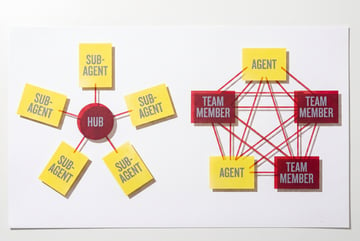
Pattern 4: Orchestrator-Subagents
What it is
An orchestrator model receives a high-level goal, breaks it into subtasks, dispatches those subtasks to specialized subagents, and synthesizes their outputs into a final result.
This is the pattern that powers most “autonomous agent” demos you’ve seen — a primary Claude instance directing a network of tools and specialized workers.
Why it works
The orchestrator handles planning and synthesis. Subagents handle execution. This separation means each component is optimized for its job.
The orchestrator doesn’t need to know how to search the web, write SQL, or call an API. It just needs to know when to delegate to the agent that does. This keeps the orchestrator’s context clean and focused on reasoning, not tool-level details.
Vertical application: Financial research
A financial analyst agent might work like this:
Orchestrator goal: “Produce a competitive analysis of Company X ahead of the earnings call.”
- Dispatches to a web search subagent to pull recent news and filings
- Dispatches to a database subagent to retrieve historical financials
- Dispatches to a sentiment analysis subagent to process recent analyst reports
- Dispatches to a chart generation subagent to produce revenue trend visualizations
The orchestrator receives all four outputs and synthesizes a unified briefing document.
Context grounding in this pattern
Context grounding — giving each subagent the precise, relevant information it needs rather than the full conversation history — is essential here. Passing the entire orchestrator context to every subagent is wasteful and often counterproductive. Construct lean, targeted context packages for each delegation.
Watch out for
Infinite loops and runaway costs. Set explicit iteration limits on the orchestrator. If it hasn’t reached a satisfactory result after N rounds of delegation, it should halt and return what it has rather than continuing to burn tokens. Claude has a tendency to be thorough, which is usually an asset — but orchestrators need hard stopping conditions.
Pattern 5: Evaluator-Optimizer
What it is
One model call generates an output. A second model call evaluates that output against defined criteria. The result of the evaluation is fed back to the generator as instructions for improvement. This loop runs until the output meets quality thresholds or a maximum iteration count is hit.
This is the self-QA loop referenced in the meta description — and it’s one of the highest-leverage patterns for quality-sensitive vertical applications.
Why it works
It’s hard to write a prompt that both generates and evaluates at the same time. Separating these roles produces better results. The evaluator can apply different criteria than the generator is trying to optimize for, catching blind spots.
Claude is a good evaluator because it can be given a specific rubric and will return structured, actionable feedback rather than vague criticism.
Vertical application: Contract drafting
A legal drafting agent might run like this:
- Generator: Drafts an NDA based on the user’s specifications
- Evaluator: Reviews the draft against a rubric (mutual vs. unilateral obligations, governing law clause, enforceability of non-disclosure period, missing boilerplate)
- Feedback loop: Evaluator returns a structured list of issues with specific suggestions
- Generator revision: Redrafts addressing the flagged issues
- Loop runs until evaluator returns a passing score or iteration limit is hit
The result is a draft that has been stress-tested by a second perspective before the user ever sees it.
Structured memory in this pattern
Structured memory — maintaining a persistent, organized record of what was generated, what was flagged, and what was changed — is critical for evaluator-optimizer loops. Without it, the generator can’t learn from previous iterations within the same session. Store evaluation results in a structured format (JSON works well) and include them explicitly in each new generation prompt.
Watch out for
Evaluator sycophancy. If both the generator and evaluator share the same underlying model, the evaluator may approve outputs it shouldn’t. Use different system prompts that explicitly put the evaluator in an adversarial stance: “Your job is to find problems with this draft. Assume the reader is a skeptical attorney.”
Pattern 6: Autonomous Agents
What it is
A fully autonomous agent perceives its environment, decides what actions to take, executes those actions using tools, and continues until a goal is met — without requiring a human to approve each step.
This is the most powerful pattern and the highest-risk one. It’s appropriate when the task is long-running, the steps are hard to predict in advance, and the cost of human oversight at each step outweighs the risk of autonomous errors.
Why it works
Remy doesn't write the code. It manages the agents who do.
Remy runs the project. The specialists do the work. You work with the PM, not the implementers.
Some tasks genuinely can’t be pre-planned. Investigating an anomalous transaction, debugging a multi-system integration failure, or conducting open-ended competitive research requires the agent to decide its next action based on what it finds at each step.
Claude’s willingness to reason about what it doesn’t know — and flag uncertainty rather than guess — makes it better suited to autonomous operation than models that are more confident but less calibrated.
Vertical application: IT operations
An IT ops agent tasked with “investigate why the staging environment is returning 504 errors” might:
- Query the logging system for recent error patterns
- Check deployment history for recent changes
- Inspect the load balancer configuration
- Run a connectivity test between services
- Identify a misconfigured timeout setting introduced in the last deploy
- Draft a remediation recommendation and alert the on-call engineer
None of these steps were pre-programmed. The agent decided what to investigate based on what it found.
Watch out for
This pattern requires the most careful guardrailing. Define explicit tool permission scopes — an autonomous agent in IT ops should be able to read logs and run diagnostics, but not make production changes without human approval. Build in human-in-the-loop checkpoints for any action that can’t be undone. Anthropic’s guidance on responsible agentic behavior emphasizes minimal footprint and preferring reversible actions — build these principles into your agent’s system prompt explicitly.
Combining Patterns in a Real Vertical App
Most production agents use multiple patterns together. Here’s how a vertical compliance monitoring tool might combine all six:
- Routing classifies incoming documents by type (contract, regulation update, internal policy)
- Parallelization processes large documents in sections simultaneously
- Prompt chaining handles the sequential steps of extract → analyze → flag → report
- Orchestrator-subagents manages specialized agents for different regulatory domains (GDPR, HIPAA, SOC 2)
- Evaluator-optimizer runs a QA pass on flagged items before they’re surfaced to the compliance team
- Autonomous agents monitor new regulatory publications on a schedule, triggering the full pipeline when relevant changes are detected
The key is not to use all six everywhere. Match each pattern to the specific bottleneck it solves.
How MindStudio Makes These Patterns Buildable Without Starting from Scratch
The patterns above are architecturally sound, but implementing them from scratch — handling state management, context packaging, routing logic, iteration loops, and tool orchestration — involves significant infrastructure work.
MindStudio’s visual no-code builder maps directly to these patterns. You can build orchestrator-subagent hierarchies using MindStudio’s workflow system, connect Claude (and 200+ other models) without managing API keys, and wire in tools like web search, database queries, and external APIs through 1,000+ pre-built integrations.
The evaluator-optimizer loop, for example, becomes a branching workflow in MindStudio: a generation step, an evaluation step with a scoring condition, and a loop back to generation until the score threshold is met or the iteration limit is reached. What would take days to build in code takes an hour in the visual builder.
For teams that do want to build in code, the MindStudio Agent Skills Plugin gives any Claude-based agent — including those built with LangChain or CrewAI — access to 120+ typed capabilities as simple method calls. The infrastructure layer (rate limiting, retries, auth) is handled, so the agent logic stays focused on reasoning.
You can start building for free at mindstudio.ai.
Frequently Asked Questions
What are Claude’s agentic patterns?
Claude’s agentic patterns are six architectural blueprints for building multi-step AI workflows: prompt chaining, routing, parallelization, orchestrator-subagents, evaluator-optimizer, and autonomous agents. They were documented by Anthropic’s engineering team based on what works reliably in production systems. Each pattern addresses a specific type of complexity — sequential tasks, branching logic, parallel processing, multi-agent coordination, quality loops, and autonomous decision-making.
What is the difference between an AI workflow and an AI agent?
A workflow follows a pre-defined sequence of steps with predictable branching. An agent decides its own sequence of actions based on what it observes at each step. In practice, most production systems are hybrids: a workflow handles the overall structure while one or more autonomous agents handle the parts where the right action depends on runtime information.
How does context grounding work in multi-agent systems?
Context grounding means giving each model call exactly the information it needs — no more, no less. In multi-agent systems, each subagent should receive a targeted context package rather than the full conversation or session history. This keeps inference costs down, reduces the risk of irrelevant context confusing the model, and makes outputs more predictable. Practically, this means building context-construction logic into your orchestrator that extracts and packages only the relevant fields before each dispatch.
When should I use structured memory in an agent?
Use structured memory any time your agent needs to maintain state across multiple model calls within a task. Evaluator-optimizer loops need structured memory to track what was generated, what was flagged, and what changed between iterations. Autonomous agents need structured memory to avoid re-investigating things they’ve already examined. A simple approach: maintain a JSON state object that gets updated after each step, and include the relevant parts of that state in each subsequent prompt.
What’s the biggest mistake teams make when building vertical AI agents?
The most common mistake is building monolithic prompts that try to do everything at once — extract, analyze, reason, format, and decide in a single call. This leads to inconsistent outputs, poor error handling, and agents that fail unpredictably in edge cases. The fix is decomposition: identify each distinct subtask in your workflow and give it its own prompt, tools, and validation logic. The patterns above are the vocabulary for doing that decomposition systematically.
Are these patterns specific to Claude, or do they work with other models?
The patterns work with any capable language model. They’re architectural patterns, not Claude-specific techniques. That said, some patterns benefit from Claude’s particular strengths: its tendency to flag uncertainty (useful in autonomous agents), strong instruction-following (useful in routing and orchestration), and long-context performance (useful in parallelization with sectioning). If you’re building a system where these properties matter, Claude is worth evaluating specifically for those roles even if other models handle other parts of the pipeline.
Key Takeaways
- The six patterns — prompt chaining, routing, parallelization, orchestrator-subagents, evaluator-optimizer, and autonomous agents — cover the vast majority of architectural problems in vertical AI apps.
- Most production agents combine multiple patterns. The art is matching the right pattern to the specific bottleneck.
- Context grounding and structured memory aren’t separate patterns — they’re foundational practices that make all six patterns work reliably.
- Evaluator-optimizer loops are one of the highest-leverage changes you can make to any quality-sensitive agent. Separate generation and evaluation into distinct calls with an adversarial evaluator stance.
- Autonomous agents are powerful but require explicit guardrails: scoped tool permissions, iteration limits, and human-in-the-loop checkpoints for irreversible actions.
- If you want to implement these patterns without building infrastructure from scratch, MindStudio gives you a visual builder and pre-built integrations to get a working agent deployed in hours rather than weeks.