What Is the /goal Command vs Dynamic Workflows in Claude Code? Depth vs Width Explained
Claude Code's /goal command loops until done while dynamic workflows run agents in parallel. Learn which pattern fits your task and budget.

Two Ways Claude Thinks About Getting Things Done
If you’ve spent any time with Claude Code, you’ve probably noticed there’s more than one way to tell it to tackle a complex task. You can set a /goal and let it run, or you can set up dynamic workflows that spin up multiple agents working in parallel. Both approaches involve Claude, both automate work — but they operate very differently under the hood.
This distinction matters more than it might seem. Pick the wrong pattern for your task and you’ll either waste money, hit timeouts, or get incomplete results. The /goal command and dynamic workflows aren’t interchangeable — they’re built for different shapes of problems.
This article breaks down exactly what each pattern does, when to use each one, and how to think about the depth vs. width tradeoff that defines the difference between them.
What the /goal Command Actually Does
The /goal command in Claude Code sets a persistent objective. When you issue /goal, you’re telling Claude: “Here is the end state I want. Don’t stop until you’ve reached it.”
Claude then enters a loop. It assesses where things stand, takes an action, checks whether the goal is met, and if not, takes another action. This continues until the goal is satisfied or Claude hits a context or resource limit.
The Loop in Practice
Built like a system. Not vibe-coded.
Remy manages the project — every layer architected, not stitched together at the last second.

Think of it like this: you tell Claude /goal: write a full test suite for this module with 100% coverage. Claude doesn’t do that in one shot. It:
- Looks at the module
- Writes some tests
- Runs them
- Checks coverage
- Identifies gaps
- Writes more tests
- Runs again
- Keeps going until coverage hits 100%
This is depth-first execution. Claude goes deep on a single task, iterating until it’s finished.
What Makes /goal Different from a Single Prompt
A normal Claude prompt is stateless and single-pass. You ask, Claude responds, done. The /goal command is fundamentally different because it creates a feedback loop. Claude evaluates its own output against the stated goal and decides whether to continue.
This means /goal tasks can run for many steps — often dozens of iterations — without you being in the loop. That’s the point. You define success criteria, then step away.
The Resource Reality
Because /goal loops until completion, costs scale with task complexity. A goal that requires 20 iterations costs roughly 20x more than a single prompt. This isn’t a flaw — it’s the appropriate cost of autonomous, iterative problem-solving. But it does mean you need to be thoughtful about what you hand off this way.
Goals that are well-defined, verifiable, and bounded work well. Goals that are vague or open-ended can loop indefinitely or converge on a wrong interpretation.
What Dynamic Workflows Are
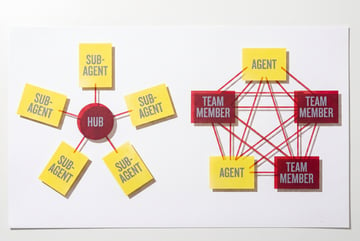
Dynamic workflows are a different architectural pattern entirely. Instead of one agent iterating on one task, you’re orchestrating multiple agents — potentially running simultaneously — each handling a piece of a larger job.
In Claude Code’s multi-agent model, a top-level (orchestrator) agent breaks a problem into subtasks and hands those subtasks off to subagents. Those subagents can run in parallel, and their results feed back into the orchestrator, which assembles a final output.
The Width-First Model
If /goal is depth-first, dynamic workflows are width-first. You’re not going deep on one thing — you’re spreading across many things at once.
A practical example: you need Claude to audit an entire codebase for security vulnerabilities. A /goal approach would have one agent reviewing file after file, linearly. A dynamic workflow approach would have an orchestrator split the codebase into modules and dispatch parallel subagents to review each module simultaneously. The total wall-clock time drops dramatically, even if the total compute cost is similar.
How Dynamic Workflows Are Structured
Claude’s multi-agent documentation describes three common topologies:
- Orchestrator → workers: A single orchestrator assigns tasks to multiple parallel agents.
- Pipeline: Agents run in sequence, each passing output to the next — useful when one stage depends on the previous stage’s results.
- Hierarchical: Orchestrators can themselves spawn sub-orchestrators, creating tree-structured delegation.
Dynamic workflows aren’t necessarily parallel — pipeline patterns are sequential. But they’re always multi-agent, which is the core distinction from /goal.
When Dynamic Workflows Are Built at Runtime
The “dynamic” in dynamic workflows refers to the fact that the orchestrator can decide — based on the actual task — how many agents to spawn and what to assign them. This is different from a static pipeline where you’ve hardcoded the steps in advance.
Remy doesn't write the code. It manages the agents who do.
Remy runs the project. The specialists do the work. You work with the PM, not the implementers.
A dynamic orchestrator might receive a task, analyze it, and decide to spawn three workers. Or seven. Or one, if the task turns out to be simple. The architecture adapts to the problem at hand.
Depth vs. Width: The Core Tradeoff
Here’s the cleanest way to frame the difference:
| Dimension | /goal Command | Dynamic Workflows |
|---|---|---|
| Execution pattern | Single agent, iterative loop | Multiple agents, parallel or pipeline |
| Best for | Sequential, dependent tasks | Independent, parallelizable tasks |
| Cost structure | Scales with iterations | Scales with agent count |
| Speed | Limited by sequential steps | Can be much faster (parallel) |
| Complexity | Lower setup overhead | Higher orchestration complexity |
| Failure modes | Loops, context exhaustion | Coordination errors, partial failures |
The right choice depends on whether your problem is sequential or parallelizable.
Sequential Problems Favor /goal
Some tasks genuinely can’t be parallelized because each step depends on the previous one. Debugging is a classic example. You run the code, it fails, you read the error, you make a fix, you run it again. You can’t parallelize this — step 2 requires the output of step 1.
For sequential, iterative problems, /goal is the right tool. It’s simple to set up, it handles the loop for you, and it’s efficient for tasks where you can’t meaningfully split the work.
Parallelizable Problems Favor Dynamic Workflows
If your task can be broken into independent chunks, dynamic workflows win — especially on time. Processing 100 documents, testing 20 API endpoints, generating descriptions for a product catalog, running code analysis on 30 files — these tasks have no dependency between individual units. Running them in parallel is strictly better than running them sequentially.
The tradeoff is orchestration overhead. You need to design how the task gets split, how results get aggregated, and how failures in one agent affect the overall workflow. That’s more complexity upfront, but it pays off at scale.
When to Use Each Pattern
The abstract comparison is useful, but let’s get concrete about task types.
Use /goal When:
- The task is inherently iterative. Writing code until tests pass, refining a document until it meets a rubric, searching until you find a specific answer — these tasks loop by nature.
- Each step depends on the previous. You can’t evaluate step 2 until step 1 is done.
- The end state is clearly verifiable. Tests pass. The file compiles. The API returns 200. The clearer the success condition, the better
/goalworks. - You’re working within a single context window. The
/goalagent maintains a continuous context, which is useful when earlier work informs later decisions. - Setup simplicity matters.
/goalrequires almost no architecture work. Define the goal, let it run.
Use Dynamic Workflows When:
- The task has independent subtasks. If item A’s processing doesn’t affect item B’s processing, parallelize it.
- Speed is a priority. Parallel execution compresses wall-clock time even when total compute is similar.
- The task is too large for one context window. Distributing work across agents sidesteps context limits.
- You need different specializations. You can route different subtasks to agents configured differently — one tuned for code analysis, another for documentation, another for security review.
- You’re processing at scale. Ten items might be fine for
/goal. Ten thousand items need parallel infrastructure.
The Hybrid Case
Remy is new. The platform isn't.
Remy is the latest expression of years of platform work. Not a hastily wrapped LLM.
These patterns aren’t mutually exclusive. You can build dynamic workflows where each individual worker uses a /goal loop for its assigned piece. The orchestrator handles width (distributing work); each worker handles depth (completing its subtask iteratively). This is often the most powerful combination for complex, large-scale automation.
Common Mistakes with Each Approach
Understanding the pitfalls helps you avoid expensive errors — both in compute costs and in output quality.
/goal Mistakes
Setting vague goals. “Improve this codebase” is not a goal — it’s a direction. Claude will loop, make changes, and may never converge because there’s no clear success condition. Be specific: “Refactor this module so all functions have docstrings and there are no lines over 100 characters.”
Underestimating iteration count. Complex goals can require dozens of steps. If you’re surprised by the cost, the goal was probably more complex than you anticipated. Scope goals carefully.
No exit conditions. If Claude can’t verify whether the goal is met, it may run indefinitely. Use goals with binary, checkable success criteria.
Dynamic Workflow Mistakes
Overcomplicating simple tasks. If you have three items to process, spinning up a multi-agent orchestrator is overkill. The coordination overhead outweighs the parallel benefit.
Poor task decomposition. If subtasks aren’t truly independent, parallel agents can produce conflicting results that are hard to merge. Analyze dependencies before splitting work.
Ignoring partial failures. In a parallel workflow, some agents may fail while others succeed. Your orchestrator needs logic to handle this — retry, fail loudly, or continue with partial results. Assuming all agents succeed is a common mistake.
Skipping result validation. With multiple agents producing outputs, someone needs to validate that the pieces fit together. Build in an aggregation and validation step at the end.
How MindStudio Handles Both Patterns
If you’re building production workflows rather than experimenting in Claude Code’s CLI, you’ll likely want a platform that handles both the depth (iterative loops) and width (multi-agent parallelism) patterns without requiring you to architect the infrastructure yourself.
MindStudio’s visual workflow builder lets you configure both patterns directly. For sequential, iterative tasks, you can set up agents with looping logic that checks a condition and re-runs until it’s met — the equivalent of /goal but with a visual interface and no code required. For parallel workloads, MindStudio lets you fan out to multiple agents simultaneously, collect their results, and feed them into an aggregation step.
What makes this practical for non-engineers is that MindStudio handles the infrastructure layer — rate limiting, retries, error handling — so you’re designing the logic, not the plumbing. You can connect to Claude (or any of the 200+ models available) alongside integrations with your actual business tools: Salesforce, Notion, Slack, Google Workspace, and more.
For developers using Claude Code directly, MindStudio’s Agent Skills Plugin (@mindstudio-ai/agent) lets Claude Code call MindStudio’s typed capabilities as simple method calls. Your Claude Code agent gets access to agent.runWorkflow() and 120+ other methods without needing to manage the underlying services. It’s a clean way to give your Claude Code workflows real-world capabilities while keeping the agent focused on reasoning.
You can try MindStudio free at mindstudio.ai.
Budget and Performance Considerations
Both patterns consume tokens, and understanding cost dynamics helps you make smarter architectural decisions.
/goal Cost Model
Plans first. Then code.
Remy writes the spec, manages the build, and ships the app.
With /goal, you’re paying per iteration. A task that takes N loops costs roughly N times the per-step compute cost. You can estimate this if you have a sense of how many iterations a typical run requires — but complex tasks can be unpredictable.
Practical tips:
- Set maximum iteration limits if your platform supports them
- Monitor cost per goal to establish baselines
- For high-iteration goals, evaluate whether the task can be restructured to reduce loops
Dynamic Workflow Cost Model
Dynamic workflows cost based on the number of agents and their individual task size. Parallelism doesn’t reduce total compute — it compresses time. If you run 10 agents in parallel instead of one sequential agent, the total tokens consumed is roughly the same. But you get the result 10x faster (in wall-clock time).
The cost advantage of dynamic workflows comes from task independence — you’re not doing redundant work. Each agent handles its piece without duplicating the context of the whole.
The Time-Cost Tradeoff
For latency-sensitive applications, dynamic workflows justify their orchestration overhead because faster results have real value. For batch jobs where speed doesn’t matter, sequential /goal execution might be simpler and equally effective.
FAQ
What is the /goal command in Claude Code?
The /goal command sets a persistent objective for Claude to work toward autonomously. Claude enters an iterative loop — taking actions, evaluating progress, and continuing until the goal is met or a resource limit is reached. It’s designed for tasks that require multiple sequential steps to complete.
How do dynamic workflows differ from using /goal?
Dynamic workflows involve multiple agents working in parallel or in a pipeline, whereas /goal uses a single agent in a loop. Dynamic workflows are better for tasks with independent subtasks that can be distributed across agents simultaneously. The /goal command is better for sequential, iterative tasks where each step depends on the previous.
When should I use /goal vs a multi-agent workflow?
Use /goal when your task is sequential — debugging, iterative refinement, or any task where step 2 depends on step 1’s output. Use multi-agent dynamic workflows when your task can be split into independent chunks, especially when speed matters or the task is too large for a single context window.
Does parallel execution with dynamic workflows reduce cost?
Parallel execution doesn’t reduce total token consumption — it reduces wall-clock time. If ten agents process ten items in parallel, the total compute is roughly the same as one agent processing all ten sequentially. The benefit is speed, not cost. Cost efficiency comes from avoiding redundant work, not from parallelism itself.
Can /goal and dynamic workflows be combined?
Yes. A common pattern is to use a dynamic workflow orchestrator that distributes subtasks to worker agents, where each worker uses iterative (goal-like) execution to complete its assigned piece. The orchestrator handles width; each worker handles depth. This combination is often the most powerful approach for complex, large-scale tasks.
What are the biggest failure modes for each pattern?
For /goal: vague success criteria that prevent convergence, and underestimating iteration count leading to unexpected costs. For dynamic workflows: poor task decomposition where subtasks aren’t truly independent, and failing to handle partial agent failures gracefully in the aggregation step.
Key Takeaways
- The
/goalcommand creates a depth-first loop — one agent iterates until a goal is met. It’s best for sequential, dependent tasks with clear success criteria. - Dynamic workflows create width-first execution — multiple agents work in parallel or pipeline. Best for independent, parallelizable tasks where speed matters.
- Cost scales with iterations for
/goal; with agent count for dynamic workflows. Neither is inherently cheaper — they’re suited to different problems. - The most common mistake with
/goalis setting vague goals; the most common mistake with dynamic workflows is poor task decomposition. - Both patterns can be combined: orchestrators handle width while individual workers handle depth iteratively.
- For teams building production systems on top of these patterns, platforms like MindStudio provide the orchestration layer without requiring custom infrastructure code.