What Is Claude Code Ultra Plan? How Cloud-Based Planning Speeds Up Your AI Workflows
Claude Code Ultra Plan offloads planning to Anthropic's cloud using multi-agent exploration. Learn how it works and when to use it.

What Ultraplan is in Claude Code
If you’ve used Claude Code for more than a few hours, you’ve seen it pause before writing code — reading files, mapping the codebase, working out an approach. That pause is planning, and Ultraplan is the feature that moves the hardest planning off your local terminal and into the cloud.
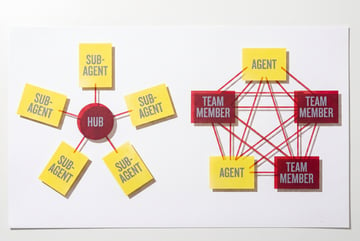
Ultraplan is a cloud-based, multi-agent planning feature in Claude Code, Anthropic’s terminal coding agent. It’s not a subscription tier or a pricing plan. It’s a mode you trigger for a specific task. Instead of planning locally in one pass, Claude Code sends multiple sub-agents into the cloud to explore your codebase at the same time, then hands you a structured plan in a web interface where you can review it, comment on it, and edit it before any code gets written.
Once you approve the plan, you decide how to build: run the work in the cloud, or “teleport” the approved plan back to your local terminal and execute it there.
This article covers what Ultraplan does, how the workflow runs end to end, when it’s worth using, and how it fits into larger AI development workflows.
What Claude Code is (and why planning matters)
Claude Code is a command-line tool that gives Claude direct access to your codebase. It reads files, writes and edits code, runs terminal commands, searches the web, and calls external APIs — all on its own, from instructions you give in plain language.
Other agents ship a demo. Remy ships an app.
Real backend. Real database. Real auth. Real plumbing. Remy has it all.

Unlike a chatbot where you paste snippets back and forth, Claude Code works as an agent. It takes a goal, figures out the steps, and carries them out.
That agentic model makes planning critical. Before touching a file, Claude Code needs to:
- Understand the existing codebase structure
- Identify which files are relevant to the task
- Determine the correct sequence of changes
- Anticipate dependencies and side effects
- Choose the right approach from several options
Plan poorly and you get incomplete edits, broken imports, or changes that work in isolation but break something downstream. Plan well and Claude Code can handle complex, multi-file refactors in one session. Ultraplan exists to make that planning step much stronger on hard tasks.
What Ultraplan actually does
Standard local planning happens inside your terminal session: Claude reads the relevant files, builds a mental model, and forms a plan in a single sequential pass. That’s enough for adding a function, fixing a bug, or writing a component to an existing pattern.
Ultraplan is built for the harder cases. It changes the planning step in three ways.
Multi-agent exploration in the cloud
Instead of one agent reading the codebase top to bottom, Ultraplan spins up multiple sub-agents that explore different parts of your project at the same time. One might trace the database layer, another the API routes, another the frontend. Because they run in parallel, they cover more ground and catch edge cases and cross-file dependencies that a single sequential pass tends to miss.
A web interface for reviewing the plan
The plan doesn’t just scroll past in your terminal. Ultraplan produces a structured, multi-step implementation plan in a web UI. You read through it, comment on specific sections, and edit or tweak the steps before committing to them. This is the review stage where you catch a wrong assumption cheaply, before it turns into forty modified files.
Cloud or local execution
Once the plan looks right, you approve it and pick how to build. You can start coding on the web and let the work run in the cloud, or teleport the approved plan back to your local terminal and run it against your local environment.
How the Ultraplan workflow runs
Here’s what happens from trigger to execution.
Phase 1: Problem decomposition
Ultraplan takes your instruction and breaks it into sub-problems. For “refactor the authentication system to use JWT instead of session cookies,” that might mean:
- Inventory all files that touch auth logic
- Map the current session-based middleware
- Identify API endpoints that rely on auth state
- Check frontend code for session-dependent behavior
- Find existing JWT libraries or evaluate adding one
- Determine a rollback strategy
Phase 2: Parallel exploration
Each sub-problem goes to a sub-agent running in the cloud. These agents don’t change anything — they read, analyze, and report back. Running in parallel, they finish exploration far faster than a single agent working through each sub-problem in turn.
Phase 3: Plan synthesis
The findings get pulled together into a coherent plan: a sequence of file edits, dependency ordering (what has to change before what), and flagged risks that need a human eye. This is the plan that shows up in the web interface.
Phase 4: Review and edit
You review the plan on the web, comment on sections, and adjust anything that’s off. Nothing gets written until you approve.
Phase 5: Execution
After you approve, Claude Code executes — either building in the cloud or on your local machine after a teleport. By this point it’s working from a plan you’ve already seen and signed off on.
How to run Ultraplan
The setup is short:
- Update Claude Code. Ultraplan needs Claude Code v2.1.91 or later. Check with
claude --version. - Connect your GitHub repo. Run
/web-setupin Claude Code to link your repository. The cloud agents plan from your GitHub remote, not from uncommitted files on your disk, so commit and push your latest work before you start. - Trigger it. Run
/ultraplan <task>— for example,/ultraplan migrate the auth service to JWTs. You can also type “ultraplan” anywhere in a prompt, or ask Claude to “refine with Ultraplan” when a quick local plan is too shallow for the task. - Review on the web. Open the session link at claude.ai/code, read the plan, comment, and edit.
- Execute. Choose “Approve plan and start coding on the web,” or teleport the plan back to your terminal to run it locally.
When Ultraplan helps
Ultraplan adds coordination overhead, so it isn’t always faster in wall-clock time. It pays off in specific situations.
Large, complex codebases
When a project has hundreds of files and intricate interdependencies, sequential analysis often misses connections. A sub-agent focused only on the database layer can spot a pattern that a single agent, distracted by frontend concerns, would skip. Parallel specialization produces better coverage.
Cross-cutting changes
Changes that touch many parts of the system at once — dependency upgrades, auth refactors, API versioning, design system migrations — benefit most from parallel exploration. The plan that comes back accounts for all the places a change needs to happen, including the non-obvious ones.
Uncertain requirements
When you give Claude Code a vague or open-ended instruction, multi-agent exploration lets it weigh several approaches before committing. One sub-agent might explore a simple patch while another explores a fuller refactor. Synthesis then compares the trade-offs and either picks a path or flags the decision for you.
Tasks with a high cost of mistakes
If a wrong edit in a production codebase has real consequences, spending more time up front is worth it. Ultraplan’s review step lets you catch a bad assumption before it’s committed to code.
When you don’t need Ultraplan
Being honest about the limits matters. Ultraplan is overkill for:
- Small, well-scoped tasks (adding a function, fixing a typo, writing a unit test)
- Greenfield projects with no existing complexity to navigate
- Work where you’ve already done the analysis and just need execution
- Rapid prototyping, where iteration speed matters more than plan quality
For those, a quick local plan is faster because it skips the coordination overhead and goes straight to execution.
Multi-agent planning in practice
One coffee. One working app.
You bring the idea. Remy manages the project.
Ultraplan’s multi-agent model reflects a broader shift in how AI systems handle complex reasoning. Rather than expecting a single model to hold everything in context at once, the work is split across sub-agents that each operate within a more manageable scope.
Anthropic’s research on multi-agent systems has shown that coordinating multiple agents can produce better outcomes than a single agent with a very large context window — especially for tasks that require exploring many possibilities before converging on an answer.
It’s close to how engineering teams work. A senior engineer doesn’t personally audit every file before proposing an architecture change; they delegate exploration, then synthesize the results. Ultraplan approximates that.
Why this beats a single agent: the anchoring problem
A single language model generates tokens sequentially, and each token conditions the next. Its first framing — which approach to take, which trade-offs to prioritize — propagates through the rest of the response and is hard to reverse. Research on LLM reasoning has shown models tend to anchor on the first plausible solution they generate: once an approach is in context, the model is more likely to keep developing it than to abandon it for a better one.
This isn’t a defect. It’s a natural consequence of how autoregressive generation works. But it means one agent struggles to weigh two fundamentally different solutions with fresh eyes.
Multiple sub-agents sidestep this because each starts from its own context window. There’s no shared state biasing them toward a common answer, so they can reach genuinely different conclusions — one focused on the database layer, another on API routes, another on frontend dependencies. Speed isn’t the only benefit. Sub-agents also cross-check each other: if two reach conflicting conclusions about how a module works, that conflict surfaces during synthesis as a flag, prompting a closer look before execution.
Separating generation from evaluation
Synthesis is where the findings get judged. Assembling them is straightforward; the harder task is weighing each approach against the requirements and spotting weaknesses.
There’s a reason code review is done by someone other than the author — the author is too close to their own reasoning to see its gaps. The same logic applies here. Judging the exploration results as a distinct step, rather than having each sub-agent grade its own work, reduces the self-consistency bias that comes from critiquing a plan from inside the mental model that produced it.
This pattern isn’t specific to Claude Code. It applies established multi-agent design ideas:
- Mixture of Agents (MoA): multiple models contribute candidate outputs and an aggregator synthesizes them. Together AI’s MoA research found this approach outperforms single models on reasoning benchmarks. Ultraplan applies the principle within one Claude model family, using independent sampling to create diversity rather than different model weights.
- Critic-based refinement: critique-and-revise loops have been studied extensively in alignment research. Constitutional AI, for example, has a model critique and revise its own outputs against a set of principles. Handling evaluation as its own step pushes this further, avoiding the self-consistency bias of critiquing within a single context window.
Reading the confidence signal
Seven tools to build an app. Or just Remy.
Editor, preview, AI agents, deploy — all in one tab. Nothing to install.
Parallel exploration also tells you something a single pass can’t. When the sub-agents converge on a similar approach, that agreement is a strong signal the plan is sound. When they diverge, the synthesis step matters more, and the plan you get back tends to include more explicit trade-off discussion — exactly what you want on a genuinely hard decision.
A single-agent output doesn’t tell you whether the model was confident or just committed to its first idea. Surfacing disagreement between independent explorations gives you that calibration for free.
Bringing Ultraplan into larger AI workflows
Ultraplan works well on its own, but its output is also useful downstream. The planning step produces structured artifacts — file inventories, dependency maps, proposed change sequences — that other systems can act on.
Connecting to orchestration layers
Teams building serious AI-assisted development workflows usually need more than Claude Code running interactively. They need to:
- Trigger Claude Code runs automatically (on PR creation, on failing tests, on issue assignment)
- Route Claude Code’s output to review queues
- Log planning artifacts for audit purposes
- Chain Claude Code with other specialized agents
This is where a platform like MindStudio comes in. MindStudio’s Agent Skills Plugin — an npm SDK — lets any external agent, including Claude Code, call MindStudio’s workflow infrastructure as simple method calls. You can use it to trigger Claude Code runs as part of a larger multi-step workflow, collect the outputs, and route them to the right people or systems without building that infrastructure yourself.
If Claude Code is one component among several in your development workflow, MindStudio gives you a practical way to connect it to your existing tools — Slack, GitHub, Jira, Linear — without writing the plumbing from scratch. You can try it free at mindstudio.ai.
Practical tips for getting more out of Ultraplan
A few habits make Ultraplan’s output better:
Write precise, scoped instructions. Planning is more effective when it knows the boundaries. “Refactor authentication” is harder to plan than “Replace session-based auth in /api/auth with JWT, keeping the same endpoint signatures.”
Use a CLAUDE.md file. Claude Code reads a CLAUDE.md in your project root for context about conventions, architecture decisions, and things it shouldn’t touch. A well-maintained one makes planning faster and more accurate, because sub-agents don’t have to infer what you can simply tell them.
Commit and push before you run. Because the cloud agents plan from your GitHub remote, the plan reflects what’s pushed. Get your latest work onto the remote first so the sub-agents aren’t reasoning about stale code.
Review the plan carefully on the web. The web interface is your cheapest chance to catch a wrong assumption. Read the steps, comment where something looks off, and edit before you approve — fixing it here costs far less than fixing it after the code is written.
Frequently asked questions
What is Ultraplan in Claude Code?
Ultraplan is a cloud-based, multi-agent planning feature in Claude Code, Anthropic’s terminal coding agent. It’s not a subscription tier. When you trigger it, Claude Code sends multiple sub-agents into the cloud to explore your codebase in parallel, then gives you a structured, multi-step plan in a web interface. You review, comment on, and edit that plan before approving it, then execute the work in the cloud or back in your local terminal.
Other agents start typing. Remy starts asking.
Scoping, trade-offs, edge cases — the real work. Before a line of code.
How is Ultraplan different from standard Claude Code planning?
Standard planning is sequential and local: one agent reads the relevant files and builds a plan in your terminal. Ultraplan runs multiple sub-agents in the cloud in parallel, each focused on a different part of the codebase, then synthesizes their findings into a plan you review on the web. The difference shows up as broader coverage on complex tasks and a review step before any code is written.
What do I need to use Ultraplan?
Claude Code v2.1.91 or later, and a GitHub repo connected with /web-setup. Because the cloud agents plan from your GitHub remote, commit and push your latest changes before you start. Then trigger a plan with /ultraplan <task> and open the session at claude.ai/code.
What is multi-agent exploration?
It’s splitting a coding problem across multiple sub-agents that analyze different parts of the codebase at the same time — one on the database layer, another on API routes, another on frontend dependencies. Their findings get synthesized into one plan. This catches more cross-file dependencies than a single agent reading everything in sequence.
Can I use Ultraplan with automated workflows?
Yes. Claude Code integrates into automated pipelines through its CLI and MCP (Model Context Protocol) server support, so other agents and orchestration systems can call it programmatically. Tools like MindStudio’s Agent Skills Plugin make it straightforward to trigger Claude Code, collect its output, and route results to review systems or downstream processes.
Does the planning step slow things down?
It adds time up front but usually reduces total time on complex work. A weak plan leads to mid-execution corrections and rollbacks that cost more than planning would have. On simple tasks the overhead isn’t worth it; on complex, multi-file changes, reviewing a solid plan first means fewer interruptions and a higher success rate on the first attempt.
Key takeaways
- Ultraplan is a cloud-based, multi-agent planning feature in Claude Code — not a subscription tier.
- It explores your codebase with multiple sub-agents in parallel, then gives you a structured plan to review, comment on, and edit on the web before any code is written.
- You execute the approved plan either in the cloud or by teleporting it back to your local terminal.
- Setup is Claude Code v2.1.91+, a GitHub repo connected via
/web-setup, and a committed, pushed remote; trigger with/ultraplan <task>. - It’s most valuable on large codebases, cross-cutting changes, and high-stakes production work — and overkill for small, well-scoped tasks.
If Claude Code is one piece of a larger automated system, MindStudio is worth a look. The no-code workflow builder, pre-built integrations, and Agent Skills Plugin make it easier to put Ultraplan’s output to work across your whole development process, beyond a single session.