When to Use Split-and-Merge in Claude Code (vs. Sequential Chains)
A practical guide to choosing split-and-merge over sequential chains or agent teams in Claude Code, with orchestration patterns and merge strategies.
When One Agent Isn’t Enough: Understanding the Split-and-Merge Pattern
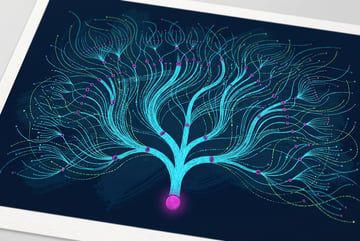
If you’ve worked with Claude Code for anything more than a quick script, you’ve probably run into a wall: complex tasks take time, long context windows fill up, and a single agent trying to do everything sequentially creates bottlenecks. The Claude split-and-merge pattern is the answer to that problem — a structured way to fan work out across multiple sub-agents running simultaneously, then collect and combine the results.
This isn’t just a performance trick. It’s a fundamental approach to multi-agent architecture that changes what’s possible with Claude-based workflows. Understanding when and how to use it — versus other patterns like agent teams or sequential chains — is one of the most valuable things you can learn if you’re building serious AI systems.
The Core Idea: Fan Out, Then Fan Back In
The split-and-merge pattern works in three stages:
- Split — A primary orchestrator agent breaks a large task into smaller, independent subtasks.
- Process — Multiple sub-agents pick up those subtasks and work on them at the same time.
- Merge — The orchestrator collects all the outputs and synthesizes them into a final result.
Think of it like assigning sections of a research report to different people simultaneously, then editing all their work into a single document. The same logic applies here.
Plans first. Then code.
Remy writes the spec, manages the build, and ships the app.

Claude Code supports spawning up to 10 sub-agents in a single parallel batch. That ceiling exists for practical reasons — context management, coordination overhead, and the cost of aggregating results — but 10 parallel agents is enough to handle most realistic workloads.
The key constraint is that the subtasks need to be independent. If sub-agent B needs the output of sub-agent A before it can start, you don’t want parallel execution — you want a sequential chain. The split-and-merge pattern is specifically suited for work that can be divided without dependencies between the pieces.
How Orchestration Actually Works
The Orchestrator’s Role
The orchestrator agent is responsible for the whole operation. It doesn’t do the actual work — it plans and coordinates. Specifically, it:
- Analyzes the full task to identify separable units of work
- Writes prompts or instructions for each sub-agent
- Spawns the sub-agents with those instructions
- Waits for all sub-agents to complete
- Reads all the outputs and produces a unified result
In Claude Code, the orchestrator typically uses tools like Task to spawn sub-agents. Each sub-agent runs in its own context window, which is one of the biggest advantages of this pattern — you’re not cramming everything into one massive context. Each agent only needs to know about its slice of the work.
The Sub-Agents’ Role
Sub-agents are simpler. They receive a specific, scoped task and execute it. They might:
- Read files relevant to their assigned section
- Run shell commands
- Search codebases
- Generate content for their piece
They don’t need to coordinate with each other. They just complete their work and return results to the orchestrator.
The Merge Step
The merge step is where things get interesting. The orchestrator now has 2 to 10 separate outputs and needs to combine them coherently. Depending on the task, this might mean:
- Concatenating — Assembling sections into one document
- Reconciling — Resolving conflicts or inconsistencies between outputs
- Summarizing — Distilling multiple analyses into a single conclusion
- Ranking — Ordering results by quality or relevance
The merge step is often underestimated. A poorly designed merge can undermine the whole operation. The orchestrator needs a clear strategy for how the pieces fit together — and that strategy should be defined before the split happens, not improvised afterward.
A Concrete Example: Auditing a Large Codebase
Say you need to audit a codebase with 50 modules for security vulnerabilities. Running this sequentially would be slow and would likely exceed Claude’s context window.
With the split-and-merge pattern:
- The orchestrator receives the task and identifies the 50 modules.
- It groups them into 10 batches of 5 modules each.
- It spawns 10 sub-agents, each assigned to audit one batch.
- Each sub-agent reads its assigned files and produces a vulnerability report.
- The orchestrator reads all 10 reports and creates a consolidated summary ranked by severity.
What might take an hour sequentially could take a fraction of that time. More importantly, each sub-agent works with a focused, manageable context — it’s not trying to hold all 50 modules in its head at once.
This isn’t hypothetical. Teams are using this approach right now for code review, test generation, documentation, competitive research, and content production at scale.
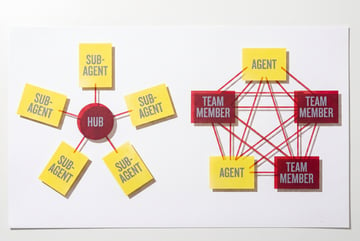
Split-and-Merge vs. Agent Teams: Knowing the Difference
Both patterns involve multiple agents, but they’re suited for different situations. Conflating them leads to over-engineered architectures.
What Makes Agent Teams Different
Agent teams — sometimes called agentic pipelines or multi-agent networks — typically involve agents with specialized roles that hand work off to each other in sequence or in a more dynamic mesh. Each agent might have a specific capability: one searches the web, one writes code, one reviews output.
The coordination in a team is more complex. Agents may communicate with each other, not just with the orchestrator. Results from one agent influence what another does. The workflow is less like “divide and conquer” and more like a collaborative process.
When to Use Split-and-Merge
Use the split-and-merge pattern when:
- The task is parallelizable. The work can be broken into independent chunks without dependencies.
- Speed matters. You need results faster than a single agent can produce them.
- Context limits are a concern. The total work exceeds what fits in one context window.
- The output needs to be unified. You want one coherent result at the end, not a collection of separate outputs.
When to Use Agent Teams
Use agent teams when:
- Specialization matters. Different parts of the task require genuinely different capabilities.
- Order matters. One agent’s output is the input for the next.
- Dynamic routing is needed. The workflow isn’t fully predictable in advance — decisions about what to do next depend on intermediate results.
- Long-running autonomy is required. Agents need to operate over extended time horizons with memory and state.
In practice, many sophisticated workflows combine both. You might have an agent team that includes an orchestrator which, at a specific step, uses the split-and-merge pattern to handle a parallelizable subtask.
Designing Good Splits
The quality of your split determines how well the whole pattern works. A bad split — one that creates hidden dependencies, uneven workloads, or ambiguous boundaries — can cause more problems than running things sequentially.
Make Subtasks Truly Independent
Before splitting, ask: can sub-agent A complete its work without knowing anything about sub-agent B’s work? If the answer is “mostly yes, but it needs to check one thing,” you have a dependency that needs to be handled differently.
One approach is to give all sub-agents shared read-only context — reference files, style guides, background documents — so they’re working from the same foundation without needing to communicate with each other.
Balance the Workload
If you split 50 files into 10 batches but 8 of the batches contain small files and 2 contain enormous ones, you’ve created a bottleneck. The overall process only finishes when the slowest sub-agent finishes.
Try to estimate the work involved in each chunk and distribute roughly evenly. For codebases, this might mean splitting by line count rather than file count. For content tasks, it might mean splitting by word count or section length.
Write Clear, Complete Sub-Agent Prompts
Each sub-agent’s instructions should be self-contained. Don’t assume the sub-agent has context about the broader task. Include:
- What it needs to do
- What inputs it has access to
- What format the output should be in
- Any constraints or quality standards to apply
Remy doesn't write the code. It manages the agents who do.
Remy runs the project. The specialists do the work. You work with the PM, not the implementers.
The extra effort in writing good sub-agent prompts pays off in cleaner outputs and a simpler merge step.
Common Pitfalls to Avoid
Even well-designed split-and-merge workflows can fail in predictable ways. Here are the ones to watch for.
Context Contamination
Sub-agents have their own context windows, but they might share access to files or tools. If two sub-agents write to the same file simultaneously, you’ll get corrupted output. Design your splits so that each sub-agent writes to its own output location, and only the orchestrator touches shared resources.
Inconsistent Outputs
When 10 sub-agents each produce output independently, they may use different terminology, formats, or levels of detail. This makes the merge step harder. Solve this by being explicit in your sub-agent prompts about expected output format — use templates, structured JSON, or clear section headers.
Losing the Thread in the Merge Step
The orchestrator has a lot of information to synthesize. If it’s not given clear instructions on how to merge, it may produce an output that reads like 10 separate summaries pasted together.
Design your merge prompt carefully. Tell the orchestrator how to handle conflicts, what to prioritize, and what the structure of the final output should look like.
Spawning Sub-Agents That Spawn More Sub-Agents
Recursive sub-agent spawning can spiral quickly into uncontrolled complexity and cost. Unless you’ve explicitly designed for it, each sub-agent should complete its task without spawning additional agents. Keep the hierarchy flat: one orchestrator, one layer of sub-agents.
How MindStudio Supports Parallel Agent Workflows
If you’re exploring the split-and-merge pattern but don’t want to build the orchestration infrastructure from scratch, MindStudio provides a no-code environment where you can build exactly this kind of parallel agent architecture visually.
MindStudio’s workflow builder lets you create branching logic that fans work out to multiple agents simultaneously and then collects results — without managing API calls, rate limits, or error handling yourself. You can connect Claude (or any of the 200+ models available on the platform) as the orchestrator, define the split logic, and wire sub-agents to handle specific chunks of work.
For developers who want to go further, MindStudio’s Agent Skills Plugin (@mindstudio-ai/agent) makes it straightforward to call MindStudio capabilities from inside a Claude Code workflow. Methods like agent.runWorkflow() let your Claude orchestrator trigger a MindStudio sub-workflow, handle the result, and continue — essentially using MindStudio as the execution layer for individual branches of your split-and-merge operation.
This is particularly useful for tasks that involve external integrations — sending emails, querying databases, generating images — where you want each sub-agent to leverage pre-built connectors rather than reinventing that plumbing.
You can try MindStudio free at mindstudio.ai.
Practical Use Cases for Split-and-Merge
Here are some real-world scenarios where this pattern delivers the most value.
Large-Scale Code Review
Assign different files or modules to different sub-agents. Each reviews its section for bugs, style violations, or security issues. The orchestrator produces a prioritized summary.
Multi-Source Research
Other agents ship a demo. Remy ships an app.
Real backend. Real database. Real auth. Real plumbing. Remy has it all.
Give each sub-agent a different source, document, or dataset to analyze. The orchestrator synthesizes the findings into a single report. This works well for competitive analysis, literature reviews, and due diligence.
Batch Content Generation
Split a list of topics, products, or keywords across sub-agents. Each generates a piece of content. The orchestrator reviews for consistency and compiles the final set.
Test Suite Generation
Assign different functions or components to different sub-agents. Each writes unit tests. The orchestrator reviews for gaps and assembles the test suite.
Parallel Data Processing
Each sub-agent processes a chunk of records — cleaning data, extracting fields, transforming formats. The orchestrator merges the processed chunks into a clean dataset.
FAQ
What is the Claude Code split-and-merge pattern?
The split-and-merge pattern is a multi-agent architecture where an orchestrator agent breaks a large task into independent subtasks, hands each to a sub-agent running in parallel, and then combines all the results into a final output. It’s designed for tasks that can be divided without dependencies between the parts.
How many sub-agents can Claude run at the same time?
Claude Code supports up to 10 sub-agents running in parallel within a single orchestration batch. This limit balances performance benefits against the cost and complexity of coordinating results.
When should I use split-and-merge instead of a sequential agent chain?
Use split-and-merge when the subtasks are independent — meaning no sub-agent needs the output of another to do its work. Use sequential chains when there are dependencies: one agent’s output becomes the next agent’s input.
What’s the difference between the split-and-merge pattern and an agent team?
Agent teams typically involve specialized agents that hand off work to each other, often in sequence or dynamic patterns, with each agent playing a distinct role. Split-and-merge is simpler: it’s specifically about parallel execution of similar tasks followed by a merge. The two patterns can be combined — a team might include an orchestrator that uses split-and-merge for a specific parallelizable step.
How do I prevent sub-agents from producing inconsistent outputs?
Write detailed, structured prompts for each sub-agent specifying the expected output format. Using templates or JSON schemas helps. The more uniform the sub-agent outputs, the easier the orchestrator’s merge step becomes.
Does the split-and-merge pattern work with models other than Claude?
Yes. The pattern is a general architectural approach, not specific to Claude. It’s been applied with GPT-4, Gemini, and other large language models. Claude Code’s Task tool makes it easy to implement natively in Claude Code workflows, but the concept transfers to any multi-agent framework.
Key Takeaways
- The Claude split-and-merge pattern uses an orchestrator to divide work across up to 10 parallel sub-agents, then synthesizes the results.
- Sub-agents each work in their own context window, keeping each unit of work focused and manageable.
- The pattern works best when subtasks are independent — no agent depends on another’s output.
- Split-and-merge is distinct from agent teams: it’s specifically for parallel execution of similar tasks, not for specialized sequential workflows.
- Good results depend on clean splits, balanced workloads, structured sub-agent prompts, and a well-designed merge strategy.
- Tools like MindStudio let you build this kind of parallel agent architecture visually, without managing the infrastructure layer manually.
Remy is new. The platform isn't.
Remy is the latest expression of years of platform work. Not a hastily wrapped LLM.
If you’re building workflows that push against the limits of what a single agent can handle, the split-and-merge pattern is one of the most effective tools available. Start with a task you already understand well, design a clean split, and see how much faster the results come back.