What Is Anthropic Claude Code Agent Teams? How Parallel Agents Coordinate in Real Time
Claude Code Agent Teams let multiple AI agents work in parallel and communicate with each other. Learn how they work and when to use them.

Why One Agent Isn’t Always Enough
Complex software projects don’t naturally fit into a single conversation thread. Refactor a large codebase, run a test suite, write new features, and debug three separate components — and a single AI agent will either overflow its context window or turn every parallel task into a sequential bottleneck.
That’s where Claude Code Agent Teams come in. Claude Code Agent Teams let multiple Claude agents run in parallel, each handling a distinct piece of work, while a central orchestrator tracks progress and synthesizes results. The primary keyword here — multi-agent coordination — isn’t a buzzword. It’s the architecture that makes complex, long-horizon coding tasks practical at all.
This article covers how Claude Code Agent Teams work, what makes parallel coordination effective, when to use them, and how to think about building on top of this kind of system.
What Claude Code Agent Teams Are
Claude Code is Anthropic’s command-line AI coding assistant. It can read files, write code, run shell commands, and interact with your development environment. On its own, it’s already capable. But Claude Code Agent Teams extend it into something more: a coordinated group of Claude instances working simultaneously on the same project.
The setup works on an orchestrator-subagent model. One Claude instance acts as the orchestrator — it breaks down a high-level task, assigns subtasks to individual subagents, monitors their progress, and eventually combines their outputs into a coherent result. Each subagent works independently within its own context window, reporting back when it’s done.
What Makes This Different From a Single Agent
A single agent has one context window. When a task grows beyond what fits in that window — or when different parts of a task have no dependency on each other — a single agent is inefficient by design.
Agent teams address this with three key properties:
- Parallelism: Multiple agents work simultaneously instead of sequentially.
- Isolation: Each subagent maintains its own context, so complex work in one area doesn’t crowd out context needed elsewhere.
- Specialization: Different agents can be given different instructions, tools, or scope — effectively acting as specialists.
This isn’t just about speed. It’s about being able to tackle problems that are genuinely too large or too multi-faceted for a single agent to handle well.
How the Orchestrator-Subagent Pattern Works
The orchestrator-subagent pattern is the backbone of Claude Code Agent Teams. Understanding it clearly makes the rest of the system much easier to reason about.
The Orchestrator’s Job
The orchestrating agent doesn’t do the bulk of the implementation work. Its job is planning and coordination:
- Receive a high-level goal (e.g., “refactor our authentication module and update all tests to match”).
- Break it into discrete, independent subtasks.
- Spawn subagents and assign each a specific task with the relevant context.
- Monitor subagent outputs as they complete.
- Resolve conflicts or dependencies between subagents’ work.
- Synthesize everything into a final result.
The orchestrator needs to be good at task decomposition — identifying which pieces of work are truly independent (and can run in parallel) versus which ones depend on each other (and must be sequenced).
What Subagents Do
Each subagent receives a clear, bounded task. It has access to the tools it needs — file reads, bash commands, code execution — and it works on that task without needing to know what the other subagents are doing.
When a subagent finishes, it returns its result to the orchestrator. That might be a patch to a file, a test report, a summary of what it found, or an updated module. The orchestrator then decides what to do with that output.
The Task Tool
In Claude Code, the orchestrator spawns subagents using a dedicated tool. Claude Code uses a Task tool to launch parallel agents with specified instructions. This is what makes the multi-agent coordination programmatic — the orchestrator isn’t just describing what should happen, it’s actually triggering it through tool calls that Anthropic’s infrastructure handles.
Orchestrated and Peer Coordination
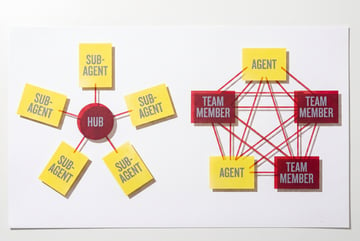
Not every agent team runs strictly top-down. Two coordination styles show up in practice:
- Orchestrated: a lead agent decomposes the goal, assigns each task, and synthesizes the results — the hierarchical model described above.
- Peer collaboration: agents pull tasks off a shared list themselves, with no central manager directing traffic. It’s closer to a Kanban board where every worker self-assigns from the same board.
Everyone else built a construction worker.
We built the contractor.
One file at a time.
UI, API, database, deploy.

Many real setups are a hybrid: an orchestrator seeds the initial task list, then hands off so agents self-coordinate from there. The peer model suits large volumes of similar, independent work — migrating dozens of endpoints, adding tests across many files — where a central assigner would just be a bottleneck.
Real-Time Coordination Mechanisms
“Coordinate in real time” can sound vague. Here’s what’s actually happening when Claude Code agents coordinate.
The Shared Task List
The most common coordination mechanism is a shared file — usually a structured task list in the project directory (a TASKS.md, or a JSON/YAML equivalent). Every agent has read/write access to it, and the file itself becomes the communication layer. Rather than messaging each other, agents read and write state.
Each task carries a status marker — pending, in-progress, completed, or blocked. When an agent is ready for work, it scans the list, finds a pending task with no unresolved dependencies, and marks it in-progress with its own identifier — effectively claiming it so no other agent grabs the same one. When it finishes, it writes any output back and flips the status to completed, which can unblock dependent tasks for other agents. File locking or atomic writes keep two agents from clobbering the same update.
The list isn’t fixed. As agents work, they discover subtasks that weren’t in the original plan and add them as new pending items for others to pick up — so the list tends to grow before it shrinks.
Coordinating through shared state instead of direct messages has real advantages: there’s no messaging infrastructure to maintain, work state survives a crashed or interrupted agent, and a human can read the file at any point to see exactly what every agent has done. The tradeoff is latency — agents learn about changes by re-reading the file rather than getting instant notifications, an acceptable cost for most coding work.
Message Passing Through Tool Results
When a subagent completes its task, its output is returned to the orchestrating agent as a structured result. The orchestrator can then pass relevant portions of that result to downstream agents as context. This is message passing, but it happens through the tool call / result loop rather than through a separate communication channel.
Sequential Checkpoints
Not all coordination is parallel. The orchestrator may run a first batch of subagents in parallel, collect their results, then run a second batch that depends on the first. This creates sequential checkpoints within an otherwise parallel workflow — useful for cases where some work genuinely needs to happen before other work can begin.
Agent-to-Agent Review
One practical pattern is assigning one subagent to generate an artifact (e.g., a draft implementation) and another to review it. The orchestrator passes the output of the first agent to the second as input. This introduces a lightweight quality check without requiring the orchestrating agent to do the review itself.
How to Enable Claude Code Agent Teams
Agent Teams is an experimental capability in Claude Code, so treat it as powerful but not yet production-hardened — expect some setup work and a degree of non-determinism in how agents coordinate.
To get started, you’ll need:
- Claude Code installed — available via npm (
npm install -g @anthropic-ai/claude-code) - A plan that supports extended agentic use — the multi-agent features are tied to higher-tier access (Claude Max or API access with enough throughput to run concurrent agents)
Built like a system. Not vibe-coded.
Remy manages the project — every layer architected, not stitched together at the last second.
Within a session, trigger multi-agent behavior by giving Claude Code a complex, parallelizable goal and asking it to use parallel agents — for example, “Refactor all API endpoints to use the new authentication middleware, using parallel agents.” Claude Code assesses whether the task is a good candidate, generates the breakdown, and spins up subagents accordingly. You can set defaults — how many subagents to allow, resource limits — in .claude/settings.json.
Before agents start, Claude Code usually shows the proposed task list. Read it. If the decomposition looks wrong, correct it there, before any tokens are spent on the wrong split.
Practical Use Cases for Agent Teams
Understanding the architecture is useful. Knowing when to apply it is more useful.
Large-Scale Refactoring
When you need to refactor code across dozens of files, agent teams let you assign different modules or directories to different subagents. They work in parallel, each focused on their scope, and the orchestrator reconciles their outputs.
Test Generation at Scale
A single agent asked to write tests for a large codebase will run out of context or produce inconsistent results. With agent teams, you can assign one subagent per module, each writing tests for that module independently, then have the orchestrator check for coverage and consistency across the full set.
Parallel Research + Implementation
Some tasks involve research followed by implementation. You can run multiple subagents researching different approaches simultaneously, then feed the orchestrator their findings to decide which direction to take — before triggering a final implementation agent.
Multi-Service Debugging
When a bug spans multiple services, a single agent might not hold all the relevant context simultaneously. Different subagents can investigate each service in parallel, and the orchestrator synthesizes their findings to identify the root cause.
Documentation and Code Generation Together
Assign one agent to write code and another to write documentation for the same feature, running in parallel. The orchestrator ensures they stay in sync — if the implementation changes, the documentation subagent can be updated accordingly.
When Not to Use Agent Teams
Agent teams add coordination overhead. For simpler tasks, that overhead isn’t worth it.
Use a single agent when:
- The task fits comfortably in one context window.
- The work is inherently sequential — each step depends on the last.
- The task is short-lived and well-defined.
- You need tight control over every step without delegation.
Use agent teams when:
- The task is too large for a single context window.
- Multiple independent workstreams exist.
- Speed matters and parallel execution would help.
- You can clearly define subtask boundaries without creating tight dependencies.
The orchestration layer introduces latency, cost, and complexity. For a quick code edit or a single-file refactor, just use Claude Code directly.
The Token Cost Reality
Running agents in parallel doesn’t cut token usage — it multiplies it. Each agent maintains its own context window, loading the task list, the relevant files, and its own history. There’s no token sharing between instances, so four agents on one problem can cost roughly three to four times a single-agent run, not one-fourth of it. A task that costs around 50K tokens with one agent can easily run 80–100K across a four-agent team once you account for the duplicated context.
The math works in your favor when:
- Time matters more than token spend — a migration that takes six hours with one agent might take two with a team
- The task is genuinely large and parallel — a 300-file refactor justifies the coordination overhead; a handful of tasks doesn’t
- You’re on a flat-rate plan — if cost doesn’t scale linearly with usage, the speed gain is close to free
- ✕a coding agent
- ✕no-code
- ✕vibe coding
- ✕a faster Cursor
The one that tells the coding agents what to build.
It’s not worth it for small jobs (under roughly 10–15 discrete tasks), tightly interdependent work where agents stall waiting on each other, or per-token billing where you’re watching the budget closely.
Key Design Principles for Agent Teams
A few principles help agent teams work reliably:
Keep Subagent Tasks Narrow and Explicit
Vague instructions produce inconsistent results when there’s no human in the loop to clarify. Each subagent should receive a task with clear scope, clear inputs, and a clear definition of what “done” looks like.
Minimize Shared State
When multiple agents write to the same files or resources simultaneously, you get conflicts. Design tasks so each subagent owns a distinct part of the problem — separate files, separate modules, separate concerns.
Build in Verification Steps
Don’t assume subagent outputs are correct. Build orchestration logic that verifies or reviews outputs before passing them downstream. This is where the agent-to-agent review pattern pays off.
Account for Failure Modes
Individual agents can fail, produce bad outputs, or get stuck. Your orchestration logic should handle these cases — whether that means retrying, falling back to a single-agent approach, or surfacing the failure to a human.
The Broader Context: Why Multi-Agent AI Matters Now
Single-agent AI systems were a meaningful step forward for productivity. But they’re limited by the same fundamental constraint: one context window, one sequential thread of work.
As tasks get more complex — entire codebases rather than individual files, complete workflows rather than single steps — multi-agent architectures become necessary rather than optional. Anthropic’s research on multi-agent systems supports this, showing that agent teams outperform single agents on tasks requiring broad information gathering and parallel execution.
Claude Code Agent Teams represent Anthropic’s application of this principle to software development specifically. But the underlying pattern — orchestrator breaks down tasks, subagents execute in parallel, results get synthesized — applies across domains. You’ll see the same pattern in research workflows, content production pipelines, data processing systems, and business automation.
Understanding how it works in Claude Code gives you a concrete mental model you can apply anywhere you’re building with multi-agent AI.
Frequently Asked Questions
What is Claude Code Agent Teams?
Claude Code Agent Teams is a feature in Anthropic’s Claude Code coding assistant that lets multiple Claude agents run in parallel on the same project. One agent acts as an orchestrator, breaking down tasks and delegating to subagents. Each subagent works independently on its assigned piece of work, and the orchestrator combines their outputs. The system is designed to handle tasks that are too large or too parallel for a single agent to execute efficiently.
How do Claude agents communicate with each other?
Claude Code agents coordinate primarily through shared file systems and tool call results. When a subagent completes a task, it returns its output to the orchestrating agent as a structured result. The orchestrator can then pass relevant parts of that output to other subagents as context. Agents don’t communicate directly with each other — all coordination flows through the orchestrator.
What is the orchestrator-subagent pattern?
Seven tools to build an app. Or just Remy.
Editor, preview, AI agents, deploy — all in one tab. Nothing to install.
The orchestrator-subagent pattern is an architectural approach where one agent (the orchestrator) handles planning and coordination while other agents (subagents) handle execution. The orchestrator decomposes a high-level goal into discrete tasks, assigns each task to a subagent, monitors progress, and synthesizes results. This pattern separates reasoning about what to do from the act of doing it, which makes complex workflows more manageable.
When should you use multiple agents instead of a single agent?
Use multiple agents when the task is too large for a single context window, when multiple independent workstreams exist that can run in parallel, or when speed is a priority and parallel execution would help. Stick with a single agent for tasks that fit in one context window, are inherently sequential, or are short and well-defined. The coordination overhead of agent teams only pays off when the task genuinely benefits from parallelism.
How does Claude Code handle parallel task execution?
Claude Code uses a Task tool that the orchestrating agent calls to spawn subagents with specific instructions. These subagents run in parallel, each with their own context window. The orchestrator can launch multiple subagents simultaneously, wait for their results, and then use those results to trigger subsequent stages of the workflow. This tool-based spawning mechanism is what makes the parallelism programmatic rather than manual.
What are the limitations of Claude Code Agent Teams?
The main limitations are coordination overhead, cost (multiple agents means multiple API calls), and the challenge of managing dependencies between agents’ work. Poorly designed agent teams — where subagents have overlapping scope or share too much state — can produce conflicts that are harder to debug than single-agent failures. Agent teams also require more upfront planning to define task boundaries clearly. For simple tasks, these trade-offs aren’t worth it.
Key Takeaways
- Claude Code Agent Teams use an orchestrator-subagent model: one agent plans and coordinates, multiple agents execute in parallel.
- Coordination happens through shared file systems, tool call results, and sequential checkpoints — not through direct agent-to-agent communication.
- The main benefits are parallelism, larger effective context across the team, and the ability to specialize agents for different parts of a task.
- Agent teams aren’t always better — the coordination overhead only pays off for tasks that are genuinely large, multi-faceted, or parallelizable.
- Building on top of multi-agent systems often means agents need real-world capabilities: tools like MindStudio’s Agent Skills Plugin give Claude Code agents access to 120+ integrations without the infrastructure overhead.
If you’re building workflows where agents need to reason, act across multiple steps, and connect to external tools — MindStudio is worth exploring. You can get started free and build your first agent in under an hour.