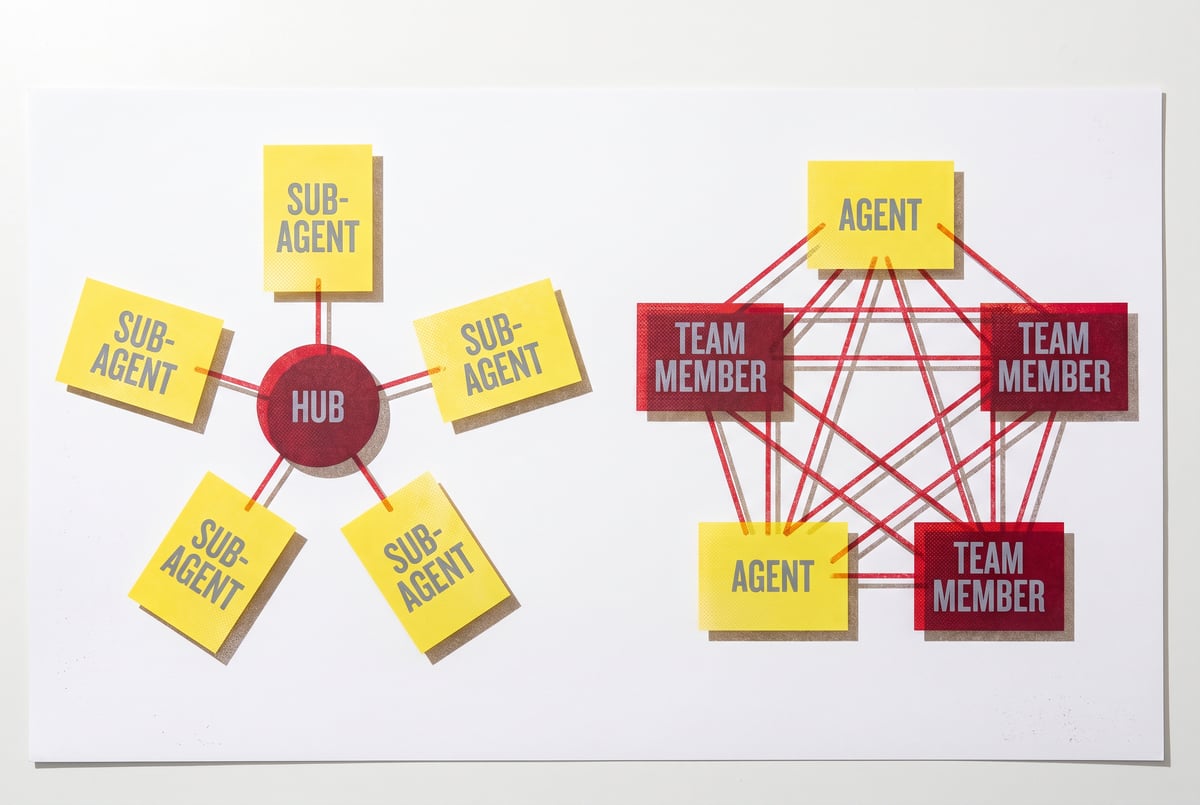
What Is Claude Code Agent Teams? Multi-Agent Collaboration Explained
Claude Code Agent Teams lets multiple AI agents collaborate as peers, not in a hierarchy. Learn how it differs from sub-agents and when each pattern fits.

Peer Collaboration vs. Hierarchical Sub-Agents
Software teams have been running parallel workstreams for decades. You assign one developer to authentication, another to the API layer, a third to the frontend — and they sync up through a shared ticket board. Claude Code Agent Teams applies the same flat, peer-collaboration model to AI agents — a meaningful departure from the hierarchical orchestrator-subagent pattern most multi-agent systems use.
Instead of one Claude instance working through a codebase sequentially, Agent Teams lets multiple Claude agents pick tasks off a shared list, work concurrently, and update that list in real time. The result is faster execution on large, decomposable problems — but it comes with tradeoffs worth understanding before you commit to the approach.
This article explains what Claude Code Agent Teams actually is, how the shared task list mechanism works, how it compares to sub-agents, and when parallel collaboration is — and isn’t — the right call.
What Claude Code Agent Teams Actually Is
Claude Code is Anthropic’s agentic coding tool: a terminal-based AI assistant that can read files, write code, run shell commands, and interact with your development environment autonomously. Out of the box, it operates as a single agent working through tasks one at a time.
Agent Teams extends this by allowing multiple Claude Code instances to run simultaneously, each operating as an independent agent but coordinating through a shared task list. Think of it as a distributed workforce where every worker reads from the same board and updates it as they go.
The key property here is real-time shared state. Each agent can see what’s already being worked on, claim a task for itself, complete it, and move to the next available one — without stepping on another agent’s work.
This pattern is sometimes called “parallel agents with a shared scratchpad” in multi-agent system design, and it’s one of the more practical approaches to scaling AI work horizontally.
The Shared Task List: How It Works
The coordination mechanism in Claude Code Agent Teams is a structured task list — typically a file in the project directory (like TASKS.md or a JSON equivalent) that all running agents can read from and write to.
Task States and Claiming
Each task in the list carries a status marker:
- Pending — available for any agent to pick up
- In progress — claimed by a specific agent (often tagged with an agent identifier)
- Completed — done, with optional notes attached
- Blocked — waiting on another task or external input
When an agent finishes its current work, it scans the task list, finds a pending item, marks it as in-progress with its own identifier, and begins working. This prevents two agents from attempting the same task simultaneously.
How Agents Update the List
Agents aren’t just passive consumers of the task list — they’re active contributors. As an agent works through a feature or bug fix, it may discover subtasks that weren’t in the original list. It can add those as new pending items, which other agents can then pick up.
This creates a self-expanding workload: the initial task list is a starting point, not a ceiling. The final list at the end of a session typically has more items than it started with, most of them completed.
Coordination Without Centralized Control
There’s no “manager agent” arbitrarily assigning work in this model. Each agent makes its own decisions about what to pick up next, guided by the shared state. This is what distinguishes Agent Teams from the orchestrator-subagent pattern — more on that below.
The closest analogy is a Kanban board with no project manager. Everyone can see the board, everyone self-assigns, and the system works because the rules are simple and visible.
Agent Teams vs. Sub-Agents: The Key Difference
Both approaches involve multiple Claude instances working together, but the architecture is meaningfully different.
Sub-Agents (Hierarchical)
In the sub-agent model, a single orchestrator agent coordinates everything. It:
- Receives the high-level goal
- Breaks it down into tasks
- Spawns sub-agents and assigns each one a specific job
- Waits for results
- Synthesizes the outputs
Sub-agents report back to the orchestrator, which stays in control of the overall workflow. This is a top-down, hierarchical structure. The orchestrator has full visibility; the sub-agents have narrow scope.
Best for: Tasks where the decomposition strategy isn’t obvious, where results from one sub-task affect the next, or where a single agent needs to synthesize diverse outputs into a coherent whole.
Agent Teams (Peer Collaboration)
Everyone else built a construction worker.
We built the contractor.
One file at a time.
UI, API, database, deploy.

Agent Teams is a flat, peer-to-peer structure. There’s no orchestrator managing the flow. Instead:
- A task list is created upfront (or generated by an initial planning step)
- Multiple agents spin up and start pulling from the list independently
- Each agent works autonomously, updating shared state as it goes
- Agents naturally self-distribute work based on availability
Best for: Large volumes of similar, independent tasks — like migrating dozens of API endpoints to a new pattern, adding tests across many files, or refactoring consistent chunks of a codebase.
When the Lines Blur
In practice, you can combine both patterns. A single orchestrator agent might create the initial task list, then spawn a team of agents to execute against it in parallel. The orchestrator hands off control once the list is populated, and agents self-coordinate from there.
This hybrid is often the most efficient structure for large software projects.
A Practical Walkthrough: Agent Teams in Action
Here’s how a real Agent Teams session might unfold on a medium-sized codebase migration.
Scenario: You need to migrate 40 route handlers from Express.js to a new framework. Each migration is mostly independent — different files, minimal cross-dependencies.
Step 1: Generate the task list
Either you create it manually or prompt a single Claude instance to scan the codebase and generate a list of all 40 route files as tasks. The result is a TASKS.md with 40 pending items.
Step 2: Launch the agent team
You start 4 Claude Code instances pointing at the same project directory and task list. Each instance receives context about the migration pattern — what the new framework looks like, what needs to change, and the task list location.
Step 3: Parallel execution begins
Each agent claims its first task, marks it in-progress, and starts migrating the file. When done, it marks the task complete, commits the changes (or stages them), and picks up the next available task.
Step 4: Discovered subtasks get added
Agent 2 notices that three of its route handlers share a helper function that also needs updating. It adds that as a new task to the list. Agent 4, which finishes its batch early, picks it up.
Step 5: Completion
All 40+ tasks are completed in roughly the time it would take one agent to handle 10. You review the changes, run your test suite, and merge.
Token Costs: What Parallel Agents Actually Cost
This is the part most people underestimate. Running Agent Teams is significantly more expensive in token terms than running a single agent.
Why Costs Multiply
Each agent instance maintains its own context window. That context includes:
- System prompts and instructions
- The current state of the codebase (relevant files)
- The task list
- Conversation history of its own actions
If you run 4 agents simultaneously, you’re paying for 4 separate context windows running in parallel. There’s no token sharing between instances.
Practical Estimates
For a complex codebase migration:
- A single-agent approach might consume 500K–2M tokens over a session
- A 4-agent team working the same problem could use 1.5M–6M tokens (not exactly 4x, because agents working on smaller scoped tasks may have shorter context windows)
Remy is new. The platform isn't.
Remy is the latest expression of years of platform work. Not a hastily wrapped LLM.
Claude’s pricing varies by model tier. Claude Opus 4 and Claude Sonnet 4 have different rates, and the choice of model for your agent team has a major impact on total cost.
When the Cost Is Worth It
The math works in your favor when:
- Time is more valuable than token spend. A migration that takes 6 hours with one agent might take 2 hours with a team.
- Tasks are genuinely parallel. If tasks depend on each other, agents will stall waiting for dependencies, wasting tokens without saving time.
- The task list is large. Agent Teams overhead (setup, coordination, context) is a fixed cost. Small task lists don’t give you enough throughput gain to offset it.
- You’re using faster, cheaper models. Running Agent Teams with Claude Haiku (where available for coding tasks) dramatically changes the economics.
When It’s Not Worth It
- Small projects (under 10–15 discrete tasks)
- Tasks with heavy cross-dependencies
- When one agent’s output needs to inform another’s work mid-stream
- Budget-constrained situations where you need to be selective about token spend
Common Use Cases for Claude Code Agent Teams
Some problem types naturally fit the parallel, shared-task-list model.
Large codebase refactors — Updating naming conventions, migrating patterns, or applying a consistent code style across hundreds of files. Each file is a task; agents distribute the work naturally.
Bulk test generation — Writing unit tests for every function in a module or across a service. Agents can work through functions or files independently.
Documentation generation — Creating or updating docstrings, README sections, or API docs across a large codebase. Highly parallel, low interdependency.
Dependency upgrades — Identifying and updating deprecated API usage across a codebase, where each module or file can be handled independently.
Multi-language translation — If you’re adapting a library from one language to another, files can often be translated in parallel.
The common thread: tasks that are clearly decomposable, largely independent, and high in volume.
Where MindStudio Fits for Multi-Agent Workflows
Claude Code Agent Teams is powerful, but it lives in the terminal. You’re managing agent instances, maintaining the task list manually or through scripts, and handling all the infrastructure yourself.
If you want multi-agent coordination without managing that infrastructure — or if you want to build workflows that combine AI agents with business tools, APIs, and data sources — MindStudio is worth looking at.
MindStudio’s Agent Skills Plugin (@mindstudio-ai/agent) is specifically built for developers running autonomous agents like Claude Code. It gives your agents access to 120+ typed capabilities as simple method calls — things like agent.sendEmail(), agent.searchGoogle(), agent.runWorkflow(), or agent.generateImage() — without you having to build those integrations from scratch.
If you’re coordinating agent teams on a codebase migration and want agents to post status updates to Slack, log results to Airtable, or trigger downstream workflows when tasks complete, the Agent Skills Plugin handles that plumbing so your agents can stay focused on the actual work.
- ✕a coding agent
- ✕no-code
- ✕vibe coding
- ✕a faster Cursor
The one that tells the coding agents what to build.
You can also use MindStudio’s visual workflow builder to design multi-agent processes that don’t require writing code at all — useful when the people orchestrating the agents aren’t developers. Connecting agents to HubSpot, Notion, Google Workspace, or any of 1,000+ business tools takes minutes instead of days.
MindStudio is free to start at mindstudio.ai.
FAQ
What is Claude Code Agent Teams?
Claude Code Agent Teams is a multi-agent collaboration feature in Anthropic’s Claude Code tool. It allows multiple Claude instances to run concurrently, each pulling tasks from a shared task list, claiming items to prevent duplication, and updating the list as they complete work. The result is parallel execution on large, decomposable software projects.
How is Agent Teams different from Claude’s sub-agent feature?
Sub-agents follow a hierarchical model: one orchestrator agent assigns work to subordinate agents and synthesizes their outputs. Agent Teams is a flat, peer model: all agents are equal, there’s no central orchestrator, and coordination happens through the shared task list rather than through a managing agent.
How much do Claude Code Agent Teams cost in tokens?
Each agent in an Agent Teams session maintains its own independent context window, so token costs scale roughly with the number of agents you run. A 4-agent team may use 3–4x the tokens of a single-agent session on the same problem. Costs vary by model tier (Opus, Sonnet, Haiku) and context size, but expect meaningful multipliers over single-agent work.
When should I use Agent Teams instead of a single agent?
Use Agent Teams when you have a large number of similar, independent tasks — like refactoring dozens of files, generating tests across a codebase, or migrating many API endpoints. Avoid it when tasks are tightly interdependent, when your task list is small (under 10–15 items), or when token budget is a primary constraint.
Can Agent Teams handle tasks with dependencies between them?
Partially. Agents can mark tasks as “blocked” in the shared list and move on to other work. But true dependency management — where one agent’s output feeds directly into another’s starting state — is better handled by the orchestrator-subagent pattern, where a central agent controls sequencing. Agent Teams works best when most tasks can be executed in any order without blocking each other.
What does the shared task list look like in practice?
It’s typically a structured file in the project directory — a Markdown file, JSON, or YAML — that lists each task with its current status and any relevant metadata (like which agent claimed it, or notes from completion). Agents read from and write to this file as they work. Some implementations also include task priority, dependencies, and estimated complexity to help agents make smarter decisions about what to pick up next.
Key Takeaways
- Claude Code Agent Teams allows multiple Claude instances to work in parallel through a shared, real-time task list — no central orchestrator required.
- The core mechanism is simple: agents claim tasks, mark them in-progress, complete them, and move to the next available item, preventing duplicate work.
- Agent Teams differs from sub-agents in that it’s a flat, peer structure rather than a hierarchical one — better suited for parallel volume, not sequential dependency chains.
- Token costs multiply with each agent you add, so the math works best when you have many independent tasks and time savings justify the spend.
- The best use cases are large refactors, bulk test generation, documentation updates, and any high-volume work where tasks are clearly decomposable and mostly independent.
- If you want to coordinate multi-agent workflows with business tools — or build them without managing infrastructure manually — MindStudio is worth exploring as a complement to Claude Code.