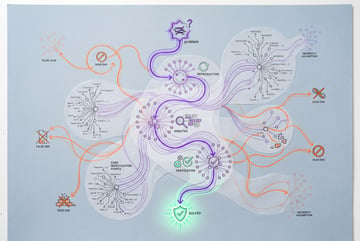
Fix AI Coding Agent Problems With Skills, Rules, and Hooks
Practical fixes for AI coding agents that fake completion, skip tests, or ignore rules, using devil's advocate reviews, evidence, and hooks.

Why do AI coding agents claim work is done when it isn’t?
AI coding agents hand back summaries that say “done” and “tested” even when the implementation has real gaps, because their default behavior is to narrate confidence rather than prove correctness. The fix is to force a second pass: either ask the same agent to play devil’s advocate against its own output, or route the work through a separate reviewer agent with fresh context whose only job is to find holes before you trust the result.
This pattern, along with several others, comes down to a simple idea: most coding agent frustrations get solved not by switching tools but by adjusting the “AI layer” you’ve built around the agent, meaning its skills, rules, and hooks. Builders are increasingly acting as engineers of the harness, not just prompters, and that shift in focus is what actually closes the gap between what an agent says it did and what it actually did.
TL;DR
- False completion claims get caught by asking the agent what would make its own work fail, or by handing the output to a separate reviewer agent with no prior context.
- Testing evidence matters more than test counts, so good setups require real command output, screenshots, or browser automation attached to the pull request, not just a claim that unit tests passed.
- Passing tests don’t mean a working app, since agents default to shallow validation, so a dedicated skill that opens the real app and clicks through it like a user closes that gap.
- Rules are probabilistic, hooks are guaranteed, which means any instruction phrased as “never do X” or “always do Y” belongs in a hook, not just a markdown rule file.
- The fix process is always the same conversation: describe the problem to the agent, propose a rough solution, and ask where it belongs in your skills, rules, or hooks so the fix persists across future sessions.
- Solutions are not one-size-fits-all: the same problem (broken apps despite passing tests) can be solved by editing a planning skill in one setup and creating a brand-new “try it” skill in another.

How do you get proof that a coding agent’s work actually works?
The core issue is that agents will tell you “10 out of 10 tests pass” and stop there, which is not the same as demonstrating the feature functions. Real testing evidence means commands and their actual output, plus for anything user-facing, visual proof the feature works, such as screenshots captured by a browser automation tool and attached directly to the pull request.
For full-stack development, this often means using a browser automation CLI to drive the running app the way a real user would, then including those screenshots as evidence rather than just a text summary. The effect is that review gets faster and trust in the agent’s output goes up, because you’re looking at artifacts instead of taking the agent’s word for it.
Where this lives in your AI layer usually depends on your workflow. Many builders fold this into a planning skill, having the agent specify upfront what testing artifacts it will produce before it starts implementing, so you know exactly what proof to expect once the work is done.
Why do tests pass but the application is still broken?
This is directly downstream of weak testing evidence. Agents default to writing unit and integration tests, which can all pass while the actual user-facing application is broken, because unit tests don’t exercise the real app the way a person would. Validation is consistently one of the weaker areas for coding agents, even when you ask for it in a separate review session.
The fix is to require the agent to open the real, running application with a browser automation tool and interact with it (clicking buttons, entering input) after any change that affects what a user sees. Some builders implement this inside an existing planning skill by adding a validation step. Others create an entirely separate skill, sometimes literally named something like “try it,” whose only job is to open the app and test it like a user after every visible change. Both solve the same problem using different structures, which is the point: the fix should match how your own AI layer is already organized.
How do hooks stop a coding agent from ignoring your rules?
Rules and skills are natural language instructions, which means following them is always probabilistic. A coding agent can ignore a rule file instruction like “never read the .env file” even when it’s written in plain sight in a global rules document. Hooks close that gap because they’re actual code tied to agent events (before a tool call, at the start of a conversation, and so on), and they can block an action outright rather than just discourage it.

The practical guideline: anything in your rules shaped like “must never,” “must always,” or “if this, then that” should be converted into a hook instead of left as a natural language instruction. Constraints and conventions (like forbidding edits to a specific migration folder, or requiring a particular package manager) are good hook candidates. Broader multi-step processes you want the agent to walk through still belong in a skill, since hooks are better suited to discrete guardrails than full workflows.
A useful exercise here is to have the agent itself scan your existing rules file (a CLAUDE.md or equivalent) and flag every instruction that’s really a “never do X” or “if this then that” pattern. Those become a checklist of hooks to build, since each one represents a rule that’s currently just a hope rather than a guarantee.
What’s the actual process for fixing any of these problems?
Across all of these issues, the method is consistent:
- Describe the problem to your coding agent in plain language, the same way you’d describe a frustration to a coworker.
- Optionally suggest a rough direction for the fix (a reviewer agent, a new skill, a hook).
- Ask the agent where this belongs in your AI layer: a new skill, an edit to an existing rule file, or a hook.
- Approve the change and let the agent write it into your setup so it persists across future sessions.
This matters because the right answer is genuinely different depending on what you’re building and which coding agent or framework you’re using. The same complaint (“tests pass but the app is broken”) produced two different valid fixes in practice: one builder extended an existing planning skill to include more validation steps, another created a brand-new skill dedicated entirely to opening and testing the live app. Neither is more correct than the other. What matters is that the fix gets captured somewhere in the AI layer instead of being re-explained every session.
Is it worth building a separate reviewer agent instead of just asking the same agent to self-check?
Asking the same agent, in the same conversation, “what would make this not actually work” is the fastest version of this fix and catches a meaningful share of real gaps. The tradeoff is that the list it generates can be exhaustive to the point of including low-value items, since the agent tends to want to appease you with lots of suggestions rather than a tightly prioritized few.
A separate reviewer agent, built as its own skill and run with fresh context, tends to be more rigorous because it isn’t anchored to the reasoning that produced the original implementation. This is also why multi-agent review patterns show up across many agent frameworks already. The advantage of building your own version is that you control exactly what the reviewer is critical about, tailored to your codebase and your common failure modes, rather than relying on a generic review pass baked into someone else’s framework.
Frequently Asked Questions
What’s the difference between a rule, a skill, and a hook in an AI coding agent setup?
Rules are natural language constraints or conventions the agent is expected to follow but might not. Skills are larger workflows or processes you want the agent to walk through step by step. Hooks are actual code tied to agent events that can enforce or block behavior with certainty, making them the right place for anything that must always or must never happen.
Everyone else built a construction worker.
We built the contractor.
One file at a time.
UI, API, database, deploy.
Why do coding agents struggle with validation specifically?
Agents default to writing unit and integration tests, which are relatively easy to generate and will often pass even when the real application is broken. Actually exercising the running app the way a user would (clicking through flows, checking real output) requires a different kind of testing step that agents don’t do by default unless a skill or rule explicitly requires it.
Can hooks fully guarantee an agent never does something unwanted?
Hooks are the closest thing to a guarantee in a coding agent setup because they run as actual code attached to specific events, such as blocking a tool call before it executes. This is more reliable than a rule written in a markdown file, which the agent might ignore, though hooks still need to be written correctly to cover the exact action you’re trying to prevent.
Do these fixes require switching to a different coding agent or framework?
No. The fixes described here are adjustments to the surrounding AI layer, meaning the skills, rules, and hooks you build around whatever coding agent you’re already using. The same underlying coding tool can behave very differently depending on how well its rules, skills, and hooks are tuned to your specific codebase and workflow.
How do I know whether to fix a problem with a rule, a skill, or a hook?
A useful test: if it’s a fact, constraint, or convention, it likely belongs in a rule. If it’s a constraint that must always or never happen, upgrade it to a hook for enforcement. If it’s a multi-step process you want the agent to follow in sequence, it belongs in a skill. Describing the specific problem to your agent and asking it to suggest where the fix belongs is often the fastest way to decide.