pStack Skills: Making Claude Code Actually Fix Bugs, Not Just Edit Files
pStack is an open-source Claude Code skill pack for bug reproduction, architecture planning, and multi-agent review. Here's how it works.
What is pStack and what problem does it solve?
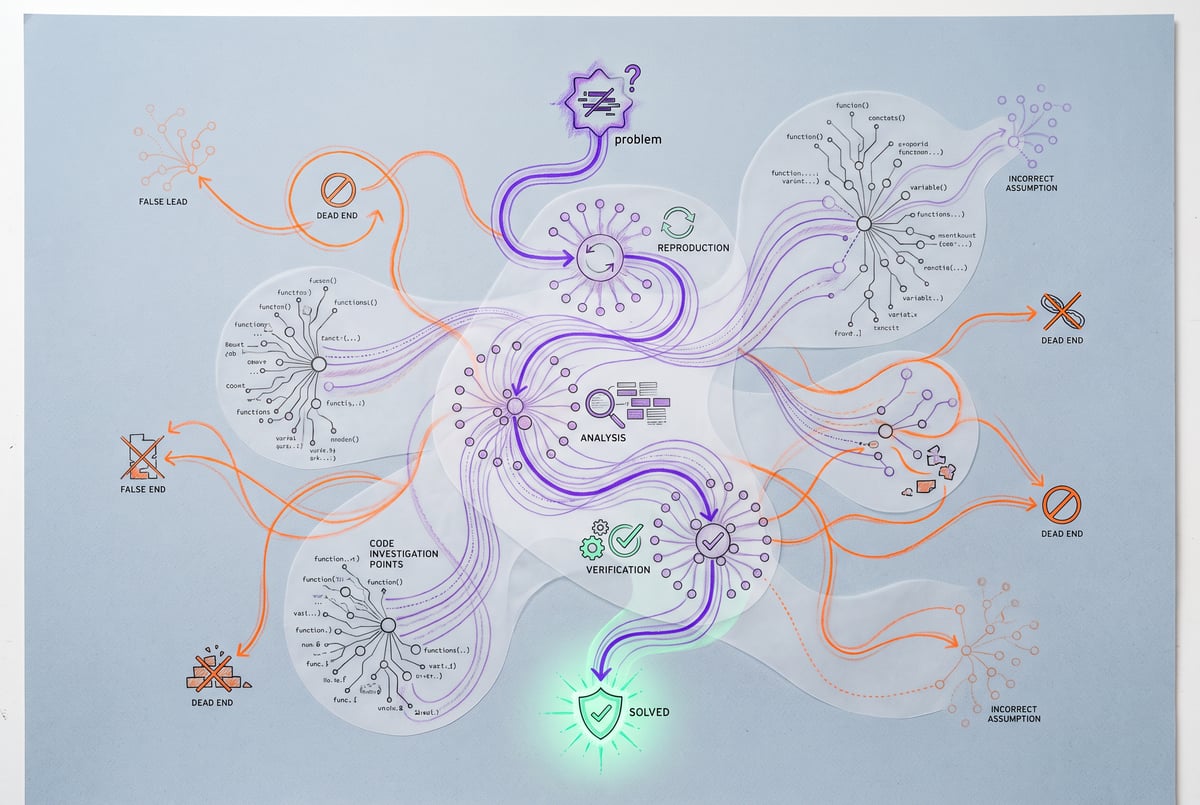
pStack is an open-source set of skills for coding agents, built to stop a familiar failure mode: you ask an AI coding tool to fix a bug, it edits several files, runs the tests, and reports success, but the bug is still there. Or you ask for a small feature and get back a new abstraction layer you now have to maintain. pStack addresses this by giving the agent explicit playbooks that force investigation before editing, keep fixes small, and verify the original problem is actually gone.
The skills were created by Potato, an engineer who works at Cursor and on the React core team, and are released under the MIT license. They were originally built for Cursor but are written so you can adapt them for Claude Code or any other coding agent that supports skills or custom instructions.
TL;DR
- pStack is a skill pack, not a model or a plugin, that encodes a disciplined engineering workflow (reproduce, fix small, verify) directly into instructions an agent like Claude Code follows.
- The core entry point is slash-command potato-mode, which walks the agent through reproducing a bug in the running app, finding the root cause, making the smallest viable fix, and re-running the original interaction to confirm it’s resolved.
- If the agent’s theory about a bug turns out wrong, the playbook requires removing the exploratory changes tied to that theory, which avoids the common mess of five half-fixes and no clarity on what actually worked.
- Separate skills called how, why, and teach help you understand unfamiliar code, trace the reasoning behind existing decisions, and learn why a fix works, rather than just accepting a patch.
- Arena and swarm let you run multiple agents in parallel, either comparing competing implementations of the same feature or splitting a larger investigation into independent, specific jobs.
- Interrogate adds a structured multi-agent review pass after implementation, triaging which findings are real risks, which are worth considering, and which are noise, instead of treating every AI suggestion as mandatory.
- Running extra agents and review rounds consumes more of your Claude Code usage or API budget, so the sensible default is one implementation and one focused review, saving the heavier comparisons for decisions that actually warrant them.
Remy doesn't write the code. It manages the agents who do.
Remy runs the project. The specialists do the work. You work with the PM, not the implementers.

How do you install and set up pStack in Claude Code?
Setup is conversational rather than a script you run blind. Open Claude Code in your project, point it at the pStack repository, and ask it to adapt the skills to your codebase: preserve any existing instructions you already have, use the tools and models available in your setup, confirm everything works, and flag anything else it needs. Claude Code handles the compatibility work itself rather than you manually porting Cursor-specific configuration. Once it confirms the setup is working, the main way you’ll interact with pStack day to day is through the /potato-mode command.
How does potato-mode make bug fixing more reliable?
You invoke /potato-mode with a task and a clear description of what a working result looks like. The playbook behind it tells the agent to reproduce the failure in the running app before it touches any code, not just read the code and guess.
Take a search box where fast typing sometimes shows results from an older, stale query. Instead of immediately patching something that looks suspicious, the agent is instructed to watch the actual network requests and figure out which response is overwriting the page. If the evidence points to a late-arriving older request clobbering newer results, it has to confirm that specifically, not assume it.
The detail worth noting: if the agent tries a fix based on a theory and the evidence later disproves that theory, the playbook has it roll back those changes. This matters because without that discipline, a debugging session can end with several unrelated workarounds stacked on top of each other and no clear signal about which one, if any, actually fixed the problem.
Once the real cause is identified, the playbook asks for a failing test to capture the bug (when that’s cheap to do), then the smallest possible fix, then a repeat of the original failing interaction to confirm it now works. For the search example, that means recreating the race condition (the older request finishing late) and verifying the newest results still win. That full loop, reproduce, fix, re-verify, is the deliverable you should expect before accepting any patch.
What do how, why, and teach actually do?
These three skills target a different problem: understanding code before or after you change it.
/how traces a flow through the codebase and explains it, useful when you’ve just opened an unfamiliar project and need to know, for example, how a form field ends up in a database query.
/why digs into the reasoning behind a piece of code using whatever history and context the agent can access. If you see a retry limit or a timeout value that looks arbitrary, asking /why before deleting it can surface a reason that isn’t visible from the code alone.
/teach is for after the fact. Once a fix is in place, you can ask the agent to explain what went wrong and why the fix addresses it, then keep asking follow-up questions until you actually understand the mechanism. This is aimed at developers who want to retain the code they’re shipping, not just merge a patch they can’t explain later.
What are architect, arena, and swarm for?
/architect is for planning before implementation. Asking it to design a feature (the transcript uses an export button that downloads currently filtered results) gets the agent to work through decisions like which filters apply, how much data might be returned, and whether an existing query can be reused, before any code is written. The goal is surfacing those questions early rather than discovering them halfway through a half-built feature. pStack’s broader philosophy also pushes toward minimal solutions. If a background job system isn’t actually necessary, it shouldn’t be added.
/arena is for when there’s a real design decision worth comparing. It sends the same task to multiple agents, lets them produce independent implementations, then has a lead agent compare the results, gets a second judgment, picks a base approach, and pulls in useful ideas from the alternatives before a final check. For the export feature, that might mean comparing a direct file download against a background-job approach, evaluated against expected data size and user experience.
/swarm is for splitting up investigation rather than comparing solutions. One agent can trace backend filter logic, another can inspect frontend filter state, a third can check existing test coverage, each with a specific assignment, with a lead agent compiling the combined findings into one report. Critically, the report is expected to note anything an agent couldn’t verify, rather than letting an incomplete check quietly pass as a clean result.
Is pStack’s interrogate skill worth the extra review step?
/interrogate runs a structured review pass after a feature is built, using independent reviewers who check specific concerns (for the export example: does it respect selected filters, does it handle failures correctly). The findings then get triaged by a lead agent into categories: which issues could actually break the feature, which suggestions are worth considering, and which are wrong or missing context.
That triage step is the useful part. Multi-agent review processes can easily generate more suggested changes than any human wants to action, and treating every comment as a requirement turns review into busywork. Interrogate is designed to hand you a verdict, not an unfiltered dump of opinions. It’s still not a substitute for manually checking the output yourself. A clean build and passing review don’t confirm a downloaded file actually contains the right rows and columns.
Does using all of pStack’s skills cost more?
Yes. The skill files themselves are free and open source, but running extra agents for arena comparisons, swarm investigations, or interrogate reviews uses more of your Claude Code usage allowance or API budget than a single agent doing a single pass. The practical guidance is to default to one implementation and one focused review for routine work, and reserve the heavier multi-agent features for bigger decisions or more complex investigations where a second opinion genuinely changes the outcome. A small, well-understood bug fix often only needs reproduction, a minimal fix, and a verification step, not the full stack of skills.
Frequently Asked Questions
What is pStack in the context of Claude Code?
pStack is an open-source collection of skills, originally built for Cursor, that encode a structured engineering workflow (reproduce bugs before fixing, keep changes minimal, verify results, use multi-agent review) into instructions a coding agent like Claude Code can follow via commands such as /potato-mode.
Who created pStack?
It was created by an engineer who goes by Potato, who works at Cursor and on the React core team, and released under the MIT license.
Do I need Cursor to use pStack, or does it work with Claude Code?
The skills were originally written for Cursor, but they’re designed to be adaptable. You can give Claude Code the pStack repository and ask it to adapt the instructions to your project and tooling.
What does potato-mode actually change about how bugs get fixed?
It forces the agent to reproduce the bug in the running application first, identify the actual root cause through evidence rather than guesswork, discard changes tied to disproven theories, apply the smallest fix, and re-run the original failing scenario to confirm the fix worked, rather than relying on tests passing as proof.
Does pStack cost extra to run?
The skill files are free, but features like arena (parallel competing implementations) and swarm (parallel split investigations) use more agent calls, which draws down your Claude Code usage or API budget faster than a single-agent workflow.