What Are AI Personal Agents? Dots, Duet, Muse and Grokbot Explained
Personal AI agents like OpenAI's Dots, Anthropic's Duet, Meta's Muse and xAI's Grokbot run 24/7 and proactively manage tasks for you.

What is a personal AI agent?
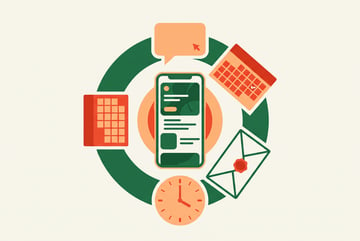
A personal AI agent is an AI system that runs continuously in the background, rather than waiting for you to open a chat and type a request. It has its own compute, access to your accounts and data through connectors, and the ability to act on your behalf: drafting emails, flagging calendar conflicts, reorganizing files, or surfacing a problem before you even noticed it existed. The defining trait is that it prompts itself. Instead of you asking “what’s on my calendar today,” the agent periodically asks itself “how could I be helping this person right now” and acts on the answer.
This is a distinct product category from a chatbot or a copilot. A chatbot responds. A copilot assists while you work. A personal agent operates on a loop, checking in, noticing things, and taking initiative within whatever boundaries you’ve set.
TL;DR
- Personal agents emerged as a new product category in 2026, moving from early experiments like OpenAI’s Operator-style tools in January toward consumer products such as Grokbot (xAI), Muse (Meta AI), Dots (OpenAI) and Duet (Anthropic/Claude).
- These agents run 24/7 on their own compute rather than waiting inside a chat window, periodically checking your email, calendar, and other connected tools to decide if there’s something useful to do.
- Three underlying technical shifts made this possible: dramatically improved connectors (MCP-based integrations), AI that can reliably pilot a full desktop (clicking, typing, navigating software), and models that are good at long-running, self-directed tasks.
- Connectors stopped being one-way. Earlier integrations mostly pulled data into a chat; current connectors can also act outward, sending emails, creating files, and modifying documents directly.
- The shift in prompting style matters as much as the agents themselves. Getting value out of a personal agent depends less on writing a perfect one-off prompt and more on giving the system durable context about who you are, your goals, and what “done” looks like.
- Desktop apps open up more capability than browser-based chat. Local file access and fuller connector permissions tend to be gated behind desktop clients rather than the web version of these tools.
- The category is still early and uneven. Reliability, the scope of what an agent is allowed to do unsupervised, and how much proactive behavior is actually useful versus noisy are all still being worked out.
Built like a system. Not vibe-coded.
Remy manages the project — every layer architected, not stitched together at the last second.

How did we get from chatbots to personal agents?
The path ran through two earlier breakthroughs. First, connectors and skills matured. Early plugin systems for AI chat tools (dating back to 2023) were unreliable, often “forgetting” context or failing to complete multi-step tasks like managing an inbox. An update to the Model Context Protocol (MCP) mid-2026 made these integrations meaningfully more dependable, letting an AI actually read, write, and act across tools like email and cloud drives instead of just referencing them.
Second, computer use got good. Claude’s “co-work” capability, introduced in January, let an AI operate a desktop for extended stretches, sometimes 10 to 15 minutes at a stretch early on, using local folders and remote-controlling applications directly. As the underlying models improved (a later GPT-6-class model, referred to as “Astra,” was a notable jump), this extended to hours-long unattended sessions, with AI piloting complex software like Blender to build out entire 3D environments.
Once connectors could reliably move information in and out, and the AI could pilot a full computer instead of just a chat window, the pieces existed for an agent that doesn’t need you present at all. That’s the personal agent: a system with standing permissions, a loop that runs without a human triggering each step, and model-level reasoning good enough to decide what’s worth doing next.
What do Dots, Duet, Muse and Grokbot actually do?
The specific products differ by company but share the same shape. Each gives the user an AI with access to connected accounts (commonly email and calendar) and a persistent presence that doesn’t require an open chat session to function. The agent checks in periodically and can proactively flag issues: a double-booked meeting, an unanswered message, a task that’s falling behind. In the strongest version of this experience, the agent doesn’t just notify you, it prepares the next action, such as drafting a rescheduling email, and asks for approval before sending.
This is a meaningful change in interaction model. Traditional AI chat use is pull-based: you ask, it answers. Personal agents are push-based: it notices, it proposes, you approve (or it acts autonomously within limits you’ve set). The practical effect is that the AI starts behaving less like a tool you operate and more like an assistant who has their own standing tasks.
Why do personal agents need better prompting habits, not just better tools?
Three capabilities had to improve in tandem for this category to work: connectors, computer use, and the models’ own reasoning about long, self-directed tasks. But a fourth factor determines whether any of it is actually useful day to day: how well the human sets up context for the agent to work from.
Early AI use leaned heavily on prompt engineering, iterating on a single instruction until it produced a good result for one task. Personal agents reward a different approach, sometimes called goal-based prompting: instead of a precise one-off instruction, the agent needs standing context about who you are, your current situation, and what a good outcome looks like, so it can figure out the steps on its own across many tasks over time.
Without that context, a personal agent defaults to generic behavior, surfacing low-value notifications or making suggestions that don’t match how you actually work. With it, the same underlying model becomes noticeably more useful because it can connect a new task to your established goals and preferences rather than treating every request as an isolated event.
Is it worth setting up a personal agent now?
For anyone who already lives inside connected tools, email, calendar, cloud storage, shared documents, a personal agent can remove a layer of manual triage: checking for conflicts, drafting routine responses, noticing scheduling problems early. The clearest wins so far are around calendar management, inbox triage, and surfacing things a busy person would otherwise miss.
The tradeoffs are real too. These systems need meaningful account access to be useful, which raises the stakes on permissions and oversight. They’re also only as good as the context they’re given. A personal agent with no information about your priorities will make mediocre guesses about what matters. And because the category is new, behavior can be inconsistent between providers and even between updates from the same provider.
The honest takeaway: the underlying capability (reliable connectors, solid computer use, models that handle long unattended tasks) is real and improved substantially through 2026. Whether a specific agent product is “worth it” depends on how much of your work already happens in software these tools can connect to, and how much time you’re willing to spend giving it the context it needs to act well on your behalf.
Frequently Asked Questions
What makes a personal AI agent different from a regular chatbot?
A chatbot waits for a prompt and responds within that conversation. A personal agent runs continuously, checks connected accounts and tools on its own schedule, and can propose or take action without being asked first.
Which companies have shipped personal agent products?
Based on products referenced through 2026, xAI released Grokbot, Meta AI released Muse, OpenAI released Dots, and Anthropic released Duet for Claude. Each ties into that company’s broader chat assistant and connector ecosystem.
Do personal agents require the desktop app to work well?
Generally yes. Desktop clients tend to open up fuller connector permissions and local file system access compared to browser-based versions, which is part of why capability expanded so much once desktop apps matured in 2026.
What is a connector and how is it different from a skill?
A connector (built on the Model Context Protocol, or MCP) lets an AI pull data from or send actions to another tool, like email or cloud storage. A skill is a packaged set of instructions, scripts, or files that defines a repeatable workflow the AI can run. Connectors move information and trigger actions; skills define how a task gets done.
Is it safe to give a personal agent access to email and calendar?

Remy.
It depends on the permissions you grant and how much autonomy you allow. Most current implementations let the agent draft actions like emails for approval rather than send automatically, which keeps a human checkpoint in place, but the underlying access itself is broad enough that it’s worth reviewing what each tool is permitted to do before turning it loose.