AI for E-Commerce: Product Mockups, Packaging Concepts, and App Store Screenshots
AI image generation can create product packaging concepts, e-commerce image sets, merch mockups, and app store screenshots in minutes. Here's how.
What AI Image Generation Actually Does for E-Commerce Teams
Hiring a photographer, renting a studio, sourcing props, and waiting two weeks for edited files — that’s the old way. For startups and small brands, it’s also expensive enough to skip entirely, which means launching with subpar visuals that hurt conversion before a single customer arrives.
AI image generation changes that math. You can produce product mockups, packaging concepts, e-commerce image sets, and app store screenshots in minutes — not weeks — without a designer on staff. This guide covers the specific use cases, how to get good results, and where the workflow fits into a broader content operation.
The Business Case for AI Visuals in E-Commerce
Before getting into tactics, it’s worth being clear about what AI image generation is actually solving.
For most e-commerce brands, visuals are a bottleneck. You need images before you can run ads, populate product pages, test packaging ideas, or submit to an app store. The traditional pipeline — brief, design, revise, approve, shoot, edit — takes time and money that early-stage teams often don’t have.
AI generation compresses that pipeline. According to data from the Nielsen Norman Group, product images are consistently among the top factors affecting online purchase decisions. Getting more of them, faster, and in more contexts, directly affects revenue.
The use cases break down into four main categories:
- Product mockups — placing your product on a model, in a lifestyle scene, or on a plain background
- Packaging concepts — visualizing box, bag, label, or tube designs before committing to print
- E-commerce image sets — generating multiple angles, color variants, and context shots at scale
- App store screenshots — creating the framed, annotated screenshots required for the App Store and Google Play
Remy is new. The platform isn't.
Remy is the latest expression of years of platform work. Not a hastily wrapped LLM.

Each has its own requirements and quirks. Here’s how to approach them.
Product Mockups: From Sketch to Sellable Image
Product mockups are the most common AI image use case for e-commerce. The goal is simple: show your product in a realistic setting without a photoshoot.
Types of Mockups You Can Generate
Flat lay mockups are the easiest to generate and the most forgiving. You describe the product and context — “white ceramic mug on a wooden table with coffee beans and a linen napkin, soft morning light” — and modern image models like FLUX or Midjourney produce something usable in one or two attempts.
Lifestyle mockups are harder but more valuable. These show your product in use — someone holding a water bottle on a hike, a skincare product on a bathroom shelf, a tote bag over a shoulder. The model needs enough detail about the product’s appearance, the setting, and the lighting to produce something that reads as authentic rather than obviously generated.
Ghost mannequin and flat apparel shots work well with current models, especially for basic garments. For complex or highly detailed clothing, you’ll need more iteration and possibly a reference image.
Prompt Structure That Actually Works
Vague prompts produce vague results. Good mockup prompts follow a consistent structure:
- Subject — What is the product? Be specific. “A 16oz glass hot sauce bottle with a metal cap and minimalist label” beats “a bottle.”
- Context — Where is it? What’s around it? What’s the surface?
- Lighting — Studio, natural, golden hour, overhead? Specify.
- Style — Editorial, clean commercial, rustic, minimalist?
- Camera — “Shot on a 50mm lens” or “close-up product shot” helps signal the composition you want.
A solid example: “A 4oz amber glass serum bottle with a gold dropper cap, sitting on white marble with dried eucalyptus, soft diffused natural light from the left, clean editorial product photography style, shallow depth of field.”
Handling Consistency Across a Product Line
One real challenge with AI mockups is consistency. If you’re generating images for 12 SKUs, you need them to look like they belong in the same catalog. A few ways to manage this:
- Keep a consistent “base prompt” for background, lighting, and style, and only swap the product description
- Use image-to-image generation when you have a reference shot you want to match
- For brand-critical work, consider fine-tuning a model on your existing product photography (tools like LoRA fine-tuning on Stable Diffusion models support this)
Packaging Concepts: Visualizing Before You Print
Packaging design is expensive to get wrong. A print run of 10,000 units with the wrong color or an unclear hierarchy is a painful lesson. AI image generation lets you visualize packaging concepts fast — before you brief a designer, before you commit to a direction, and before you spend money.
What AI Can and Can’t Do for Packaging
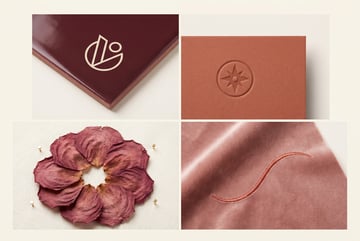
AI is good at generating conceptual renderings — a box design with a certain color palette and typographic style, a label on a cylindrical bottle, a stand-up pouch with a specific texture and logo placement.
It’s not a substitute for production-ready files. AI packaging concepts are for:
- Exploring directions (minimalist vs. bold, matte vs. glossy, earth tones vs. bright)
- Presenting options to stakeholders before involving a designer
- Creating mood board-style visuals for investor decks or early marketing
For final production, you’ll still need vector files and a proper print-ready setup. But getting to that point with a clear visual direction — rather than a long back-and-forth in a brief — saves significant time.
Prompting for Packaging Concepts
Packaging prompts need to specify the form factor clearly. A few examples:
- “Product packaging for a premium tea brand — a matte black kraft paper box with gold foil typography and botanical illustrations, clean white interior, photographed at a slight angle on a white surface”
- “Stand-up pouch for organic protein powder in forest green with minimal white sans-serif type, matte finish, product photography style”
- “Amber prescription-style glass jar with a custom label featuring handwritten-style font and a sprig of lavender, on a white background”
Adding “realistic product mockup” or “photorealistic product rendering” to the end of your prompt often helps models understand you want something that looks like a real object rather than a flat graphic.
Iterating on Packaging Directions
The workflow here is fast: generate 6–10 variations in different color palettes and styles, screenshot the best ones, and use those to brief a designer on which direction to develop. You’ve just compressed a multi-day discovery phase into an afternoon.
E-Commerce Image Sets: Coverage at Scale
A well-optimized product page typically needs 5–8 images: a hero shot, a few detail shots, a lifestyle image, a scale reference, and often a graphic explaining key features. For a catalog of 50 products, that’s up to 400 images.
AI generation makes this kind of scale possible without a proportional increase in production cost.
Building a Repeatable Image Set Workflow
The key to e-commerce image sets is systematization. For each product, define the shots you need — then use a consistent prompt template for each shot type.
For example, a basic template set for a supplement brand might look like:
- Hero shot — product centered on white, no props, studio lighting
- Lifestyle — product in context (kitchen counter, gym bag, bedside table)
- Detail shot — close-up of label or key feature
- Scale reference — product next to a common object for size comparison
- Feature graphic — product with overlaid text callouts (usually done in Canva or Figma after generation)
For shots 1–4, AI generation handles the heavy lifting. Shot 5 is a hybrid — generate the base image, then add text in a design tool.
Color Variants Without Reshooting
If your product comes in multiple colorways, AI image-to-image generation can repaint an existing product image to show each variant. This isn’t perfect for every product, but for simple items like water bottles, phone cases, or apparel, it’s a significant time-saver compared to photographing each variant separately.
App Store Screenshots: A Specific and Underrated Use Case
One coffee. One working app.
You bring the idea. Remy manages the project.
App store screenshots are one of the most direct revenue-driving assets a mobile app can have. Research from StoreMaven consistently shows that screenshot sets are among the highest-leverage variables in App Store conversion — often more impactful than the app icon itself.
But creating them is tedious. You need properly sized assets, device frames, background designs, and headline copy — all composited together in a format that meets Apple’s and Google’s technical requirements.
AI image generation addresses the background and composition components. Here’s how the workflow typically breaks down.
The App Store Screenshot Stack
Each screenshot frame is a composite of three elements:
- Device mockup — the phone or tablet frame containing a real screenshot from your app
- Background — the scene or gradient behind the device
- Headline — a short text callout describing the feature shown
AI generation handles element 2 well. You generate a visually compelling background — abstract gradients, lifestyle scenes, solid colors with texture — then composite your device frame and text in Figma or a tool like AppFollow or Rottenwood.
Some teams go further and use AI to generate the entire screenshot frame concept as a rough comp, then refine it in a design tool. This is especially useful early on when you’re testing different visual directions before committing to a style guide.
Prompting for App Store Backgrounds
App store backgrounds need to be visually interesting without competing with the device frame. Good prompts for these:
- “Soft gradient background in deep navy transitioning to teal, minimal texture, no text, no objects, suitable for mobile app marketing”
- “Abstract geometric shapes in coral and cream tones, flat design style, clean and modern”
- “Blurred bokeh background in warm amber tones, no recognizable objects, smooth and clean”
Avoid generating backgrounds with busy or detailed imagery — they’ll compete with your device frame and headline.
Generating Multiple Variants for A/B Testing
One advantage of AI-generated backgrounds is how fast you can produce variants. If you’re running App Store Optimization (ASO) and want to A/B test three different screenshot styles, generating three background sets takes minutes rather than requiring three separate design sessions.
Merch Mockups: Print-on-Demand Made Visual
If you run a print-on-demand operation — t-shirts, hoodies, mugs, tote bags, phone cases — product mockups are your entire storefront. Customers can’t touch the product, so the visual is doing all the selling.
Most POD platforms provide basic mockup generators, but they’re often limited in style and context. AI image generation lets you go further.
Beyond Basic Mockups
Instead of the generic white-background mockup your POD platform provides, you can generate lifestyle images that show your merch in context:
- A hoodie worn on a nighttime city street
- A tote bag at a farmer’s market
- A mug on a cabin breakfast table
These feel real in a way that flat mockups don’t. And for brands with a specific aesthetic — streetwear, cottagecore, outdoor adventure — the right context image does meaningful brand-building work.
Prompt Considerations for Apparel
Apparel is one of the harder categories for AI image generation because the design on the garment needs to be accurate. A few approaches:
- Generate the scene and garment first, then composite your design onto it using a tool that supports perspective warping (Photoshop’s warp tool, or specialized tools like Placeit’s overlay feature)
- Use image-to-image generation with your actual design as a reference, though results vary significantly by model
- Focus AI generation on the scene and lighting, and use your POD platform’s mockup as the final base
Seven tools to build an app. Or just Remy.
Editor, preview, AI agents, deploy — all in one tab. Nothing to install.
For simple text-based or icon-based designs, some models handle it directly. For complex artwork, compositing is usually the more reliable path.
How MindStudio Handles E-Commerce Visual Workflows
The individual use cases above all work as one-off prompts. But for an e-commerce operation running at any scale — multiple products, multiple image types, regular catalog updates — the manual prompt-by-prompt approach gets slow.
This is where MindStudio’s AI Media Workbench comes in. It’s a dedicated workspace for AI image and video production that gives you access to all the major generation models — FLUX, Stable Diffusion, and others — in one place, without setup or API configuration.
More importantly, it lets you chain image generation into automated workflows. A practical example:
- You upload a product data sheet with SKU names, descriptions, and color variants
- A MindStudio workflow parses each product and constructs a tailored prompt using your brand’s base template
- The workflow generates a set of images for each SKU — hero shot, lifestyle, detail
- Generated images are automatically saved to a connected Google Drive folder or Airtable database, organized by product
What would take a team member several hours of manual work — constructing prompts, generating images, organizing outputs — runs automatically. For a catalog refresh or a new product launch with multiple SKUs, that’s a significant operational difference.
MindStudio also includes tools like background removal, upscaling, and face swap within the same workspace, which means post-processing steps that usually require separate software happen inside the same workflow.
The platform is no-code, so you don’t need a developer to build this. Most workflows take between 15 minutes and an hour to set up.
Common Mistakes That Hurt AI-Generated Visuals
A few things that consistently produce bad results:
Under-specifying the product. If your prompt says “a bottle,” the model will generate a generic bottle. If it says “a 500ml matte black stainless steel water bottle with a loop handle and a wide mouth opening,” you’ll get something that actually resembles your product.
Ignoring lighting. Lighting is one of the single biggest signals of image quality. “Soft diffused natural light” or “studio lighting with a subtle shadow” produces dramatically different results than leaving it unspecified.
Accepting the first output. The first generation is almost never the one you use. Run 4–8 variations, pick the best, and refine from there. Most professional AI image workflows treat generation as iterative, not a one-shot process.
Using AI images for legally sensitive categories. AI-generated images of people can create issues around consent, likeness, and accuracy — particularly for medical products, certain food categories, or anything regulated. Know your category’s requirements before using AI-generated lifestyle images with people.
Skipping human review. AI models hallucinate details — an extra finger, a weirdly distorted label, background elements that don’t belong. Every AI-generated image needs a human review before it goes live on a product page or ad.
Frequently Asked Questions
Can AI-generated product images actually replace professional photography?
Other agents ship a demo. Remy ships an app.
Real backend. Real database. Real auth. Real plumbing. Remy has it all.
For many use cases, yes — particularly for early-stage brands, catalog items, digital products, and anything sold primarily through online channels where customers are used to varied image quality. For luxury brands, premium packaging, or categories where tactile authenticity is critical (high-end jewelry, fine food), professional photography still has an edge. Most established e-commerce operations use AI generation to supplement photography rather than replace it entirely — AI handles scale and speed, professional shoots handle hero content.
What AI models are best for product mockups?
FLUX.1 (particularly the Dev and Pro variants) produces strong results for product photography-style images with good detail retention. Midjourney v6 is widely used for lifestyle and editorial-style images. Stable Diffusion with custom checkpoints offers the most flexibility if you need fine-tuning on your specific product. The right choice depends on your specific use case and how much control you need over the output.
How do I maintain brand consistency across AI-generated images?
Consistency requires a systematic prompt template rather than ad-hoc generation. Create a base prompt that specifies your lighting style, background aesthetic, and visual tone — then swap only the product-specific details. For teams that need tight consistency, fine-tuning a model on your existing product photography (using LoRA techniques) produces the most brand-coherent results. Tools like MindStudio’s workflow builder can enforce prompt templates automatically across a full catalog run.
Are AI-generated images allowed on Amazon and other marketplaces?
Amazon’s policies don’t explicitly prohibit AI-generated images, but they require images to accurately represent the product as sold. If an AI image misrepresents dimensions, colors, or features, it violates listing policies regardless of whether it was AI-generated or photographed. Always ensure your AI-generated images are accurate to the actual product. Some categories also have specific image requirements (white backgrounds, minimum resolution, no watermarks) that apply universally.
How much does it cost to generate product images with AI?
Costs vary by model and platform. Through individual model APIs, image generation typically costs $0.01–$0.08 per image depending on quality settings. At scale (say, 500 images for a catalog), that’s $5–$40 in raw generation cost — a fraction of a product photography session. With a platform like MindStudio, image generation is included within the plan, and the workflow automation layer adds additional value by reducing manual time. The real cost saving isn’t just the per-image fee — it’s the time not spent on briefing, logistics, and post-processing.
What file formats and resolutions should I use for AI-generated e-commerce images?
Most marketplaces and ad platforms want JPEG or PNG at a minimum of 1000x1000 pixels, with Amazon recommending 2000x2000 for zoom capability. Current image models generally output at 1024x1024 or higher. For app store screenshots, Apple requires specific sizes depending on device type (1290x2796 for iPhone 15 Pro Max, for example). Many AI platforms include upscaling tools that can take a 1024px image to 2048px or higher without significant quality loss.
Key Takeaways
- AI image generation handles product mockups, packaging concepts, e-commerce image sets, and app store screenshots — each with different prompt strategies and output requirements.
- Specificity in prompts is the single biggest lever for output quality. Describe your product precisely, specify lighting, and define the visual style.
- AI generation works best as part of a systematic workflow, not ad-hoc prompting — especially for multi-SKU catalogs.
- Human review is non-negotiable. AI models produce errors that are easy to catch but damaging if they make it to a live listing.
- For teams running at scale, automated image generation workflows can compress hours of manual work into a process that runs on its own.
Other agents start typing. Remy starts asking.
Scoping, trade-offs, edge cases — the real work. Before a line of code.
If you’re building out an e-commerce content operation and want to put image generation into an automated workflow, MindStudio is worth exploring. The AI Media Workbench gives you access to the major image models in one place, and the no-code workflow builder lets you connect generation to your existing product catalog and file storage without writing any code.